In the previous post, I explained how an electronics engineer wandered into SEO and then started building systems for everything. This is the first one. It also begins with me admitting that my first explanation was wrong, which is always a relaxing way to open an article.
I tried to squeeze the workflow into one neat line: audit, plan, implement, measure, repeat. Beautiful. Clean enough to frame. Then a real project arrived carrying a migration, missing data, three page types, and a launch date that had already decided not to cooperate.
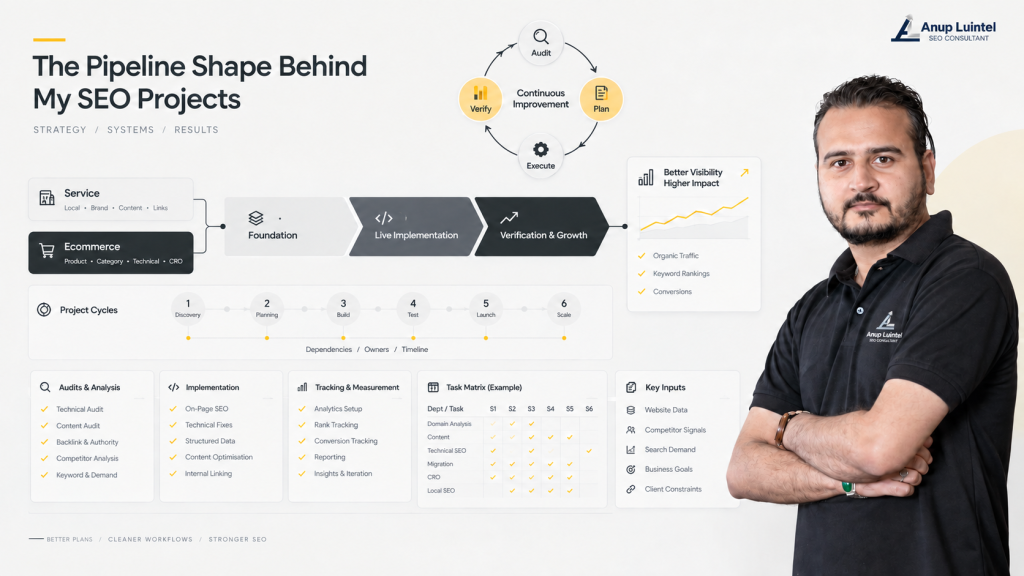
So the actual workbook does not contain one universal SEO pipeline. It contains two main business-model views, three delivery stages, six project cycles, quarterly plans, dependencies, owners, expected time, and 191 populated rows of department-level tasks. Yes, I counted. No, that was not an exciting evening.
Six boxes would be easier to explain. Unfortunately, client websites do not respect presentation aesthetics. The kickoff call ends, assumptions meet production, and suddenly the website is disagreeing with the plan in Chrome, Safari, and probably one browser nobody admitted they still use.
Why should you care about this distinction? Because the wrong route makes people design before requirements exist, scale before one pattern works, and celebrate a completed task that never reached the live website. The spreadsheet remains green, though, so at least the spreadsheet is emotionally stable.
One System, Five Ways to Inspect It
The easiest way to understand this is to stop asking me for one master checklist. I tried that. The checklist became a small country. I now inspect the same system through five views because each view answers a different question.
The views talk to each other, but they do different jobs. The resource matrix tells me that a rendering audit belongs after foundational setup. A recovery cycle may pull that same audit forward because I need it to diagnose the loss before approving a larger plan.
Same task, different reason. I crawl a new build to check whether we implemented the plan properly. I crawl a traffic-loss project to separate technical damage from changes in content, demand, links, or search behaviour. If I treat both crawls as ‘run Screaming Frog,’ I have collected data and avoided thinking.
This is where a simple checklist starts getting cheeky. It gives the same task name twice and quietly hopes nobody asks why it exists.
The Resource View Has Three Stages
For service and ecommerce work, I organise the resource view into three stages: before foundational setup, setting the website live, and after foundational setup. In normal-human language, that means decide what should happen, make it happen, and check whether it actually happened.
These stages tell me what resources and checks I need. They do not decide the exact order for every client. The project condition, dependencies, priorities, and evidence do that, because a new build and a recovery project should not be marched through the same parade just because the spreadsheet has rows.
Of Course I Know Your Question, SAAS !!!
Yeah SaaS is absolutely there too. In my system, it usually behaves like the service branch with the location layer removed, more product and technical planning added, and more of me sitting in the planning stage asking annoying questions before anybody touches a template. Once that logic is right, it is one of the easier models to implement and scale.
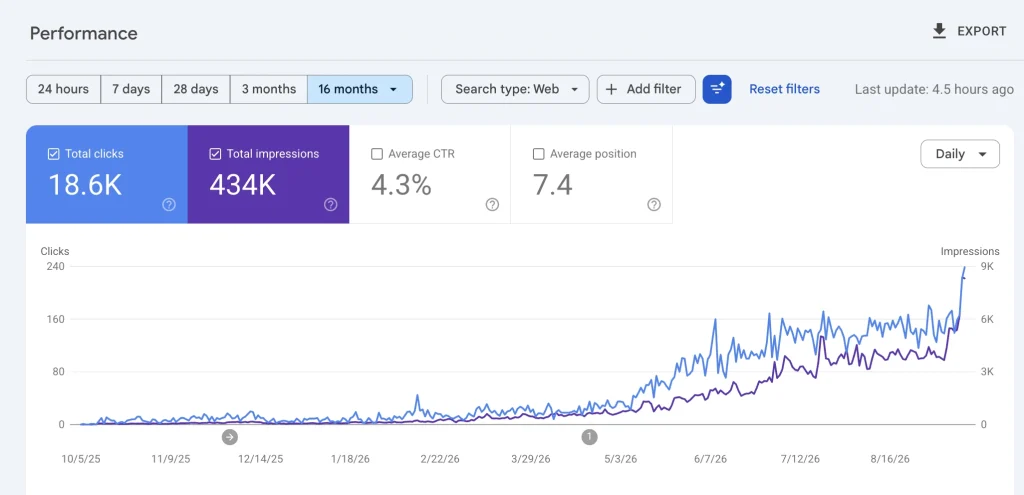
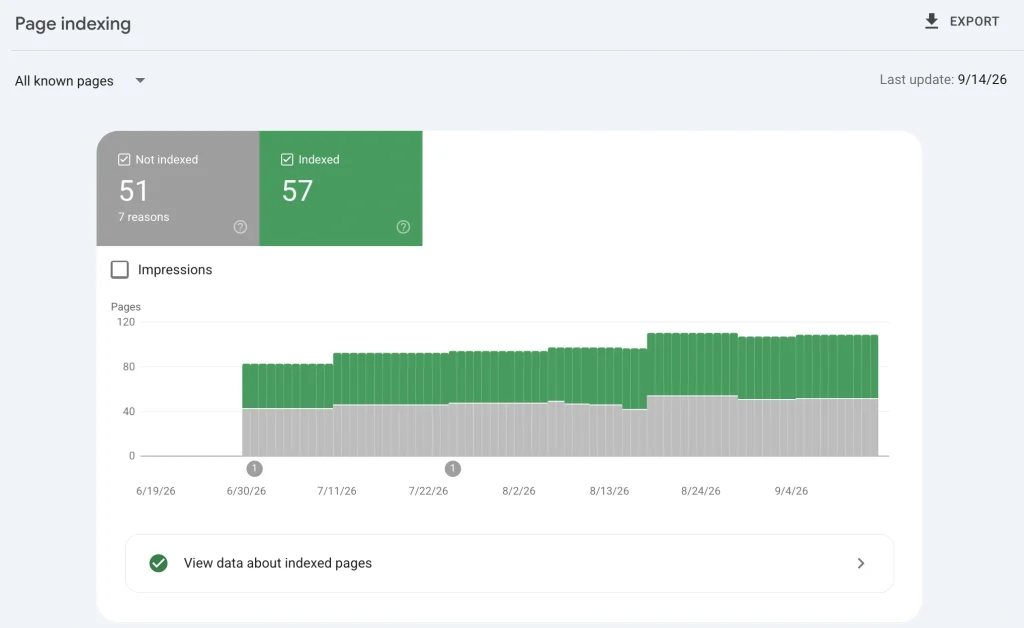
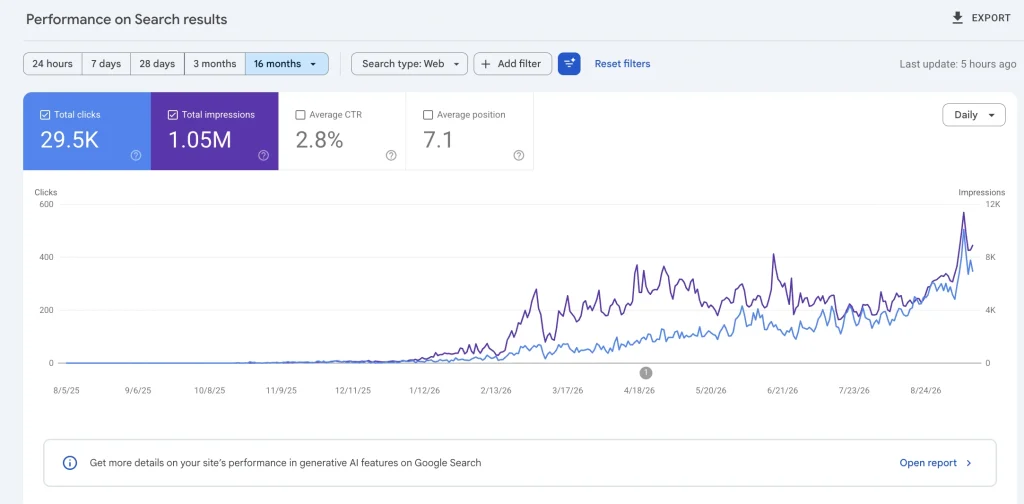
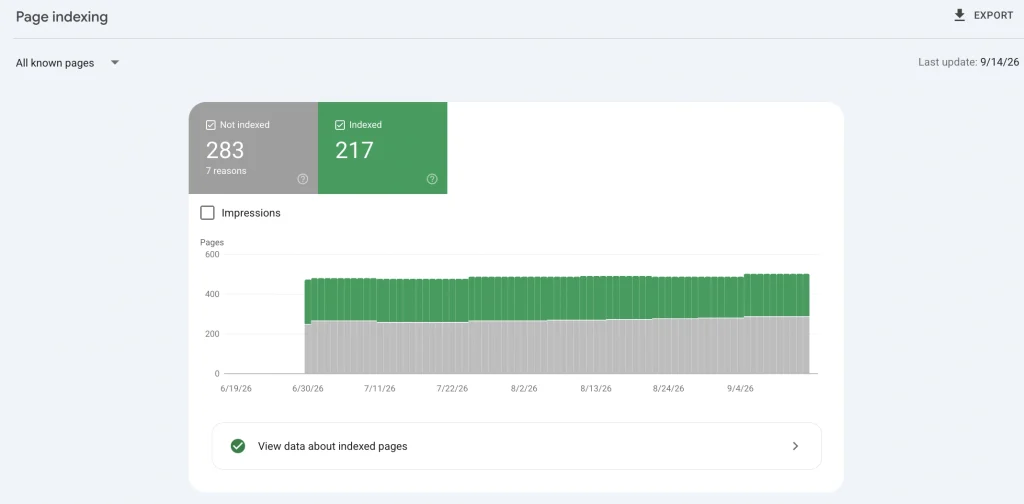
I also have SaaS case studies where the site started generating revenue in under six months. To be clear, I am not building 100,000 pages here and calling volume a strategy. That is a database having a loud day, and I am not interested in joining that parade.
Matter of Fact, let me show you graphs for the latest ones by keeping my job on a safe side lol.
Service Projects
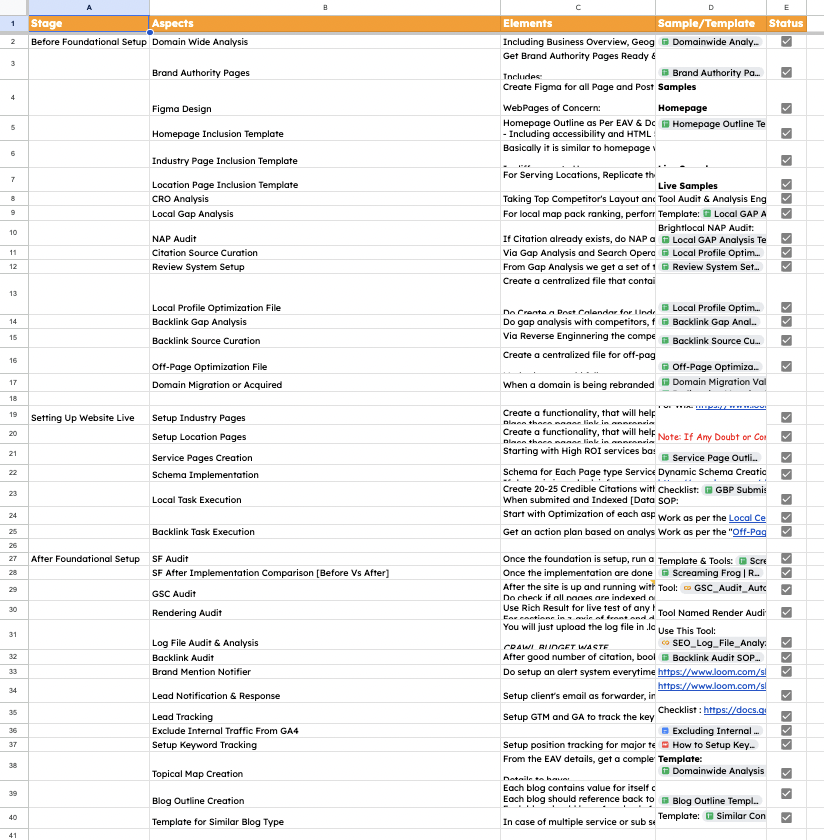
For a service project, I first define the domain, brand, page types, design logic, local presence, conversion conditions, and off-page opportunities. Then we build. Then we check the live result, because ‘developer said done’ is useful information but not yet evidence.
Before Foundational Setup
Here is what sits inside that stage and, more importantly, why I keep each part:
- Domain Wide Analysis: I need to know the business, competitors, entities, demand, page types, and structural gaps before planning URLs. Otherwise, we can optimize pages with impressive efficiency in completely the wrong direction.
- Brand Authority Pages: these pages answer the uncomfortable but necessary questions: who are you, who is responsible, what have you done, and why should anyone trust the claim? Visibility without a believable business behind it is a temporary arrangement.
- Figma Design: this is where I turn the approved page type and its centerpiece annotation into a visual page before development. The centerpiece is the single element that performs the page’s dominant task, not automatically a hero image, CTA, or whatever component looked nice in the last design. Figma lets me check that the centerpiece is visible, distinct, usable, and not fighting a second primary job before code makes the confusion more expensive.
- Homepage Inclusion Template: I use this to build the homepage as the site’s centroid: the central entity, supporting entities, representative EAV values, source context, and direct links to every top-tier commercial page. If an important commercial page is more than one click from home, the topology needs fixing. The homepage can be extensive because every relevant entity needs a representative section and route, not because I had spare words to use.
- Industry Page Inclusion Template: if a business serves 50 industries, writing 50 pages from zero is not craftsmanship; it is punishment. I control the skeleton, then change the frame around each industry’s problems, language, proof, beneficiary, and decision context. Be attentive, I said “FRAME”.
- Location Page Inclusion Template: same controlled-frame idea, but the local difference has to be real. Changing Los Angeles to Riverside and calling it localisation is find-and-replace wearing formal clothes.
- CRO Analysis: I check whether the right visitor can understand the offer, trust it, and take the next step. This does not mean putting a CTA after every section until the reader clicks just to make it stop.
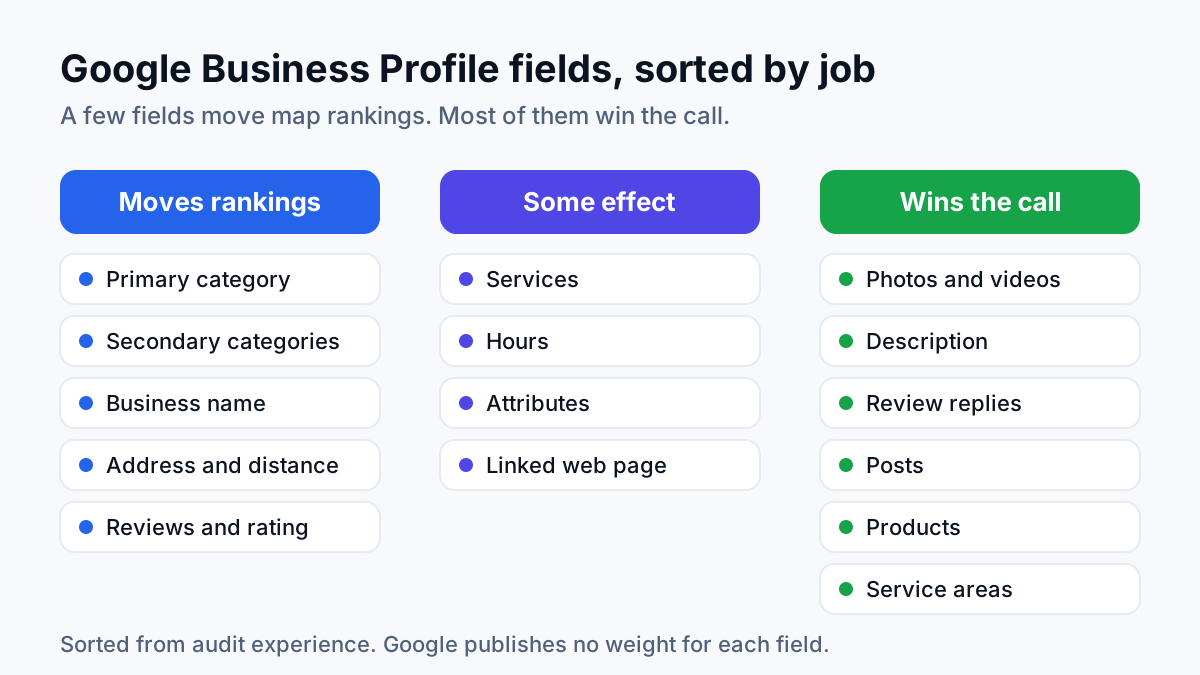
- Local Gap Analysis: I compare the business with relevant local competitors and ask what is missing: categories, services, reviews, citations, proof, content, or profile signals. ‘Do more local SEO’ is not a task. This comparison turns it into one.
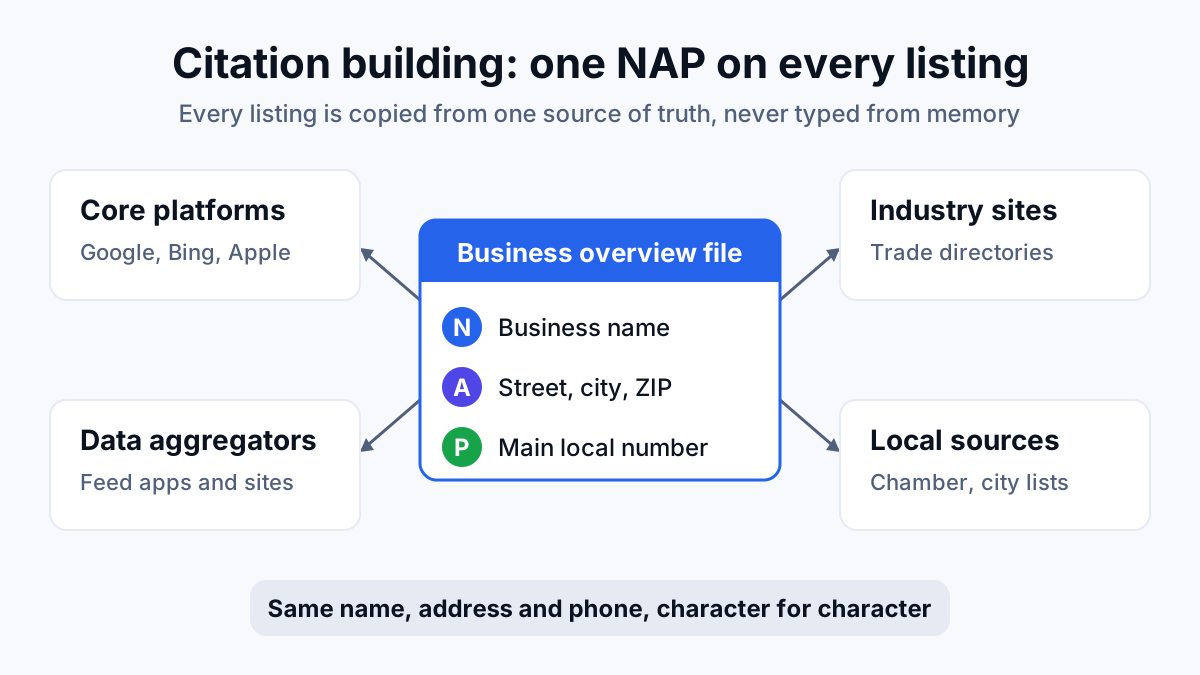
- NAP Audit: If 100 people say I am a SEO person, that gives you one clear signal. If 20 say SEO, 30 say Engineer, 40 say content creator, and the remaining ten say “Anup who?”, you do not have a reliable picture though all can be correct; you have a confused survey. I audit existing citations for the same reason: the business name, address, and phone should support one consistent entity instead of making every source cast a different vote.
Do me a Favor: If someone literally said “Anup Who?” please ask them to read this article- Who is Anup Luintel
- Citation Source Curation: relevance matters more than collecting directory logos. A room full of SEO people calling me an excellent pilot would be kind, but please do not put me in charge of the plane.
- Review System Setup: Sometimes you need to ask for appreciation after doing a good job; customers are happy, not psychic. I create separate request flows for previous and active customers, personalize them around the actual service and person who delivered it.
- Local Profile Optimization File: audits are interesting until everybody asks who is doing what. I turn the findings into one file with priorities, owners, required assets, and checks.
- Backlink Gap Analysis: I study what kinds of references the market consistently rewards. I am not copying every competitor link like parrot reading with a browser extension.
- Backlink Source Curation: बोल्नेको पिठो बिक्छ, but who is speaking and what they can support with evidence still matter. I filter opportunities by relevance, credibility, placement, and realistic value.
- Off-Page Optimization File: this turns the research into targets, outreach angles, dependencies, owners, and evidence. Otherwise, ‘build backlinks’ sits in the tracker looking busy and helping nobody.
No, this is not sixteen ways to avoid writing the service page. Each item blocks a different mistake before we start producing pages at scale. Fixing one page is work; discovering the same mistake across 300 pages is character development.
Domain Wide Analysis decides what the business, domain, competitors, entities, queries, and page structure require. Figma and the inclusion templates decide what important page types must contain, while local, CRO, and off-page analysis prepare the work that cannot be solved by page copy alone.
Setting Up Website Live
The implementation areas are:
- Setup Industry Pages: Build the approved framework with industry-specific problems, evidence, language, and internal routes. The template controls quality; it does not provide permission to make every industry sound identical.
- Setup Location Pages: Use the approved location pattern only where the business has a genuine service relationship, relevant offerings, and enough local evidence. Adding a city name to the heading is geography, not a local SEO strategy.
- Service Page Creation: Turn the service research into pages that explain the offer, answer decision-making questions, establish credibility, and guide the right visitor toward a useful next step.
- Schema Implementation: Represent eligible page information in structured form and validate the output after deployment. Schema helps machines understand clear information; it cannot perform CPR on a confused page.
- Local Task Execution: Complete the approved profile, citation, review, and local-content activities in dependency order. Record what changed, where it changed, and when it was completed.
- Backlink Task Execution: Work through the curated opportunities and record the outreach, placement, destination, result, and quality. More links without relevance mainly produce a longer spreadsheet, which is excellent news for the spreadsheet and nobody else.
Let Me Confess: “Yeah I used AI to write an explanation for the above 6 points because it is just doing what was planned in “Before Foundational Setup” stage”.
Don’t worry it is not wrong and hallucinated rather controlled by my self-developed database working on basic neural network mechanisms and populated by my working methods.
Why implementation is grouped here: This stage executes approved decisions. It should not quietly invent a second strategy halfway through the project. Repeatable on-site work can move through controlled batch implementation when the templates and technology support it. Off-site work remains dependent on people, relationships, editorial decisions, and external approval.
At this point, the approved thinking must leave the spreadsheet and survive contact with the actual website. The output is no longer another strategy document to admire during meetings. It becomes live pages, validated structured data, completed local actions, and recorded off-page work that can be inspected, tested, and improved.
After Foundational Setup
Once the foundational work is live, the next stage is to verify what the website actually accepted, identify what needs correction, and use real performance data to guide further growth.
The validation and growth areas are:
- Screaming Frog Audit: We all know what happens here. Crawl the website and find the technical problems. The difference is that a custom local app takes the Screaming Frog report and passes it through a second brain layer to attach possible solutions. Exporting 47 Excel tabs is not the same as solving 47 problems.
- Screaming Frog Before-and-After Comparison: Compare both crawls to see what improved, what stayed unchanged, and what broke while everyone was celebrating the implementation. “Task completed” is a project update. “Problem fixed” requires evidence.
- Google Search Console Audit: Check what Google discovered, indexed, ranked, ignored, or complained about. Everyone knows the major reports. The difficult part is accepting that Google does not read the project completion email.
- Rendering Audit: Compare the original source with what remains after scripts and resources finish loading. Install the View Rendered Source extension and ask AI to help you explore it for now. This deserves a separate article because JavaScript can turn one simple page into a family discussion.
- Log File Audit and Analysis: This is a gold mine. Logs show where search-engine crawlers actually go, not where the strategy document hoped they would go. Semrush and Screaming Frog Log File Analyser handled this earlier; now a custom tool does the work. All thanks to me, and partly to my refusal to repeat boring work manually.
- Backlink Audit: Return to the earlier 100-people example and check who is talking about the business, what they are saying, and whether their opinion matters. But first, ask the larger and slightly painful question: is anyone talking about us at all?
- Brand Mention Notifier: Find linked and unlinked brand mentions before opportunities or reputation problems disappear into the internet. People may discuss the brand without submitting the required SEO reporting form. Very inconsiderate.
- Lead Notification and Response: Send every enquiry to the responsible person quickly. Ranking first and replying next Thursday is a creative way to make competitors happy.
- Lead Tracking: Connect calls, forms, emails, and appointments with the pages and sources that produced them. Otherwise, every successful lead eventually becomes “probably from SEO,” which is a very scientific reporting method.
- Keyword Tracking: Track an approved query set for direction and diagnosis. Checking rankings every morning will not encourage them to grow faster. They are keywords, not tomato plants.
- Topical Map Expansion: Use actual gaps, queries, business priorities, and performance to decide what deserves coverage next. A large keyword export is not automatically a content strategy, even when the spreadsheet has beautiful colours.
- Blog Outline Creation: Turn an approved topic into a clear brief containing its purpose, questions, evidence, internal links, and boundaries. Starting with “write 2,000 words about this keyword” is not a brief. It is a cry for help.
- Scale on Similar Query-Pattern Content: Reuse a structure only when the queries share similar intent, information needs, and entity types. Location, industry, service, product, and blog content can all scale. “Believe me, these rows look similar” still does not qualify as research.
This is why before-and-after checking matters. A completed task shows what someone intended to finish. The website, Google, logs, and leads show what actually happened.
Those two stories disagree surprisingly often. Websites treat approved plans as optional reading and wait for the
Ecommerce Projects
I do not have the energy to explain the same points twice, and you do not have the time to reread them wearing ecommerce clothes. So let us come to an agreement: wherever the work repeats the service model, the explanation is simply “Copy-paste from the service model with ecommerce language.” Same logic, different business context. Fresh explanations are reserved for points that introduce genuinely new work. Laziness, when documented properly, becomes process efficiency.
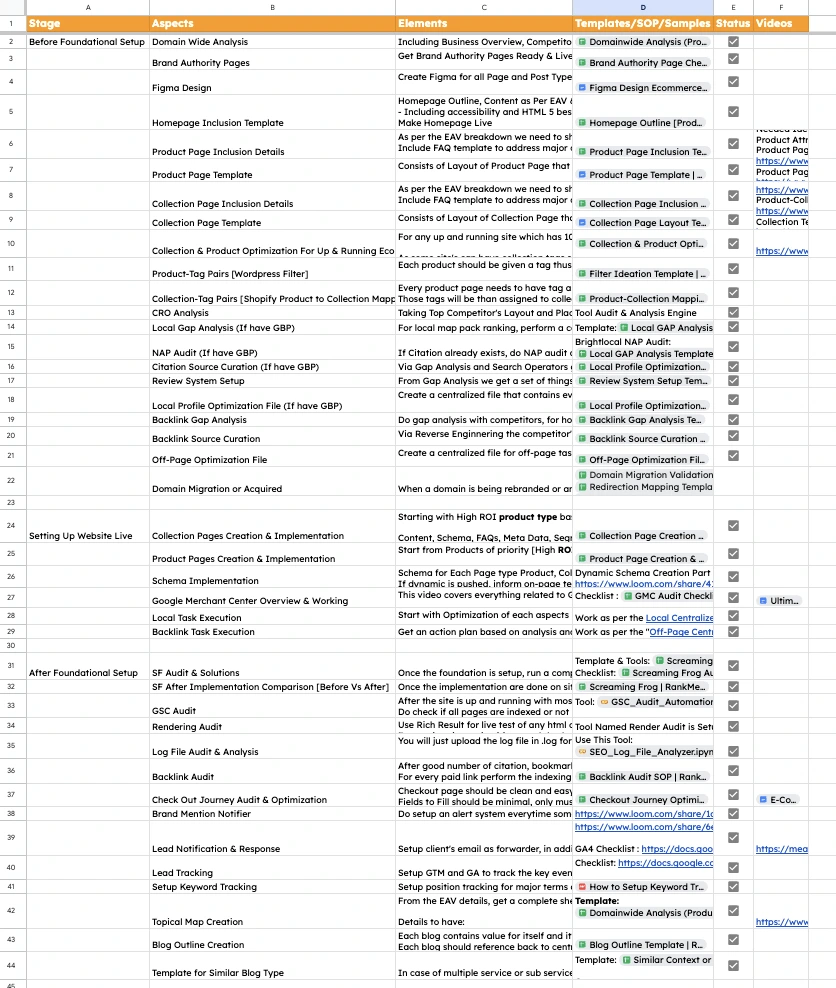
Before Foundational Setup
- Domain Wide Analysis: Copy-paste from the service model with ecommerce language.
- Brand Authority Pages: Copy-paste from the service model with ecommerce language.
- Figma Design: Copy-paste from the service model with ecommerce language.
- Homepage Inclusion Template: Copy-paste from the service model with ecommerce language.
- Product Page Inclusion Details: Define the attributes buyers need for each product type. Gadgets need specifications, food may need ingredients and nutrition, and clothing needs size, fit, material, and care. One universal product brief would be wonderfully convenient and almost completely useless.
- Product Page Template: Arrange those attributes, media, variants, proof, availability, delivery information, questions, and onward journeys into a repeatable structure. The framework changes according to the product type, not according to the writer’s mood that morning.
- Collection Page Inclusion Details: Define what buyers need to understand, filter, compare, and choose within a product group. Also establish what makes the collection meaningfully different from neighbouring collections.
- Collection Page Template: Organise selection guidance, filters, product access, supporting information, and internal routes. Detailed product information stays on product pages so every collection URL does not attempt to become the entire website.
- Collection and Product Optimisation for a Live Store: Improve the existing catalogue without treating it as a blank canvas. Current rankings, inventory, conversions, historical value, internal links, platform restrictions, and existing customer journeys all get a vote.
- Product-Tag Pairs for WordPress: Connect product attributes with filtering and category rules so catalogue membership can update programmatically. Rearranging products manually after every inventory change is not job security anyone should request.
- Collection-Tag Pairs for Shopify: Map product conditions to automated collections so membership remains consistent as inventory changes. This is useful automation because the rule is explicit and the output can be checked.
- CRO Analysis: Copy-paste from the service model with ecommerce language.
- Local SEO Gap Analysis, when a relevant GBP exists: Copy-paste from the service model with ecommerce language.
- NAP Audit, when a relevant GBP exists: Copy-paste from the service model with ecommerce language.
- Citation Source Curation, when a relevant GBP exists: Copy-paste from the service model with ecommerce language.
- Review System Setup: Copy-paste from the service model with ecommerce language.
- Local Profile Optimisation File, when a relevant GBP exists: Copy-paste from the service model with ecommerce language.
- Backlink Gap Analysis: Copy-paste from the service model with ecommerce language.
- Backlink Source Curation: Copy-paste from the service model with ecommerce language.
- Off-Page Optimisation File: Copy-paste from the service model with ecommerce language.
- Domain Migration or Acquisition Planning: Copy-paste from the service model with ecommerce language.
The local SEO items remain conditional. They activate only when the ecommerce business has a genuine local presence, such as a showroom, pickup point, physical branch, or relevant service area. A checklist looking lonely is not sufficient business justification.
Setting Up the Website Live
- Collection Pages Creation and Implementation: Build priority collections using the approved rules, useful filters, catalogue evidence, and internal routes. Commercial importance determines the implementation order. The alphabet has not been promoted to strategy director.
- Product Pages Creation and Implementation: Apply the relevant product-type template using accurate attributes, media, variants, proof, availability, delivery details, and purchase information.
- Schema Implementation: Copy-paste from the service model with ecommerce language.
- Google Merchant Center Review and Operation: Align product feeds, landing pages, prices, availability, identifiers, policies, diagnostics, and account operations. The feed and the website must describe the same product reality; Google Merchant Center is not the right place for creative differences.
- Local Task Execution: Copy-paste from the service model with ecommerce language.
- Backlink Task Execution: Copy-paste from the service model with ecommerce language.
Priority collections can move before the entire catalogue because commercial value does not care about alphabetical order. Product implementation follows approved attributes, templates, mappings, and available data. Asking someone to improvise the catalogue one SKU at a time is not flexibility; it is inconsistent with receiving a salary.
After Foundational Setup
- Screaming Frog Audit and Solutions: Copy-paste from the service model with ecommerce language.
- Screaming Frog Before-and-After Comparison: Copy-paste from the service model with ecommerce language.
- Google Search Console Audit: Copy-paste from the service model with ecommerce language.
- Rendering Audit: Copy-paste from the service model with ecommerce language.
- Log File Audit and Analysis: Copy-paste from the service model with ecommerce language.
- Backlink Audit: Copy-paste from the service model with ecommerce language.
- Checkout Journey Audit and Optimisation: Test the complete journey from product evaluation through cart, login, delivery selection, payment, and confirmation. Ecommerce visibility can improve while revenue quietly escapes through a broken field, unavailable payment method, unexpected delivery cost, or error message written by someone having a difficult Tuesday.
- Brand Mention Notifier: Copy-paste from the service model with ecommerce language.
- Lead Notification and Response: Copy-paste from the service model with ecommerce language.
- Lead Tracking: Copy-paste from the service model with ecommerce language.
- Keyword Tracking: Copy-paste from the service model with ecommerce language.
- Topical Map Expansion: Copy-paste from the service model with ecommerce language.
- Blog Outline Creation: Copy-paste from the service model with ecommerce language.
- Scale on Similar Query-Pattern Content: Copy-paste from the service model with ecommerce language.
The checkout audit is the genuinely new part here, not a decorative CRO extra. Search performance and transaction performance need separate evidence. Otherwise, traffic gets blamed for a checkout problem, or checkout gets blamed for demand that never existed.
Six Project Cycles Decide the Actual Route

Before turning the resource matrix into a plan, one question comes first:
What kind of project is this?
A new website, an existing website, a traffic recovery project, and a domain migration may all contain “SEO tasks.” That does not mean they should follow the same route. A universal checklist applied everywhere is just copy-paste wearing formal clothes.
A development-only project must create a stable website and hand it over properly. An SEO maintenance project already has history, rankings, links, tracking, and old decisions hiding under the carpet. Same website word, very different headache.
Recovery is another matter. The first response should not be publishing ten blogs and hoping Google notices the enthusiasm. Stop random changes, identify when and where the loss happened, test possible causes, build one recovery plan, execute it, and check again.
Rebranding or acquisition brings its own tension. The name, domain, platform, ownership, or structure may change, but the existing value should not disappear during the celebration. URL mapping, backups, redirects, tracking, and post-migration checks are part of the plan.
Dependencies Stop It Becoming a To-Do List
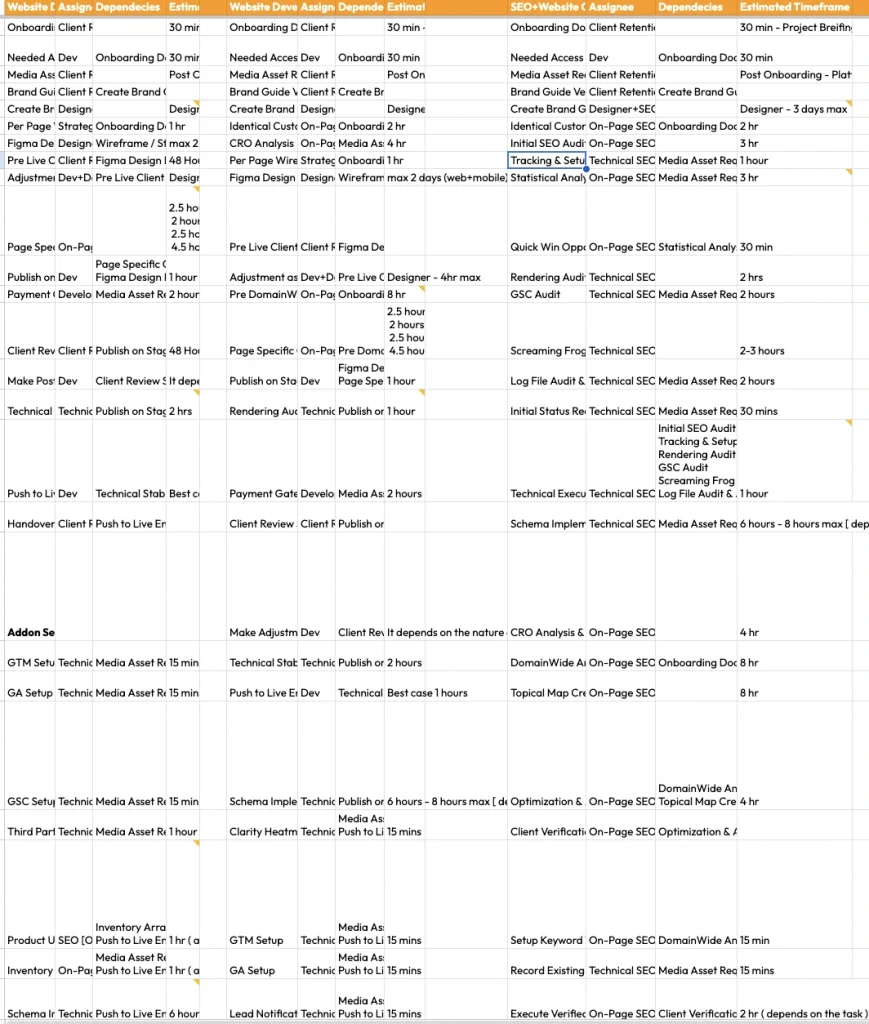
A task appearing in the spreadsheet does not mean it is ready to begin.
Every task connects to an owner, a prerequisite, and an expected time. Starting before the required input exists is not being proactive. It is starting the rework early so everyone can enjoy it twice.
Figma needs approved requirements and structural decisions. Launch needs a stable staging website. Recovery execution needs the diagnostic findings combined into one approved plan.
Dependencies also allow departments to work in parallel. Technical SEO, content, design, development, local SEO, off-page work, tracking, and reporting can overlap once their inputs are ready.
Parallel work is useful. Parallel guessing is five people producing five polished versions of the same confusion, followed by a meeting called Quick Alignment that is neither quick nor aligned.
The Department View Shows What Is Hiding Inside a Task
The Department-Task Segregation tab contains 191 populated rows.
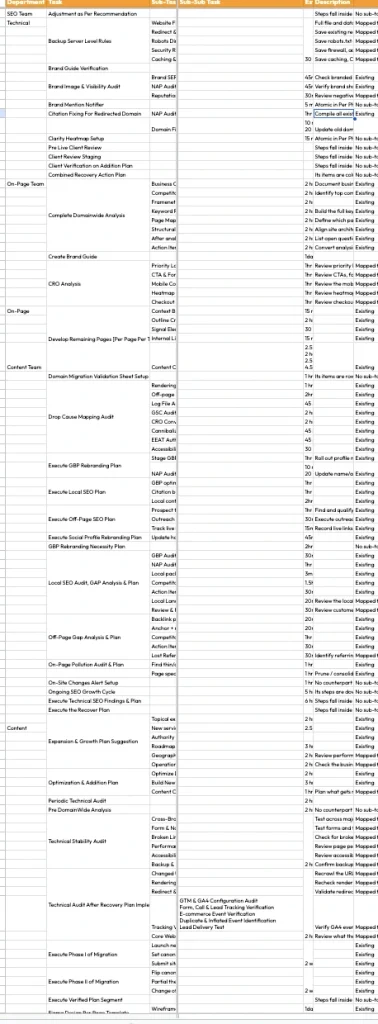
That number is not there for spreadsheet bodybuilding. It exists because a label such as Domain Wide Analysis looks small until someone must estimate, assign, complete, and review everything inside it.
Domain Wide Analysis can include:
- Business overview
- Competitor analysis
- FrameNet work
- Keyword research
- Page-map development
- Structural alignment
- Questions and action items
Content also changes by page purpose. A service page, location page, Attribute as Macro Context Blog [Let’s simplify short blog, is that okay?], extensive guide [Entity First Blogs], product page, and collection page do not require the same research or effort.
Calling all of them “one content piece” makes estimation wonderfully simple and delivery wonderfully unreliable.
Breaking tasks down helps assign the right work to the right person. It also gives reviewers something more useful to inspect than a green cell saying Analysis Complete.
Quarterly Plans Stop Everything Fighting for Monday
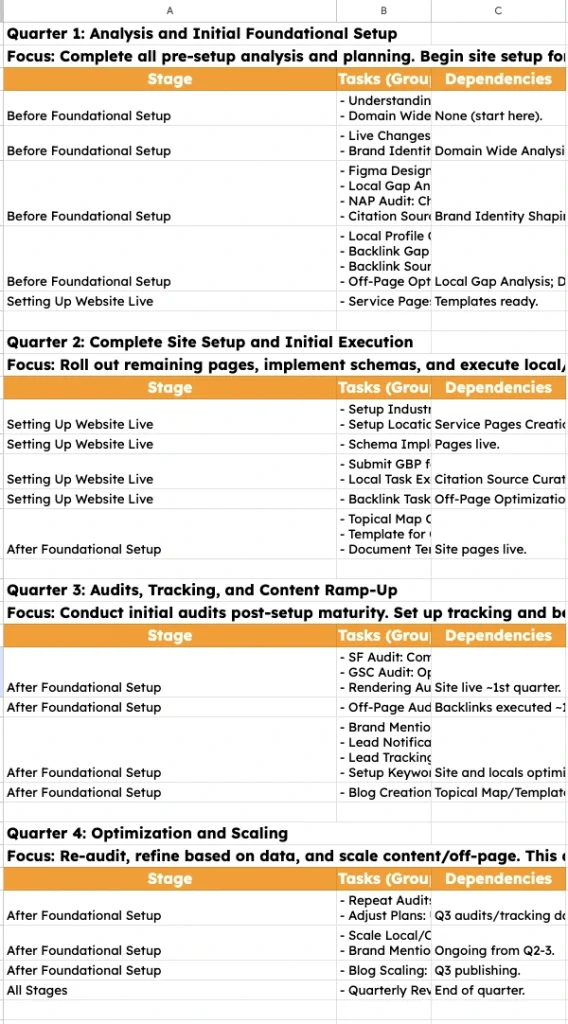
The quarterly plan separates foundation, implementation, validation, and scale.
It is not a calendar filled with activity so the retainer looks busy. Every quarter has a different job.
- Quarter 1: Understand the business, establish foundations, complete the important analysis, design the templates, and set priorities.
- Quarter 2: Expand implementation, schema, local or Merchant Center work, backlinks, topical maps, and content foundations.
- Quarter 3: Test the live system through crawling, GSC, rendering, logs, backlinks, tracking, content performance, and conversion checks.
- Quarter 4: Repeat priority audits, adjust the plan, scale what survived validation, and compare return with delivered work.
For service projects, this may mean expanding service, industry, and location coverage. For ecommerce, it may mean prioritising valuable collections and products before touching the entire catalogue.
The quarter gives direction. It is not a blood promise that every website will obey the calendar.
Access gets delayed. Platforms create restrictions. Priorities move. Audits discover problems nobody invited. The plan can change, but the reason for changing it must remain visible.
Otherwise, the project tries to research, design, build, audit, scale, and report everything in the same fortnight. Even my spreadsheets deserve better treatment than that.
Three Artifacts Carry a Finding Into Production
A finding cannot implement itself, although many audit documents have been waiting patiently for that miracle.
Meaningful findings move through three connected artifacts:
- The audit explains what was found.
- The plan explains what will be done.
- The template or SOP carries the decision into implementation and checking.
The IFESE format records:
- Issue
- Finding
- Evidence
- Consequence
- Solution
- Execution
- Verification
Effort, Impact, and Confidence then help decide what should enter the plan first. Because “fix everything immediately” sounds decisive only until somebody asks who is doing it and by when.
The Two-Copy Rule produces a team version and a client version from the same source. The developer receives implementation details. The client receives a clear explanation of the same decision.
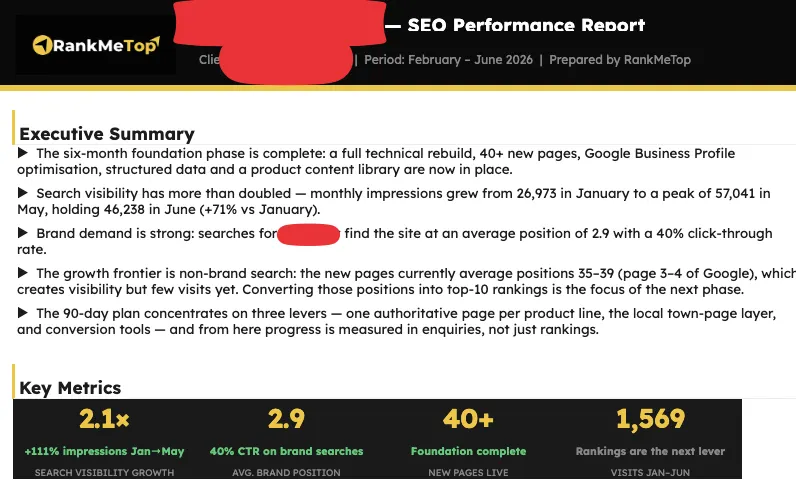
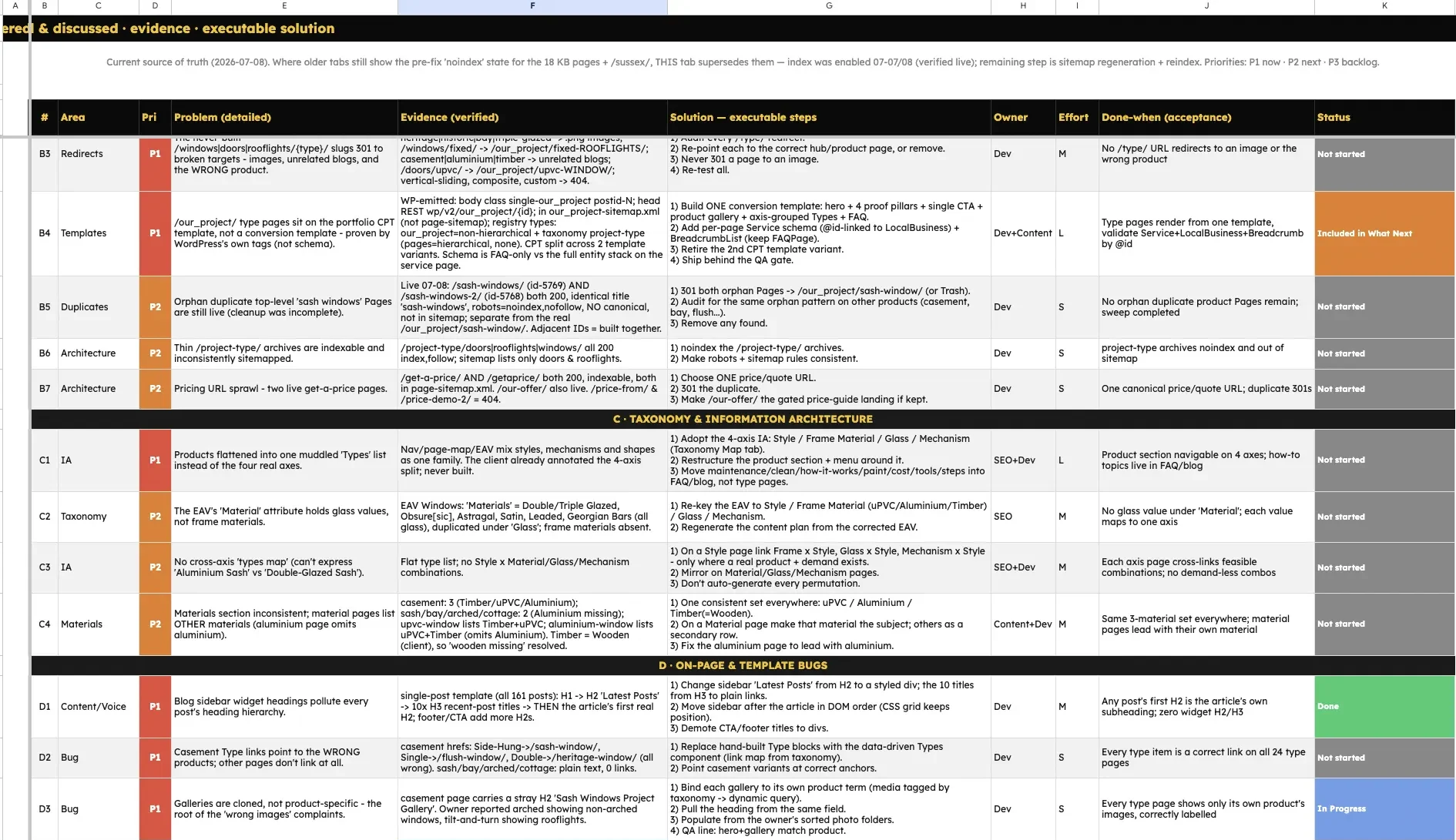
Writing them separately invites drift. Then the team implements one thing, the report promises another, and the next meeting becomes an archaeological excavation through old comments and forgotten tabs.
Verification Closes the Loop
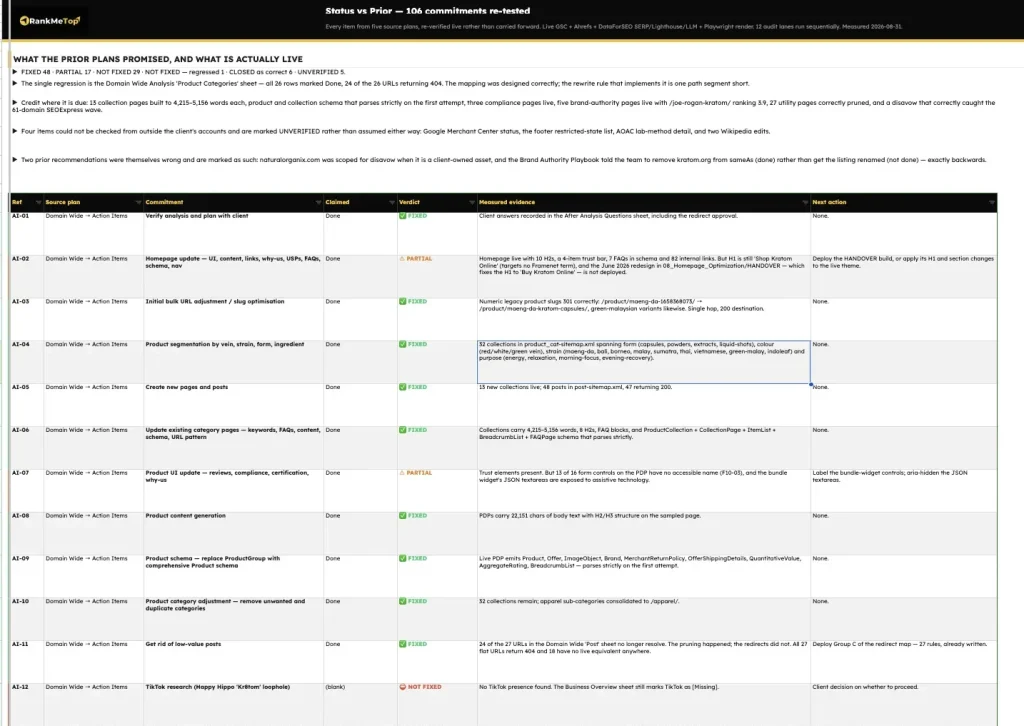
The workflow does not finish when a task turns green.
A green status proves that somebody changed a field. It does not prove that the work reached production or behaved correctly.
Prior-Plan Reconciliation compares four states:
- Planned: What was agreed
- Done: What was completed
- Live: What exists on the website
- Delta: What differs and why
This is where crawling, GSC, rendering, log files, backlinks, keyword tracking, lead tracking, Merchant Center, checkout testing, and brand monitoring become part of delivery.
Sometimes the implementation drifted. Sometimes the platform changed the output. Sometimes the original plan was wrong. Sometimes the result simply needs more time and evidence.
A useful workflow makes those possibilities visible. It does not force every project into a success story because the reporting deadline arrived.
Where Content Enters
Content does not begin with a blank document and one lonely keyword sitting at the top.
If the business, entity, audience, page purpose, structure, and expected action remain unclear, writing only makes the confusion sound fluent.
Content begins when the following questions have answers:
- What must this page do-Purpose
- What must it explain-Inclusion
- Who is Page For-ICP
- What problem does this page solve or help to solve -Problem addressed
- Where should the visitor go next-One Step Closer to Transaction [Search {/+User} Journey]
- How does it connect with the rest of the website-Contextual Relationship [Roommate, Neighbour, Relative, Acquaintance, Stranger]
Service and location pages follow approved inclusion rules. Product and collection pages use approved attributes, templates, and mappings. Blog content follows topical maps, outlines, and reusable formats where the evidence supports repetition.
Bulk production starts only after a strong base example is approved. Monitoring then checks indexing, query pickup, and performance. Weak pages return to manual review instead of allowing the same mistake to reproduce across 500 URLs with impressive speed.
The Named-Engine Content Pipeline manages the writing and review process from there. That framework can have its own article. Adding the complete explanation here would be the content equivalent of opening twelve browser tabs and insisting everything is still under control.
The Stable Part Is Traceability
The stable part is not one sacred task order.
The stable part is being able to explain:
- Why a task entered the project
- Who owns it
- What it depends on
- What it produced
- How the live result was checked
Without that chain, there is no system. There is only a busy spreadsheet doing a convincing impression of one.
Choose the project cycle that matches the website’s actual condition. Select the service or ecommerce branch. Respect dependencies. Carry findings through audits, plans, templates, and SOPs. Verify the live result. Then use the evidence to shape the next plan.
That gives every recommendation a reason, owner, input, output, and check. It also keeps earlier decisions available for review when the website politely proves one of them wrong.
This article is the map for the systems that come next.
The next post covers EBS, the entity model underneath categorisation, topical maps, and content. First, the website needs a shared definition of what the business is actually about. Otherwise, templates and writers will scale the misunderstanding across every URL on time.