Keyword cannibalisation
Your own pages fighting for the same search
Three of your posts target nearly the same thing. Google can't decide which one to show, so it rotates between them and none of them hold page one.
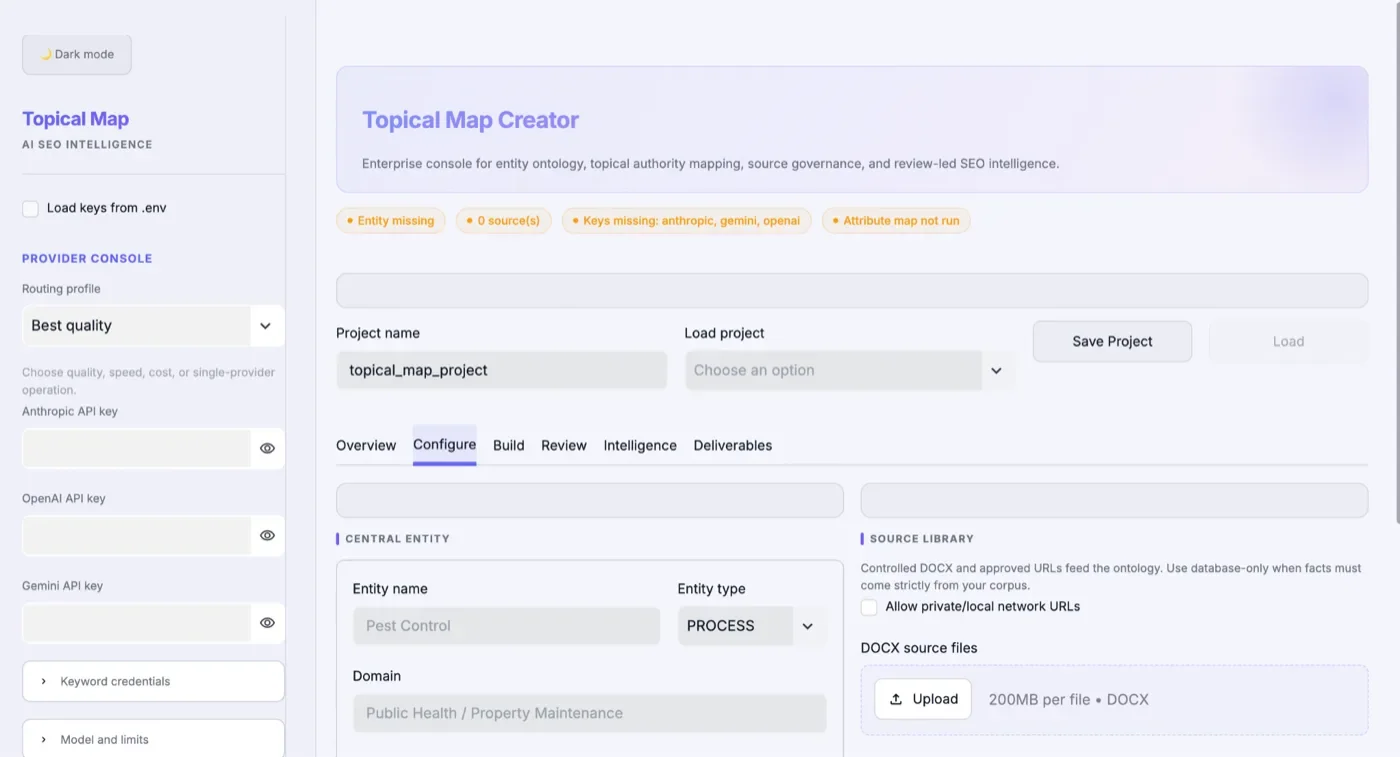
Most sites grow one blog post at a time, chasing whatever keyword looked easy that week. The result is a pile of pages that compete with each other and prove nothing. A topical map decides the whole site up front: the one thing you sell at the centre, every question a buyer asks about it, which of those deserve their own page, and how the pages connect. It becomes your content calendar, your linking plan and your answer to “what should we publish next?” for the next year.
If your site has content but no shape, the map is where I'd start.
Your own pages fighting for the same search
Three of your posts target nearly the same thing. Google can't decide which one to show, so it rotates between them and none of them hold page one.
Questions buyers ask that your site never answers
Competitors rank for the comparisons, prices and “how does it work” questions. You rank for your brand name and not much else.
Pages no other page links to
Good pages sit alone with no links pointing at them. Google treats them as unimportant, and visitors never find them either.
Each part below is a real piece of the work, with the trade term it goes by and what it means in plain English.
The one thing your business is really about
Every map starts with the noun that pays your bills. Not your company name: the thing you sell. Everything else on the site is judged by how well it supports that.
Every angle of that topic a buyer cares about
Price, size, material, fit, comparison, repair, cost to run: each attribute of what you sell can sustain its own page, and each of those attributes has its own attributes. I expand two levels deep, then stop, because a third level usually produces pages nobody searches for.
Deciding which ideas deserve a page at all
Not every keyword deserves its own URL. Each candidate is tested against a qualification model before it's added. The ones that fail get folded into an existing page instead of becoming thin content that drags the site down.
Wiring related pages so strength flows to the money pages
Each pillar owns five to fifteen cluster pages. Siblings link directly to each other, so any related page is at most one click away, and the anchor text describes the relationship, not the destination's title.
The mechanical process, not the buzzword
I've run this across more than fifty niches, and the steps don't change. Only what goes in them does. It's built into my own Topical Map Creator app and a versioned skill, so every map is made the same careful way.
Every page your site should have, arranged into pillars and clusters, with intent and page type for each.
What happens to each page you already have.
The build order, starting with the pages closest to revenue.
Which page links to which, and with what anchor text.
An outline for each new page, ready for a writer.
Your business, market, competitors and what buyers actually search, gathered before a single page is planned.
Attributes expanded, intent assigned and every candidate page tested for whether it deserves to exist.
The map turned into a build order and a linking plan your team or mine can execute.
Pages published in order, then the map re-checked each quarter against what's ranking.
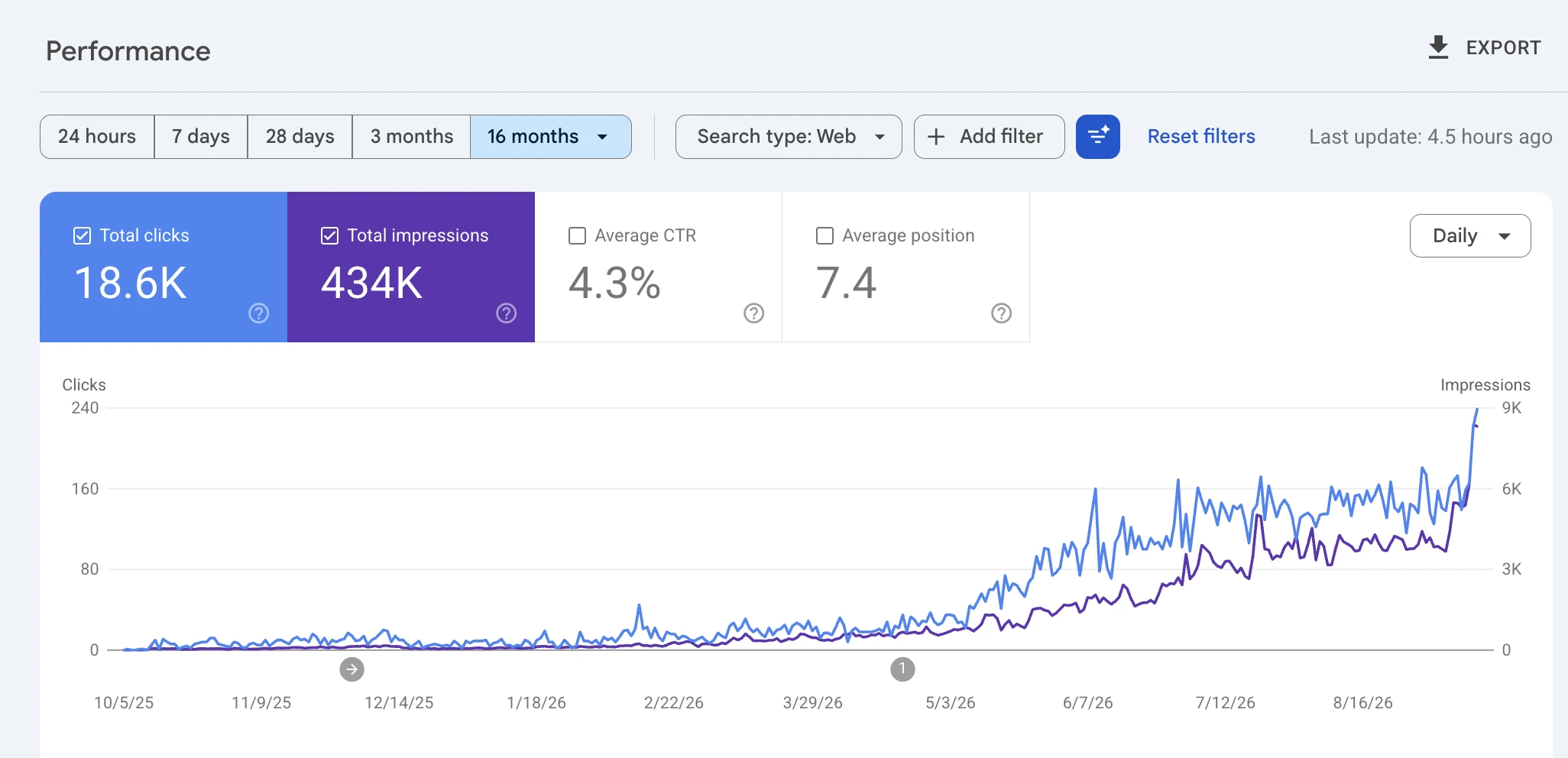
A software company with almost no search visibility. The entity and topical foundation was built from scratch, and over sixteen months the site climbed to 18.6K clicks and 434K impressions, with revenue from search inside the opening six months.
The honest part: Sixteen-month Search Console window, shown as the real chart below. It measures organic search only: total site traffic across all channels fell over the same period, so organic grew while other channels shrank. Client anonymised.
The same service does a different job in each trade. Here is the move it makes in each industry I've written up.
SEO has its own vocabulary. Here's the part of it this service uses, so a report never reads like a foreign language.

Everything on this page comes from how I actually run this work. The checklists, the tools and the results are real. Tell me what's happening on your site and I'll tell you honestly whether this is the right place to start, or whether something else needs fixing before it.
No. A keyword list tells you what people type. A topical map decides which pages should exist, what each one's job is, and how they connect, then turns that into a build order.
Almost never. Your existing pages are sorted into keep, merge or retire. Most sites have more useful content than they think. It's just not connected or aimed at the right searches.
Either your team, working from the briefs, or me. The map is built to be handed over. It doesn't only work if I'm the one executing it.
Service pages that sell, guides that get quoted in AI answers, and a rule book that keeps every page on-brand and free of filler.
See the service Get foundTitles, headings, answers, schema and links reworked page by page, so Google understands each page and buyers act on it.
See the service Fix the foundationCrawl, index, render and speed problems found, evidenced and fixed on the live site, then re-checked until they're gone.
See the serviceSend me your site and what you're trying to grow. I'll look at it myself and reply personally, usually within one business day.