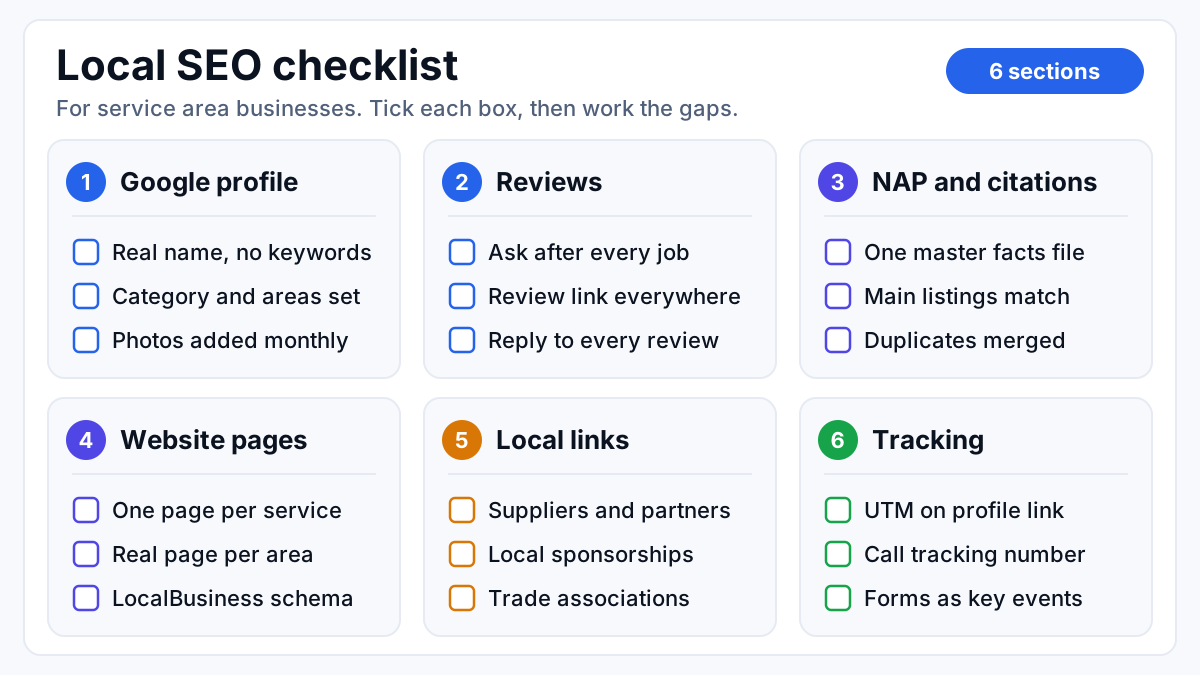
A local SEO checklist for a service area business covers six things: a complete Google Business Profile, a steady flow of real reviews, matching NAP citations, service and location pages on your website, local links, and tracking that ties map pack calls and form leads to booked jobs. Get those right, in the right order, and Google has every reason to show you on the map in the towns you serve.
Below is the checklist I work from in local audits, section by section, followed by the order to run it in (which is all a local SEO strategy really is) and a rhythm for keeping it current. A service area business is one that goes to the customer, like a plumber, HVAC tech, cleaner or pest control company, rather than one customers walk into.
How the map pack picks who shows up
The map pack is the block of three businesses Google shows with a map above the regular results when someone searches for a local service. Google is unusually direct about how it fills that block:
“Local results are based primarily on relevance, distance, and prominence.” Source: Google Business Profile Help, tips to improve your local ranking
Relevance is how well your profile and pages match what was searched. Distance is how far you are from the searcher, or from the town named in the search. Prominence is how well known and trusted you are, judged from reviews, links, mentions and listings around the web. You can't move your base, so most of the checklist works on relevance and prominence:
| Ranking factor | What it means for you | Checklist sections that move it |
|---|---|---|
| Relevance | Google can tell you do the service that was searched | Google Business Profile, service pages, location pages |
| Distance | How far your base is from the searcher, or from the town they typed | An accurate address and honest service areas |
| Prominence | Other people and sites vouch for you | Reviews, NAP citations, local links |
Tracking doesn't rank you for anything. It's on the list because without it you can't tell which of the other five sections is paying off.
Google Business Profile checklist
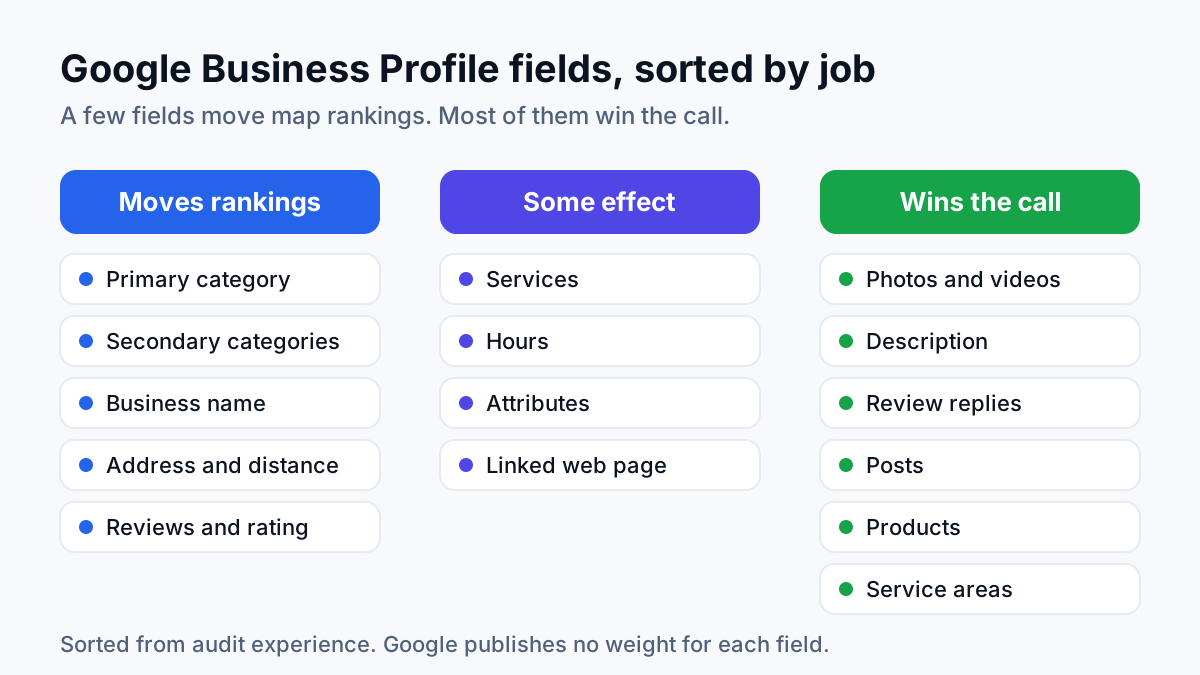
Your Google Business Profile (GBP) is the listing that appears on Google Maps and in the map pack. Everything else on this list feeds it, because it is the listing the map pack actually shows. The full walkthrough is in my guide to Google Business Profile optimization. This is the audit version:
- Owned by the business. The primary owner is someone at the company, not a former employee or an agency that might vanish with the login.
- Business name exactly as it appears on your vans, invoices and signage, with no service or city words added. Google's guidelines don't allow keywords in the name that aren't part of the real business name.
- Primary category set to the service you most want calls for, with secondary categories only for work you really do.
- Address hidden if customers don't come to you, with service areas listed as the towns, cities or counties you actually cover. Google's Business Profile help says a service area shouldn't stretch farther than about two hours of driving from where the business is based.
- Phone set to a local number you can track (more on that under tracking).
- Website link pointing at the page that matches your primary category, tagged so its traffic shows up separately in analytics.
- Hours that match reality, with emergency or 24-hour service listed only if someone really answers.
- Services listed one by one, each with a short plain description.
- Description written from plain facts: what you do, where, how long you've done it, and why a customer picks you.
- Photos of your team, vans and real jobs, added every month. No stock images.
- Posts on a calendar, each linking to the page that matches its topic.
- Messages and booking links switched on only if someone will reply quickly.
Reviews checklist
Reviews do two jobs at once: they feed prominence, and they're what a homeowner reads before tapping the call button. The aim is a steady flow, not a burst every time someone remembers to ask. The system for building that flow is in my post on how to get more Google reviews. The checklist:
- Ask every customer right after the job is done, while the result is fresh. The technician asks in person, and a text or email follows the same day.
- Put your direct review link in email signatures, invoices and job follow-ups, plus a QR code card for trades where a physical leave-behind works.
- Invite customers to say what you did and which town they're in, in their own words. Never write the review for them.
- Ask everyone, not only the happy ones. Google's review policies don't allow selectively asking for positive reviews, and they don't allow paying or offering discounts for reviews.
- Reply to every review, good or bad, within a few days. Keep each reply specific to the job, not copy-pasted.
- Watch for fake or competitor reviews and flag them through your profile rather than arguing in the replies.
In audits I run, the pattern behind a stuck profile is rarely bad reviews. It's old ones: a respectable rating built years ago, then nothing recent for a new customer to read.
NAP and citations checklist
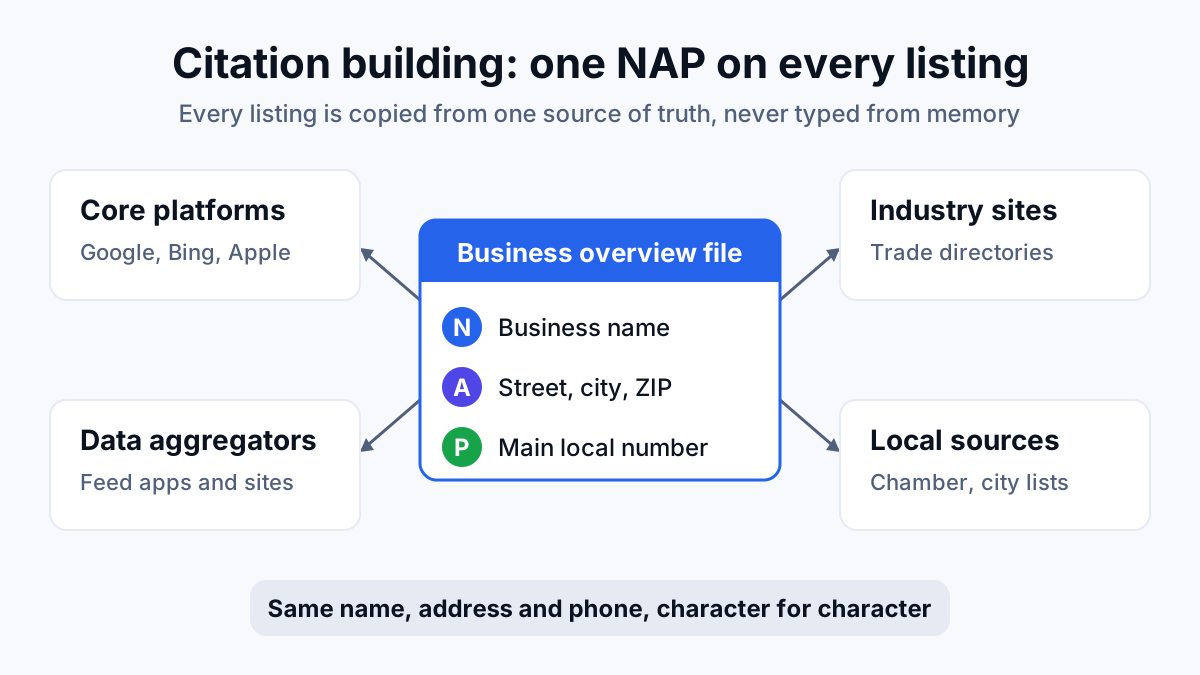
NAP stands for name, address and phone number. A citation is any listing or mention of those details online: directories, map apps, industry sites, social profiles. When they disagree, Google has less confidence about which version of your business is real. The full process is in my guide to citation building. What to check:
- Write one business facts file: exact name, address (or hidden), phone format, website URL, categories, hours and a standard description. Every listing copies from it.
- Check the big platforms against that file: Bing Places, Apple Business Connect (Apple Maps), Facebook, Yelp, Nextdoor and the BBB.
- Check the directories specific to your trade, such as home-service marketplaces and manufacturer installer locators.
- Fix old addresses and old phone numbers, especially after a move, a rebrand or a change of phone provider.
- Find and merge or remove duplicate listings, including any duplicate Google profile.
- Compare against the businesses beating you on the map: list the sources they're on and you aren't, and add the relevant ones.
- Keep a log of every submission: the site, the listing URL, who owns the login and when it went live.
Skip the bulk submission packages that promise hundreds of directories. Most of those sites have no audience, and a messy spread of half-correct listings is harder to clean up than a short list of accurate ones.
Website checklist: service pages and location pages
The profile tells Google what you do. Your website has to confirm it, with more depth than a listing allows. For a service area business that means two kinds of page doing different jobs: service pages that explain each service, and location pages that connect those services to each place you cover.
Service pages
- One page per service you want calls for (drain cleaning, water heater installation, sewer repair), not one Services page that lists everything.
- The service and the main area named in the page title, the H1 and the opening lines.
- A click-to-call number that matches your profile, and a short quote form, visible without scrolling on a phone.
- Proof tied to that service: reviews that mention it, photos of that kind of job, licenses and warranties.
- Answers to the questions people ask before booking: how long it takes, what affects the price, what happens on the day.
Location pages
A location page, sometimes called a city page or area page, targets searches like “plumber in [town]”. My guide on how to build location pages covers the build itself. The checks:
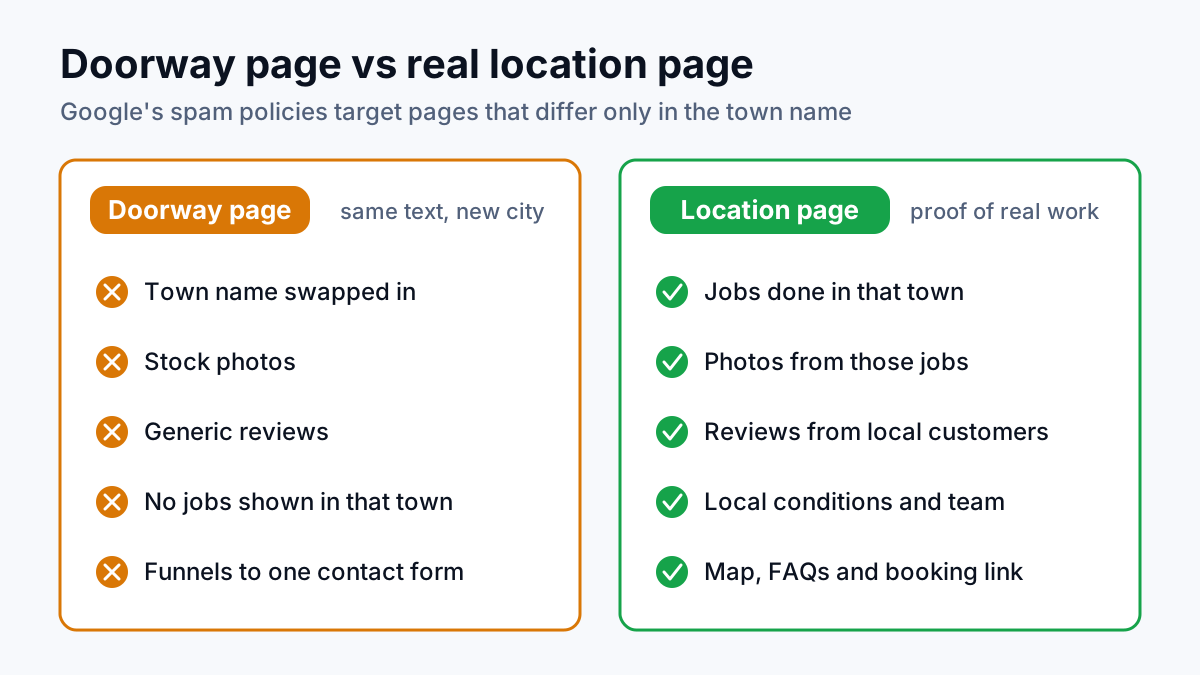
- A page only for areas where you can say something real: jobs you've done there, local housing or water issues, the neighborhoods covered, who on the team works that area.
- No find-and-replace pages where only the town name changes. That's a form letter with a map pin on it, and customers spot it as quickly as Google does.
- One page per town and service combination. If an old city page, a new template and an ads landing page all target the same town, merge them into one.
- Each location page links to the matching service pages, and each service page links to the areas it covers.
In the local audits I run, split city pages are one of the most frequent reasons rankings stall. Google divides the signals between three weak URLs instead of backing one strong one. The trade term is cannibalization: your own pages competing with each other.
Sitewide local signals
- Name, address (or service area) and phone in the footer, matching the business facts file character for character.
- LocalBusiness schema, a block of code that states your business details in a format machines read, with your service areas included. Google documents the format in its local business structured data guide.
- A homepage that names your main service and main area in its title and opening lines.
- A contact page that lists the areas you serve.
- Pages that load quickly on a phone, because a customer with a burst pipe is searching on the phone in their hand.
Local links checklist
A backlink is a link to your site from another website. For local SEO, the useful ones come from sites tied to your area or your trade, because they show Google that real people and organizations in your community know you. You don't need many. You need real ones:
- Supplier and manufacturer sites with dealer or certified installer locators.
- Local sponsorships (youth sports teams, school events, charity drives) where the sponsor page links to you.
- Chamber of commerce and trade association member directories.
- Local news and community sites, where a useful comment on a seasonal problem such as frozen pipes, storm damage or pest season earns a mention.
- Businesses that refer work to you, like realtors, property managers and home inspectors, where a genuine resources page makes sense.
- Nothing bought in bulk: no link packages, no networks of sites built to sell links. They risk a penalty and they don't hold.
Tracking calls and form leads from the map pack
Plenty of service businesses can tell me their map pack position and can't tell me how many booked jobs it produced last month. Tracking closes that gap. It's the section people skip, and it's the one that tells you whether the other five are worth the effort.
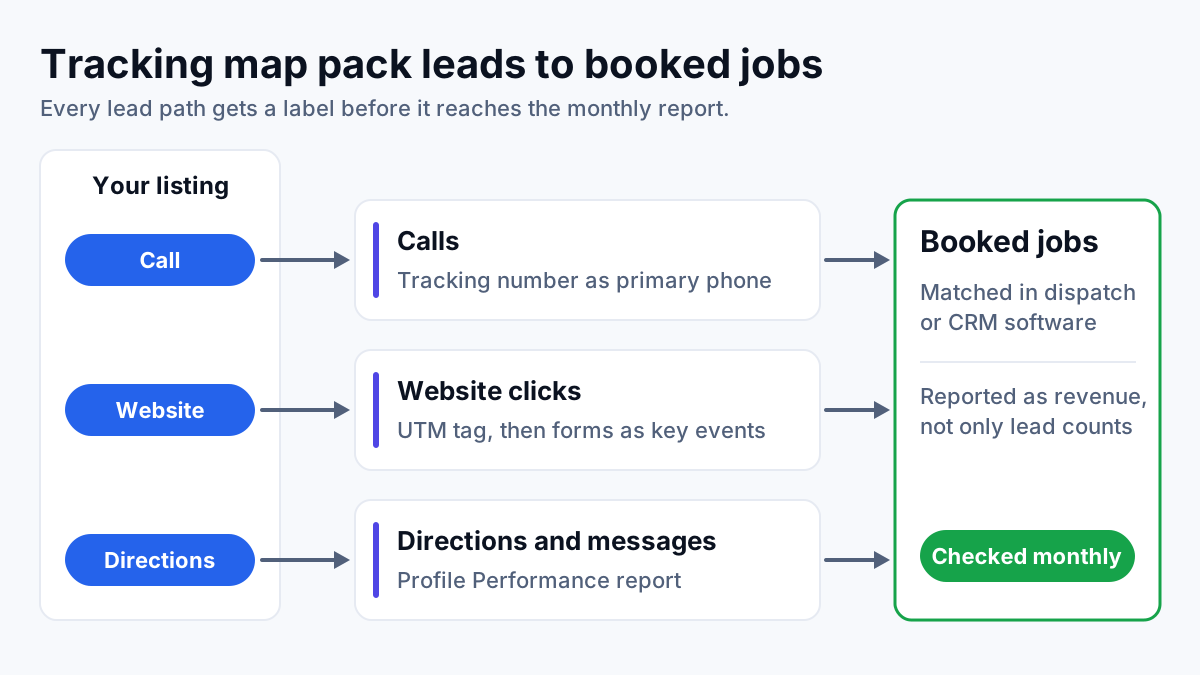
- A UTM tag on the profile's website link. A UTM tag is a label added to the end of a URL (for example utm_source=google, utm_medium=organic, utm_campaign=gbp) so analytics separates map pack traffic from regular search traffic.
- A call tracking number as the profile's primary phone, with your main business number listed as a secondary number. Calls become countable, and your main number still matches your citations.
- Every form submission recorded as a key event in Google Analytics 4 (key events are what GA4 now calls conversions), with the source and landing page captured.
- The profile's Performance report checked monthly for calls, website clicks, direction requests and messages. These count taps, not answered calls, so read them as a trend line.
- Map rankings checked across the service area, not from your office. A grid tracker checks your position at points spread over the map, because the map pack changes from one neighborhood to the next.
- Leads matched to booked jobs in your dispatch or CRM software every month, so the report shows revenue, not only calls.
Lead count on its own misleads. For a local plumbing business in Florida I worked with, organic revenue grew three months in a row, from $10,378 to $14,373 to $15,497, reported in actual dollars. Lead volume wasn't a straight line: 43 leads in July fell to 27 in August, even as revenue and booking rate improved that month. Judged on leads alone, August looked like a bad month. It wasn't.
Local SEO strategy: the order to work through the checklist
A local SEO strategy is mostly a question of order. Each section depends on the one before it, so doing them out of sequence means redoing work. This is the order I run it in:
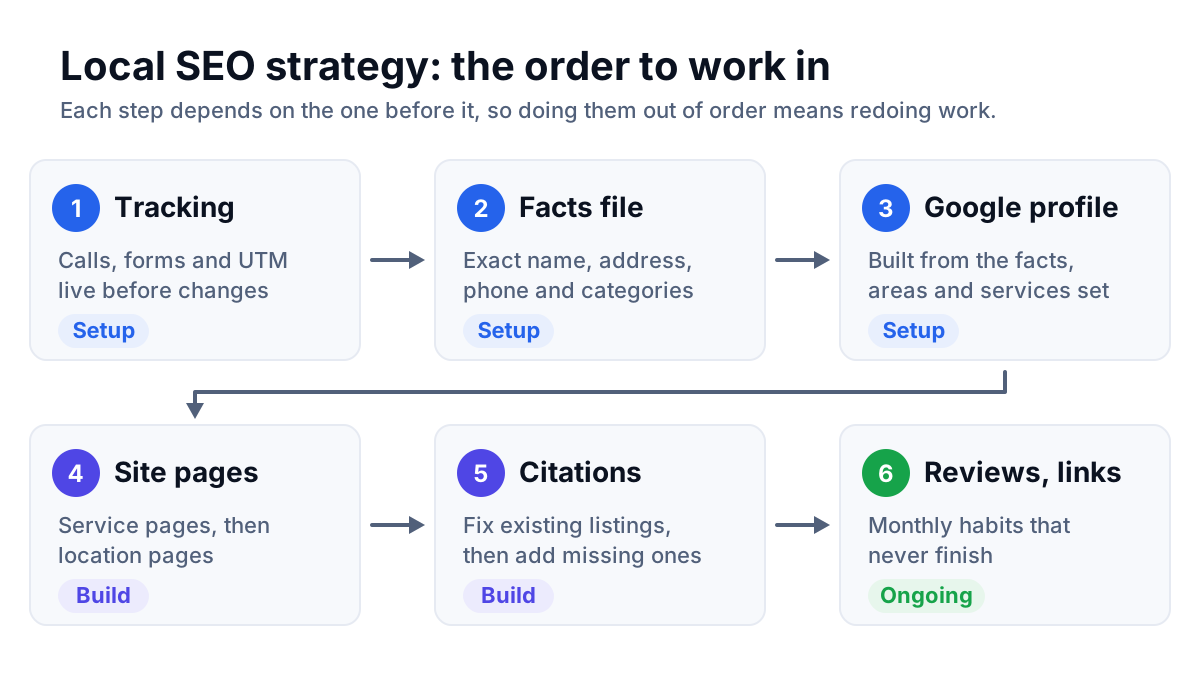
- Tracking baseline. Call tracking, the UTM tag and form key events go live before any change, so there's a before and after.
- Business facts file. Settle the exact name, address, phone and categories once, so nothing downstream has to be redone.
- Google Business Profile. Categories, service areas, services and description, all built from the facts file.
- Service pages, then location pages. The profile links to them, so they need to exist and say the right things. Location pages come after service pages because they link to them.
- Citations. Fix existing listings, then add the missing ones from the competitor gap. Doing this after the facts are settled means each listing gets edited once.
- Reviews and local links. These start as soon as the profile is right and never stop. They're monthly habits, not projects.
Priority inside that order comes from a gap analysis. Put your profile, reviews and pages next to the three businesses that currently hold the map pack for your main service, and start with the widest gap. If they each have a steady stream of recent reviews and you have none since last year, reviews jump the queue.
Keeping the checklist current
Local SEO isn't a one-time setup. Listings get edited by strangers (Google accepts suggested edits from the public), competitors add reviews, and your service areas change as you grow. This is the rhythm I'd keep:
| Checklist section | What to check | How often |
|---|---|---|
| Google Business Profile | Name, categories, hours and any edits suggested by the public | Monthly |
| Reviews | New reviews answered, request flow still running | Weekly |
| NAP and citations | Main listings still match the facts file | Quarterly, and after any move or number change |
| Service and location pages | Pages still match the services you sell and the areas you cover | Quarterly |
| Local links | One or two genuine opportunities pursued | Monthly |
| Tracking | Calls, forms and booked jobs reconciled | Monthly |
Your next step is a gap list: your profile, reviews, listings and pages compared against the businesses above you on the map, ranked by which gap costs you the most calls. You can build it yourself from this checklist. If you'd rather have it done for you, that comparison is where my work as a local SEO consultant starts, and the list is useful whether you hire help or fix it in-house.