Google Business Profile optimization means setting the right primary category, services, service areas, hours, photos, reviews and posts on your listing, so Google can match it to local searches and the people who see it choose you. Only a handful of those fields shape map rankings. The rest decide whether a searcher calls you or the business listed below you.
Below I go through the profile field by field: how Google says it ranks local results, a table that sorts each field into ranking or conversion, what to enter in each one, how to track the traffic it sends, and the mistakes that get profiles suspended.
How Google ranks local results
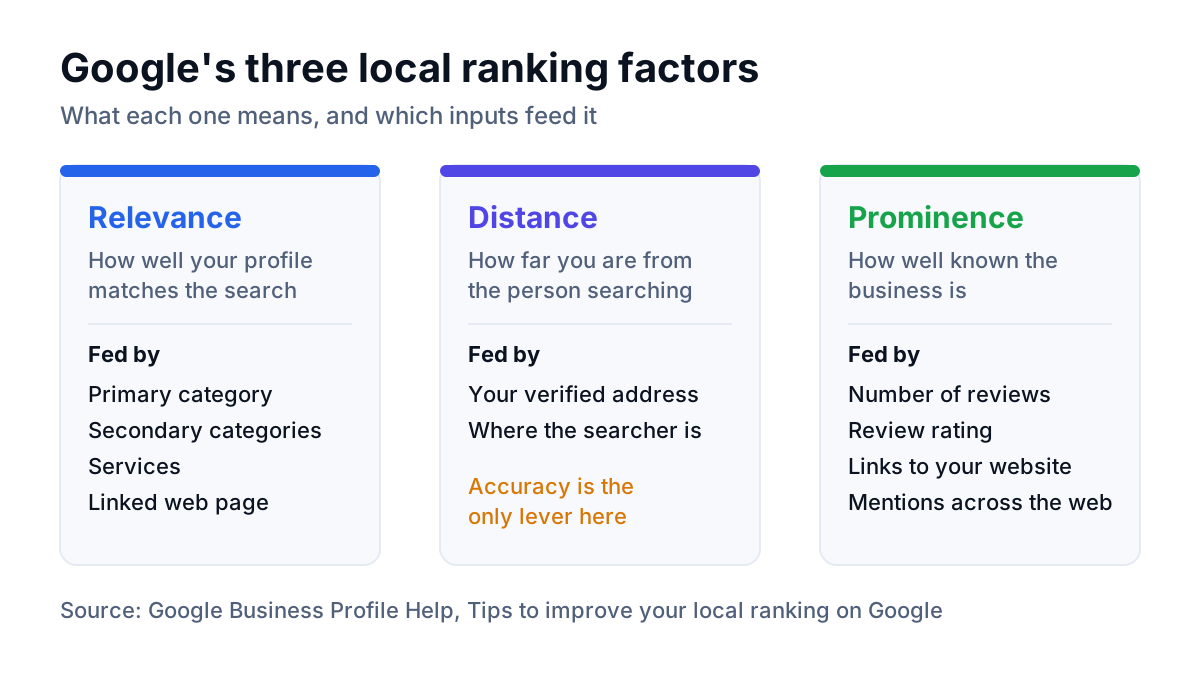
Your Google Business Profile (GBP) is the listing that shows on Google Maps and in the map pack, the block of three businesses under a map that appears for searches like “plumber near me”. Google's help page on local ranking names three factors that decide which businesses appear there:
- Relevance: how well a Business Profile matches what someone searched for.
- Distance: how far the business is from the person searching.
- Prominence: how well known the business is. Google says this includes how many websites link to the business and how many reviews it has.
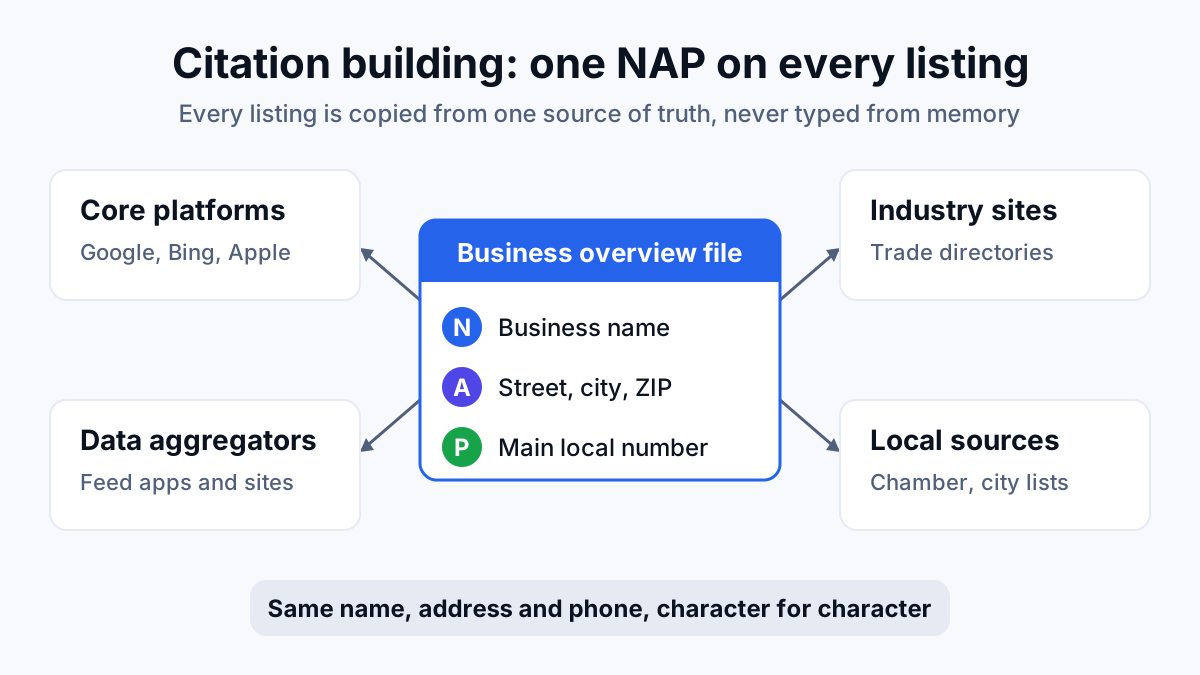
Profile fields feed relevance directly: your categories, services and the page you link to tell Google what you do. Distance comes from your address, and the only optimization there is accuracy. Prominence is mostly earned outside the profile, through reviews, links and consistent mentions of your name, address and phone (NAP) on other sites, which is the job of citation building. Google is blunt about shortcuts:
“There's no way to request or pay for a better local ranking on Google.” (Google Business Profile Help, Tips to improve your local ranking on Google)
Which fields move rankings and which win the call
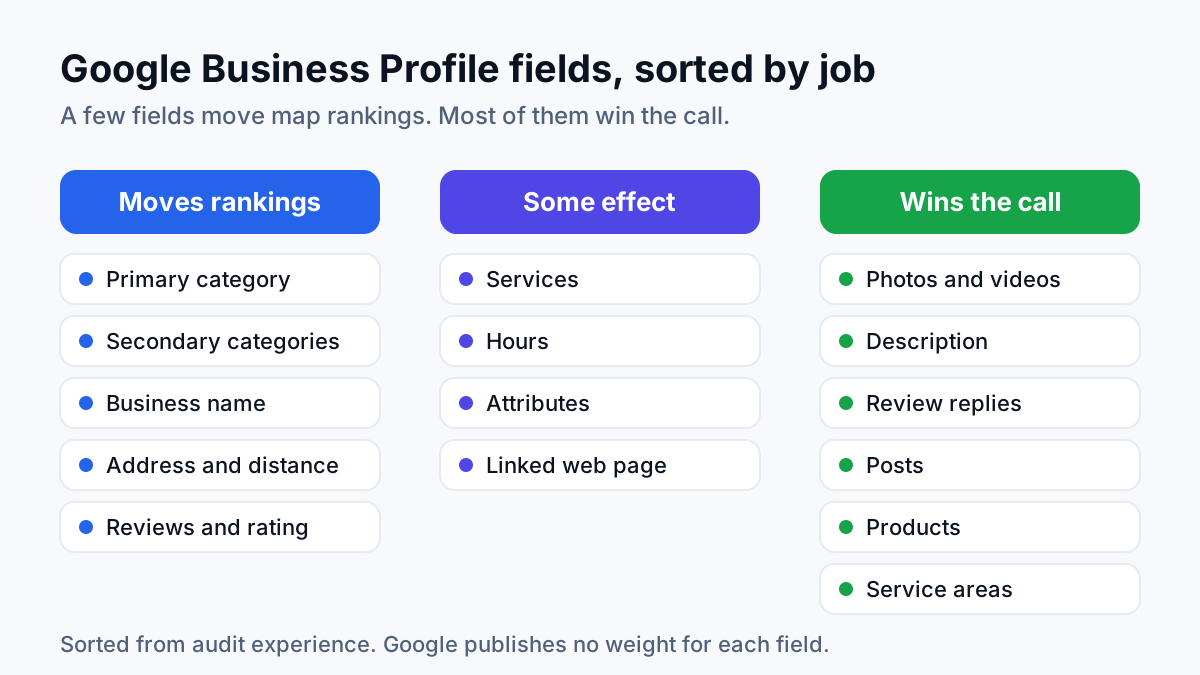
Google confirms the three factors but doesn't publish a weight for each field. The table below is how the fields behave across the local accounts I've audited. “Ranking” means the field changes where you appear in the map pack. “Conversion” means it changes whether the person who sees you calls, books or asks for directions.
| Field | Moves map rankings? | Helps conversion? | What to do |
|---|---|---|---|
| Business name | Yes, which is why people stuff it | Yes | Your real-world name only |
| Primary category | Yes, the biggest lever | Indirectly | The most specific match for your main service |
| Secondary categories | Yes, for the searches they add | Indirectly | Only what the business is, not what it has |
| Address | Yes, through distance | Yes, for directions | A real, staffed location |
| Service areas | Little | Yes | Where you really work |
| Hours | Some, at the time of search | Yes | Real hours plus holiday hours |
| Services | Some | Yes | Every service, in customer words |
| Products | Not that I've measured | Yes | Packages and common jobs |
| Description | No | Yes | Plain facts, under 750 characters |
| Photos and videos | Not directly | Yes, strongly | Real work, team and premises |
| Reviews | Yes, through prominence | Yes | Ask every customer, no rewards |
| Review replies | Not proven | Yes | Reply to every review |
| Posts | No | Some | Offers and updates linked to the matching page |
| Attributes | Minor | Yes | Every factual attribute that applies |
| Website link | The linked page matters | Yes | The matching page, tagged with UTM |
Read the table two ways. If you're missing from the map pack, fix the ranking rows. If you appear but the phone stays quiet, fix the conversion rows.
Business name: your real name, nothing added
Enter your business name exactly as it appears on your signage, vehicles, invoices and website. Google's guidelines for representing your business say that unnecessary information in the name isn't permitted and could get the profile suspended. That rules out service keywords, town names, taglines and phone numbers.
“Smith Plumbing Emergency Plumber Miami 24/7” is not a business name. It's a search query with a van attached. Stuffing like this does lift rankings for a while, which is why it's common, and it's why competitors report it through Google's “suggest an edit” option. A suspended profile drops out of the map pack entirely until an appeal succeeds.
If the service is part of your registered, real-world name (“Miami Drain Pros” painted on the trucks), use it. The test is whether a customer would see the same name on your paperwork.
Primary and secondary categories: the biggest lever
Primary category
The primary category is the strongest relevance signal you control in the profile. In audits I run, a broad or wrong primary category is one of the most common reasons a solid business doesn't appear for its main service. “Contractor” is a weaker match than “Roofing contractor” for someone looking for a roofer, because the category is the plainest statement of what you do.
To choose it, search your main service on Google Maps from inside your service area and note the category shown under each of the top three listings. Then pick the most specific category from Google's list for the service that brings in most of your revenue. Google's guidelines give a useful test: choose categories that complete the sentence “This business IS a…”, not “This business HAS a…”.
Secondary categories
Secondary categories cover your other core services. A plumbing company that installs water heaters as a real line of business might add a water heater category. Google's guidelines ask you to use as few categories as possible to describe the core business, and I agree for a practical reason: every extra category is a claim, and categories for work you rarely do attract calls you'll turn down.
Categories decide which suggested services and attributes Google offers you, so after any category change, recheck both.
Services and products
Services
Google suggests a list of services based on your categories. Tick every one you really offer, then add custom services in the words customers use: “burst pipe repair”, not “emergency hydraulic remediation”. Give each service a short, plain description. In my experience services support relevance a little; their bigger job is showing a searcher at a glance that you do the exact job they need.
Products
Products aren't only for shops. A service business can list fixed packages or common jobs (a drain inspection, an AC tune-up, a roof survey) as product cards with a photo, a short description and a link to the matching page. I've never measured a ranking change from products, but they fill the profile with specific offers, which is what a customer comparing three listings wants to see.
Address or service areas
This choice depends on where you meet the customer. If customers come to your premises, show the address. If you travel to them, you're a service-area business, and Google's guidelines say you should hide the address and list the areas you serve instead. The same guidelines say service areas shouldn't extend farther than about two hours of driving from where the business is based.
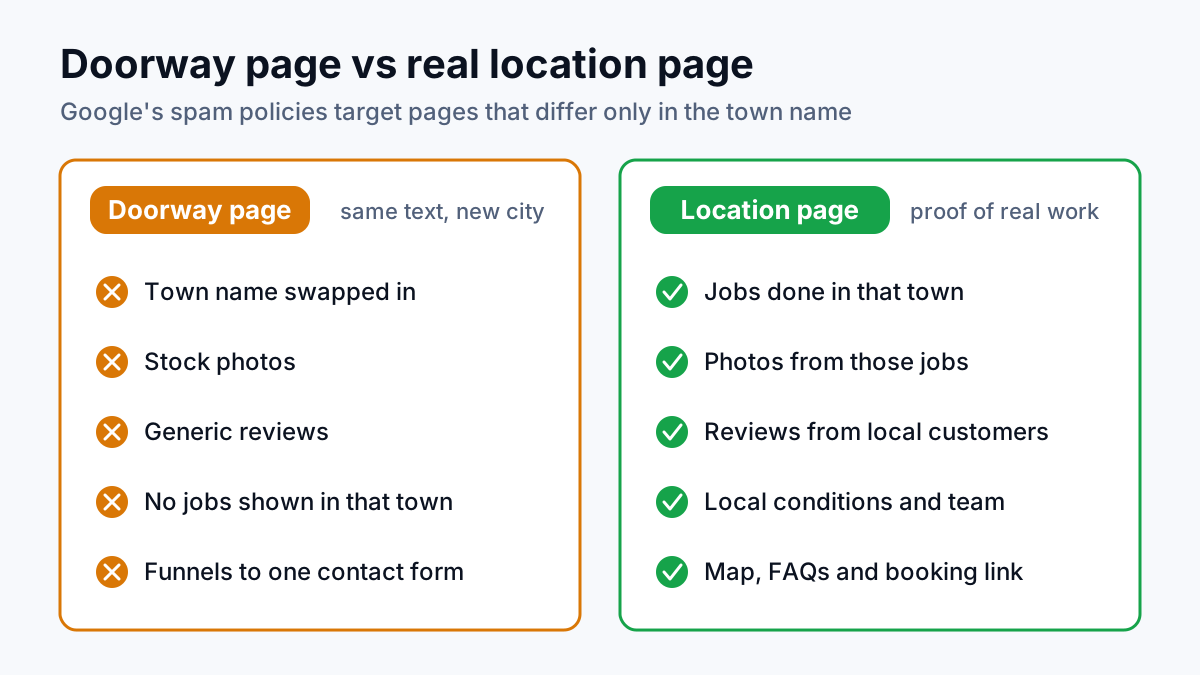
Service areas describe where you work; they don't make you rank there. Distance is still measured from your verified address, so a business based in one suburb rarely reaches the map pack in a town an hour away just because that town is listed. To compete further out, you need reviews from customers there, citations and location pages that tie your service to each place.
Never use a mailbox, a coworking desk or an unstaffed virtual office as your address. Google's guidelines don't accept them, and a fake address is a fast route to a suspension.
Hours
Enter your regular customer-facing hours, as Google's guidelines ask, and set special hours for holidays before they arrive. Profiles marked as closed tend to appear less for searches made outside their hours, so accurate hours are worth keeping current. The fix is never to fake them: marking the business open 24 hours when nobody answers the phone at night trades a small ranking gain for bad reviews from customers who couldn't reach you.
Business description
Google's help page caps the description at 750 characters, asks you to leave out URLs and HTML, and says to describe the business rather than promotions or sales. I've never seen the description move rankings. It matters because customers read it, and because Google's AI answers on Maps draw on profile details when people ask questions about a business.
Start from plain facts: what you do, who for, where, since when, and one thing that sets you apart (licensing, a warranty, response times). Mention your main service and area naturally, once each. Keep the finished text on file and reuse the same facts on your website and directory listings, so every platform tells the same story.
Photos and videos
Google's own tips say photos and videos let you show customers what you offer. Upload a clear logo and cover photo, then real images: the team, the vehicles, finished jobs, and the outside of the premises so people recognize it on arrival. Stock photos persuade nobody.
Geotagging photos (adding GPS coordinates to the image file) is a popular tactic. I have never measured a ranking effect from it, so spend that time taking better photos instead.
Reviews and replies
Reviews are the prominence signal you can influence most directly, since Google names the number of reviews as part of prominence. Their count, rating and freshness shape how a searcher reads your listing too, so they work on ranking and conversion at the same time.
Ask every customer, at the moment the job is done, with a direct review link. Never offer a discount or gift for a review, and don't ask only the customers you expect to be happy: Google's policies prohibit both. The full system is in my guide on how to get more Google reviews.
Reply to every review, good and bad, within a few days. Google says replying shows customers you value their feedback. Keep replies specific and calm. A reply to a one-star review is written for the next hundred readers, not for the reviewer.
Q&A: retired, so move the answers
Google has retired the public questions and answers section on Business Profiles. New questions can no longer be added, and newer profiles don't show the section at all. Questions people ask about a business on Maps are now answered by Google's AI, which draws on the profile, the website and reviews.
That moves the job rather than removing it. Take the questions customers ask on the phone (Do you charge a call-out fee? Do you work weekends? Are you licensed?) and answer them in your services, your description and an FAQ section on your website, so the AI answer pulls correct facts instead of guessing.
Posts
Posts are short updates, offers or events that appear on the profile. I haven't been able to measure a ranking effect from them. Their value is conversion: a recent post shows the business is active, and an offer or a seasonal service (furnace checks before winter) gives a hesitant customer a reason to call.
Plan them on a calendar, give each post one message, and link each one to the page that matches it rather than the homepage by default.
Attributes
Attributes are the small facts shown on a profile, such as online appointments, onsite services or a wheelchair-accessible entrance. You set the factual ones; subjective ones come from the opinions of Google users. Set every factual attribute that's true for you. Their ranking effect is minor, but they answer a customer's practical question before they have to ask it.
Website link and UTM tracking
The website field has two jobs. Link it to the page that most closely matches your primary category and location: the homepage for a single-location business, the matching location page for each branch of a multi-location one. Then tag that link so you can measure what the profile sends you.
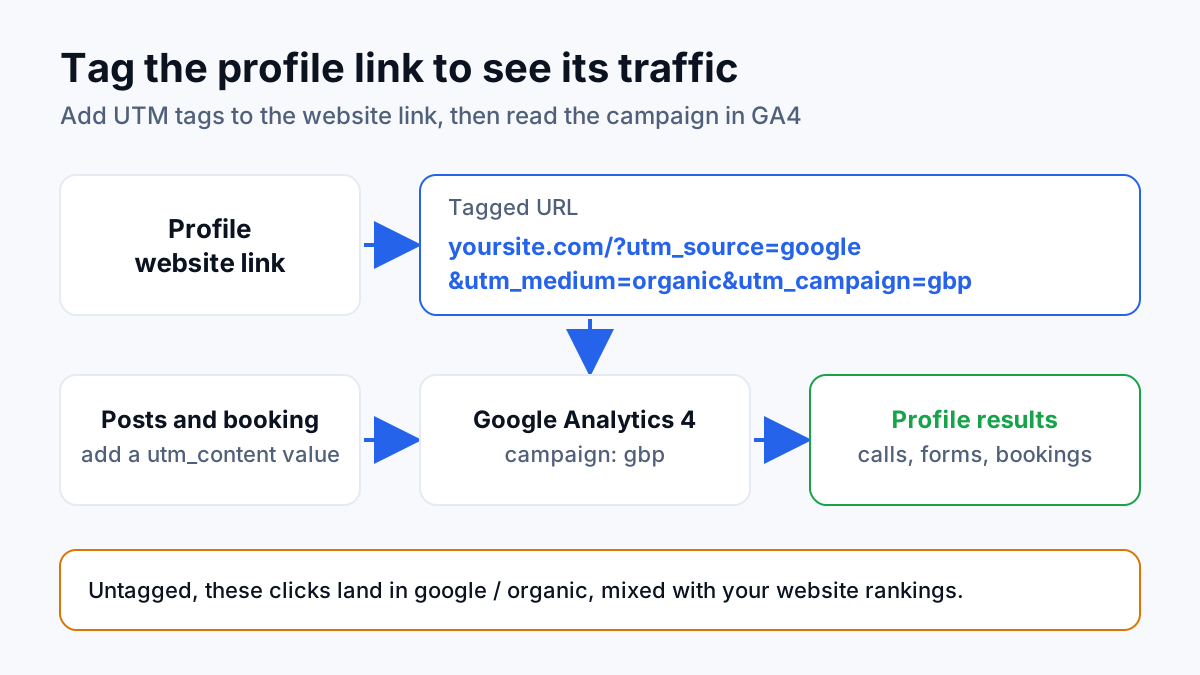
Tagging means adding UTM parameters, short labels at the end of a URL that analytics tools read. Without them, Google Analytics 4 (GA4) files profile clicks under Google organic search, mixed in with clicks from your normal website rankings, so you can't tell which one is working. A tagged link looks like this:
https://yoursite.com/?utm_source=google&utm_medium=organic&utm_campaign=gbp
Keeping the source as google and the medium as organic leaves the traffic in GA4's Organic Search channel, and the campaign value gbp separates it. Use the same pattern on the appointment link and on post links, with a utm_content value such as booking or post so each one shows separately.
Calls are the other half. The profile's own performance report counts calls, direction requests and website clicks. If you use a call tracking number, put it in the primary phone field and keep your main number as a second phone, so your NAP still matches your listings elsewhere.
Report the profile in money where you can, not in views. On a local SEO engagement for a Florida plumbing business, organic revenue grew three months in a row, from $10,378 to $14,373 to $15,497, reported in actual dollars. Lead volume didn't follow the same line: 43 leads in July fell to 27 in August, even as revenue and booking rate improved that month. Counting leads alone would have told the wrong story.
Mistakes that sink a profile
- Keywords in the name. It breaks Google's guidelines, invites reports from competitors and risks a suspension.
- A broad primary category. Picking “Contractor” when you're a roofer leaves the biggest lever unused.
- A fake or virtual address. Mailboxes and unstaffed offices aren't eligible, and a suspension undoes every other fix.
- Duplicate profiles. Two listings for one location split your reviews and leave Google unsure which one is real.
- Rewarded or filtered reviews. Paying for reviews and asking only happy customers both break Google's review policies.
- Inconsistent NAP. An old address or a different phone number on directories weakens trust in the details on the profile.
- Untagged links. Without UTM tags you can't see what the profile earns, so you can't judge the time spent on it.
Where to start on your own profile
Work in the order that moves the most, one change at a time, so you can see what each one did:
- Check your primary category against the top three businesses in your map pack.
- Strip anything that isn't your real-world name out of the business name.
- Confirm the address or service areas follow Google's guidelines.
- Fill in services, hours, holiday hours and every factual attribute.
- Add the UTM-tagged website link, and a call tracking number with your main number kept as a second phone.
- Start a steady review request routine and reply to every review.
- Add real photos, a fact-based description and a monthly post calendar.
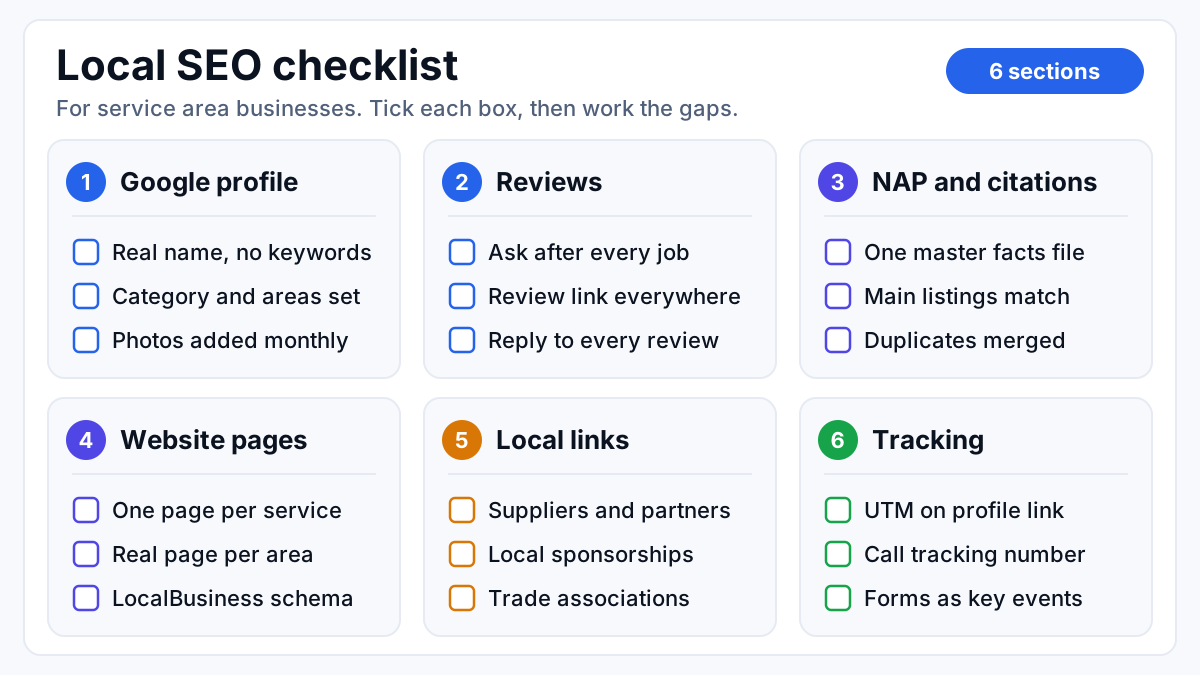
The profile is one part of local search. The rest (citations, location pages, local links) is laid out in my local SEO checklist. If your profile is complete and competitors still outrank you, the gap is usually prominence, which I cover in how to rank higher on Google Maps.
If you'd rather have someone audit your profile against the businesses beating you on the map and set it up field by field, that's the work I do as a local SEO consultant.