More Google reviews come from a habit, not a campaign: ask every customer right after the job, send a direct review link they can open in one tap, and reply to every review that comes in. The rules that keep it safe are short. Never offer a reward, never ask only the happy customers, and never post reviews from staff, family or paid sources.
This is how to get more Google reviews the way I set it up for service businesses: the ask sequence and its timing, the review link and QR code, text and email templates written out in full, who on your team should ask, how to reply to good and bad reviews, and exactly where Google's policy draws the line.
Why review count and freshness matter
Google says it plainly. Its page of tips to improve your local ranking names relevance, distance and prominence (how well known a business is) as the main factors, and states that “more reviews and positive ratings can help your business's local ranking.”
Reviews do a second job that has nothing to do with rankings. The map pack (the three businesses Google shows on a map above the normal results) puts your star rating, your review count and a few review snippets right next to your competitors'. A homeowner choosing between three plumbers reads those snippets before anything on your website. Recent reviews that describe the actual job answer the question they are really asking: will this company turn up and do it properly?
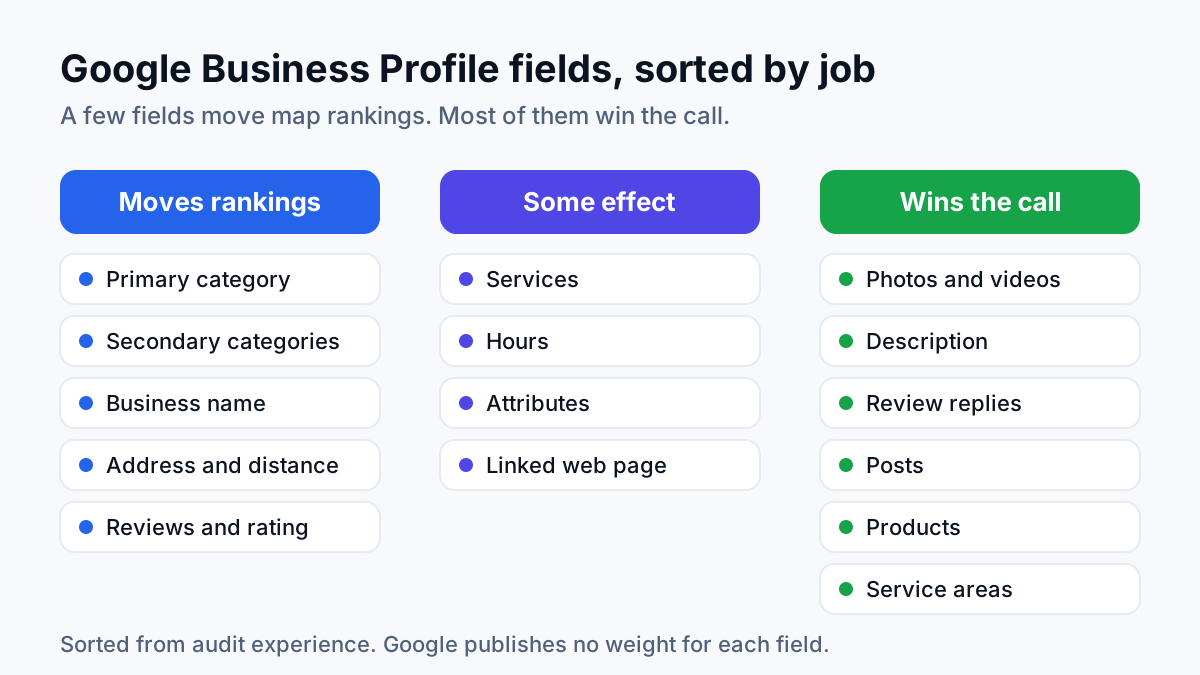
In audits I run for local businesses, the company with the thin review profile is rarely the one doing worse work. It is the one that only asks when somebody remembers to. Reviews are one input among several: a complete profile matters too, which is covered in Google Business Profile optimization, and ranking higher on Google Maps depends on distance and relevance as well. What reviews give you is the one signal you can grow every week.
When to ask: right after the job
The strongest moment to ask is the few hours after the work is finished. The customer has just watched the leak stop or the AC come back on, the technician's name is fresh, and their phone is in their hand. Ask two weeks later in a batch and you are asking someone to recall a Tuesday they have already forgotten. Nobody wakes up on a Saturday wanting to write about their drain.
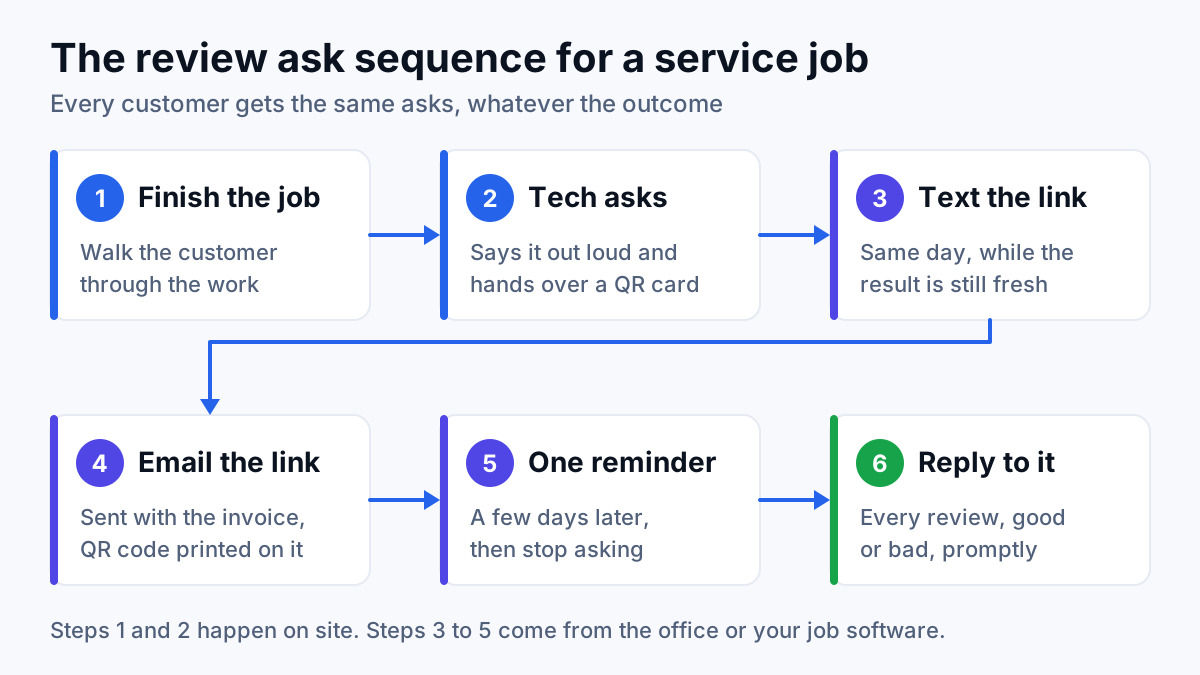
Here is the timing I set for every client, and it matches the diagram above:
- At the door, when the job is done. The technician asks out loud and hands over a card with the QR code on it.
- Same day, by text. The review link arrives within a few hours, while the result is still fresh. Use email instead for customers who prefer it.
- Next morning, with the invoice. The invoice email carries the link, and the invoice itself carries the QR code.
- A few days later, one reminder. Then stop, whatever the customer did or did not do.
Two rules go with that sequence. Ask on every completed job, not only the ones that went smoothly, because asking selectively is review gating and Google prohibits it. And ask only when the job is really finished: if a part is on order and a return trip is booked, wait until the return trip is done, so the review describes the finished work.
Past customers count too. A one-time request to customers from recent months is fine, as long as each of them had a real experience with you. Spread those requests over a few weeks rather than sending a year of contacts in one afternoon. Google's policy lists “unusual volumes or patterns of review contributions” among the signs of rating manipulation, and a sudden spike looks exactly like that.
How to ask: the direct review link and QR code
Every extra tap between the request and the review form loses people. Telling a customer to “search for us on Google and find the reviews” turns a one-minute job into a scavenger hunt. A direct review link opens the review form on your profile straight away.
Get your review link
- Open your Business Profile while signed in to the Google account that manages it, on a computer.
- Select Read reviews, then Get more reviews.
- Select Copy for the link, or right-click the QR code and save the image.
Those steps come from Google's help page on how to create a Google link or QR code to request reviews, which notes that the QR code can only be generated from a computer browser, not a phone. Google's review tips add one more detail worth knowing: customers must be signed in to a Google account to post a review, and they can create one with a non-Gmail email address.
Put the QR code on the invoice
Google suggests placing the link on receipts, in thank-you emails, at the end of a chat and on a printed QR code. For a service business, that becomes:
- A QR code printed on every invoice, with one plain line above it such as “Tell others how the job went.”
- A small leave-behind card the technician hands over at the door, with the same QR code and the technician's name.
- The review link in every office email signature.
- A review button on your website's thank-you page, the one people land on after booking.
Printed codes reach the customers who never open a follow-up email. Digital links work because the customer can tap them from the sofa. Use both.
Review request templates you can copy
Short beats clever. Each template below says who is writing, links straight to the review form and says nothing about stars or what to write. Replace the bracketed parts with your own details.
Text message, same day
Hi [name], it's [technician] from [business]. Thanks for having us out today for the [job type]. If you have a minute, would you share how it went on Google? [review link] It helps other people in [town] choose a [trade].
Email with the invoice, next morning
Subject: How did your [job type] go, [name]?
Hi [name], thanks for choosing [business]. [Technician] finished your [job type] on [day], and your invoice is attached. We are a local company, and people in [town] read reviews before they call anyone, so an honest review from you makes a real difference. It takes a minute or two: [review link]. If anything about the job is not right, reply to this email and I will sort it out personally. [Owner name], [business]
The offer to fix problems appears next to the review link, never in place of it. Everyone gets both.
One reminder, a few days later
Hi [name], a quick follow-up from [business]. If you have a moment to review [technician]'s visit, here is the link again: [review link]. Either way, thank you for your business.
Notice what the templates leave out: no “if you loved us”, no star count, and no request to mention the technician or to use particular words. Google's policy says merchants should not “request that specific content be included”, and it gives asking for reviews that identify a staff member as an example. Naming the technician in your message is fine. Asking the customer to name them in theirs is not.
Who asks: the technician or the office
Both, with different jobs. The technician has the relationship; the office has the process. In the service businesses I work with, relying on only one of them is where the system leaks.
| Who | What they do | Strength | Where it breaks |
|---|---|---|---|
| Technician | Asks out loud at the end of the job and hands over the QR card | The customer just met them and saw the result | Busy technicians forget, or feel awkward asking |
| Office | Sends the text and email with the review link after the job is closed | Consistent and trackable, never skips a job | A message from a company feels less personal than a face at the door |
| Job software automation | Sends the same messages when a job is marked complete | Runs on busy weeks when nobody has time | Fires on unfinished jobs if the job status is wrong |
Coach the spoken ask down to a sentence the technician can say without a script: “We're a local company and reviews really help us. I'll send you a link tonight, and there's a code on this card too.” Then they pack up and leave. Google's policy says merchants should not “require or pressure users to leave ratings or write reviews while on the premises”. I treat a customer's kitchen the same way as a shop floor, so a technician standing over someone while they type is off the table.
Measure the right thing. The same policy lists “merchants requesting that staff solicit a certain number of reviews” as not allowed, so per-technician review quotas are out. Track the ask rate instead: completed jobs against review requests sent. That number is fully in your control, and it is the one that slips when things get busy. It is the same setup I use in SEO for HVAC companies, where a maintenance call is short and the technician may be the only person the customer ever meets.
Reply to every review, including the bad ones
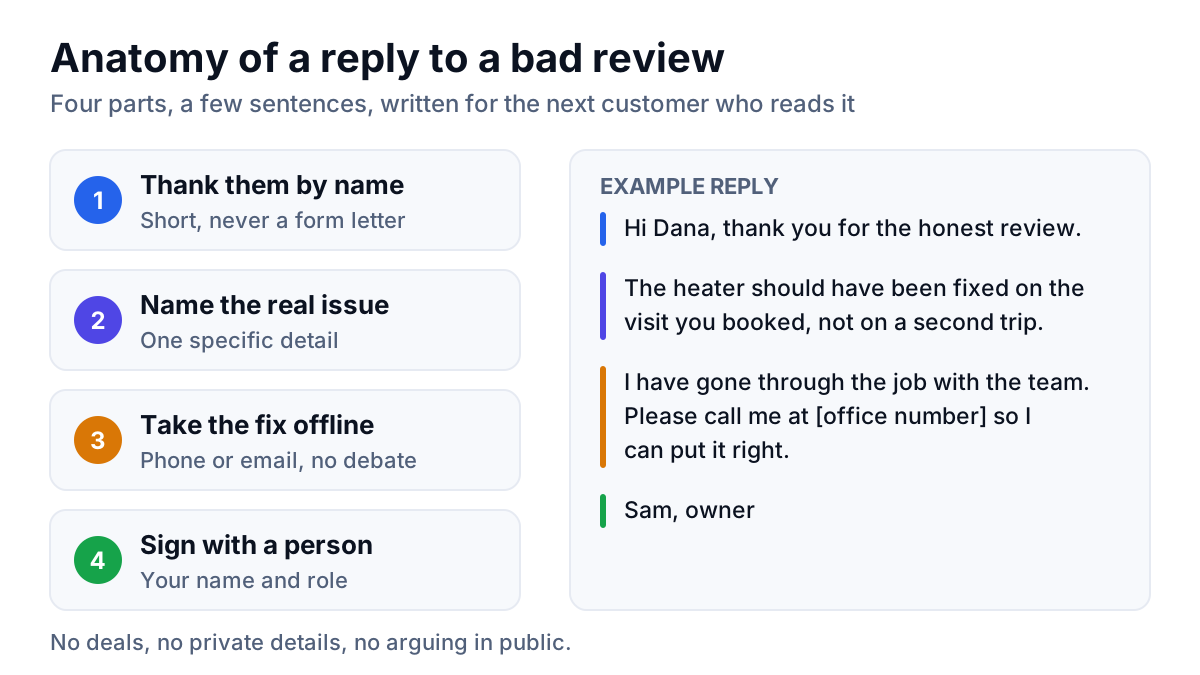
Replies are public, and the next customer reads them. Google's own review tips say to keep replies short, polite and personal, to avoid sending the same thank-you to everyone, and to keep offers and promotions out of replies. According to Google's page on managing customer reviews, the reviewer is notified when you reply and can still change their review afterwards.
Reply template for a positive review
Thanks, [name]. Glad the new [part or system] is running quietly, and I'll pass your note on to [technician]. If anything changes with it, you have our number. [Your name], [business]
One real detail from their review, one line of thanks, a name at the end. Skip stuffing service keywords and city names into replies: it reads like a robot wrote it and helps nobody.
Reply template for a negative review
[Name], thank you for telling us. You're right that [the specific problem] should not have happened, and I'm sorry it did. I've gone through the job with the team and want to put it right. Please call me directly at [office number] so we can sort it out. [Your name], owner, [business]
- Do not argue in public. State the facts once, calmly, and move the conversation to phone or email.
- Protect privacy. Do not confirm details the customer did not share, and never post their address, invoice or phone number.
- Apologize when you got it wrong, and explain the limits when you did not, such as a part the supplier had on back order.
- Reply promptly. A reply that arrives weeks later reads like damage control.
- Report, do not fight, reviews that break policy. Flag spam, fake competitor reviews and reviews from people who were never customers from your profile. Google's help page on reporting says not to report a review just because you disagree with it.
Google's tips note that following up on a complaint may encourage the customer to update their review. That is their choice to make. Offering a refund or discount in exchange for changing or removing it is prohibited, which the next section covers.
What breaks Google's review rules
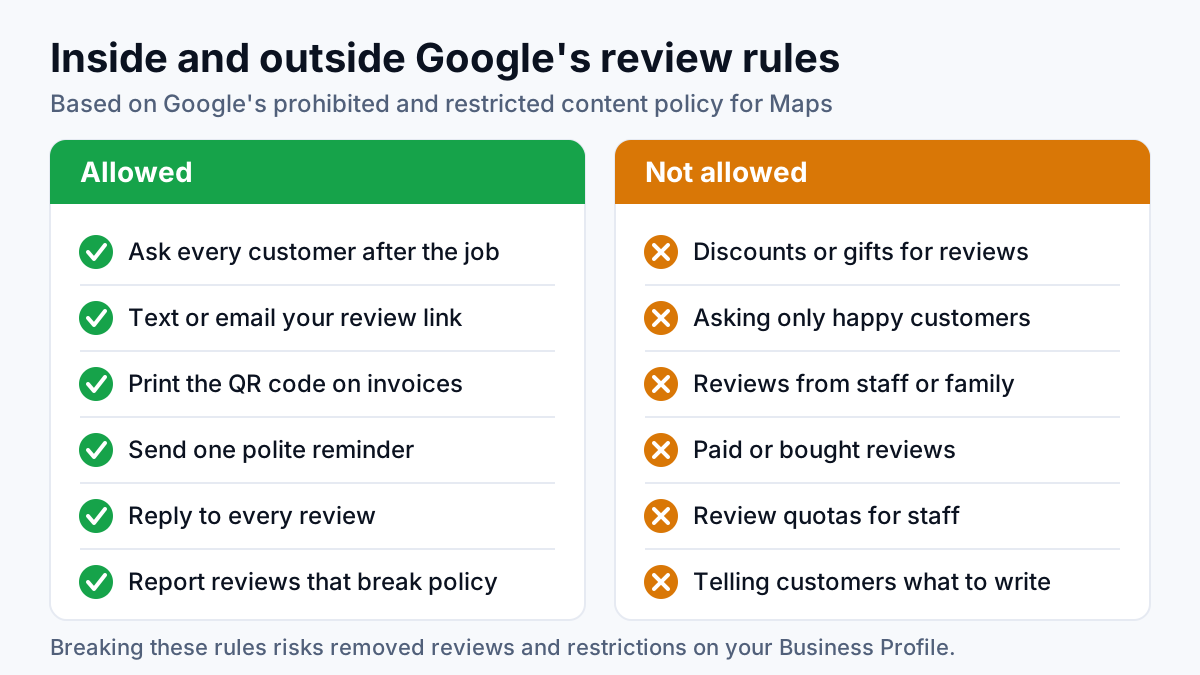
The rulebook here is Google's prohibited and restricted content policy for Maps. It starts from one line:
“Contributions to Google Maps should reflect a genuine experience at a place or business.” (Google, Maps prohibited and restricted content policy)
Every rule below follows from it. These are the practices I see most often in audits, matched to the part of the policy they break:
| Practice | What it looks like | What Google's policy says |
|---|---|---|
| Incentives | A discount on the next service, a gift card, or a prize draw entry for leaving a review | Merchants may not offer incentives such as payment or discounts in exchange for posting any review, or for revising or removing a negative one |
| Review gating | A “how did we do?” survey that sends happy customers to Google and unhappy ones to a private form | Merchants may not “discourage or prohibit negative reviews, or selectively solicit positive reviews from customers” |
| Staff and family reviews | Employees, the owner's relatives or a business partner posting reviews | Content based on a conflict of interest, including current or former employment and family relationships, is not allowed |
| Bought or fake reviews | Paying a review seller, swapping reviews with another business, or posting from several accounts | Reviews “paid for, directly or in kind” and content posted from multiple accounts by one person count as fake engagement |
| Staff quotas and scripts | Each technician must collect a set number of reviews, or customers are asked to mention a name | Merchants may not ask staff to solicit a certain number of reviews, or reviews with specific content |
| Pressure on site | Handing the customer a tablet and waiting while they post | Merchants should not require or pressure users to review while on the premises |
Gating is the one owners fall into by accident. A satisfaction survey is fine on its own. It turns into gating when the answer decides who gets the Google link. The fix is simple: every customer gets the review link, whatever they answered.
A weekly routine that keeps reviews coming
Reviews stop the week the asking stops. A short check on the same day each week keeps the system honest:
- Compare completed jobs with review requests sent, and send any requests that were missed.
- Reply to every new review, positive and negative.
- Test the review link and the QR code from a phone signed in to a personal Google account, the way a customer would.
- Read the new reviews for patterns. The same complaint twice is an operations problem, not a marketing one.
- Report any review that breaks Google's content policy, and leave the rest alone.
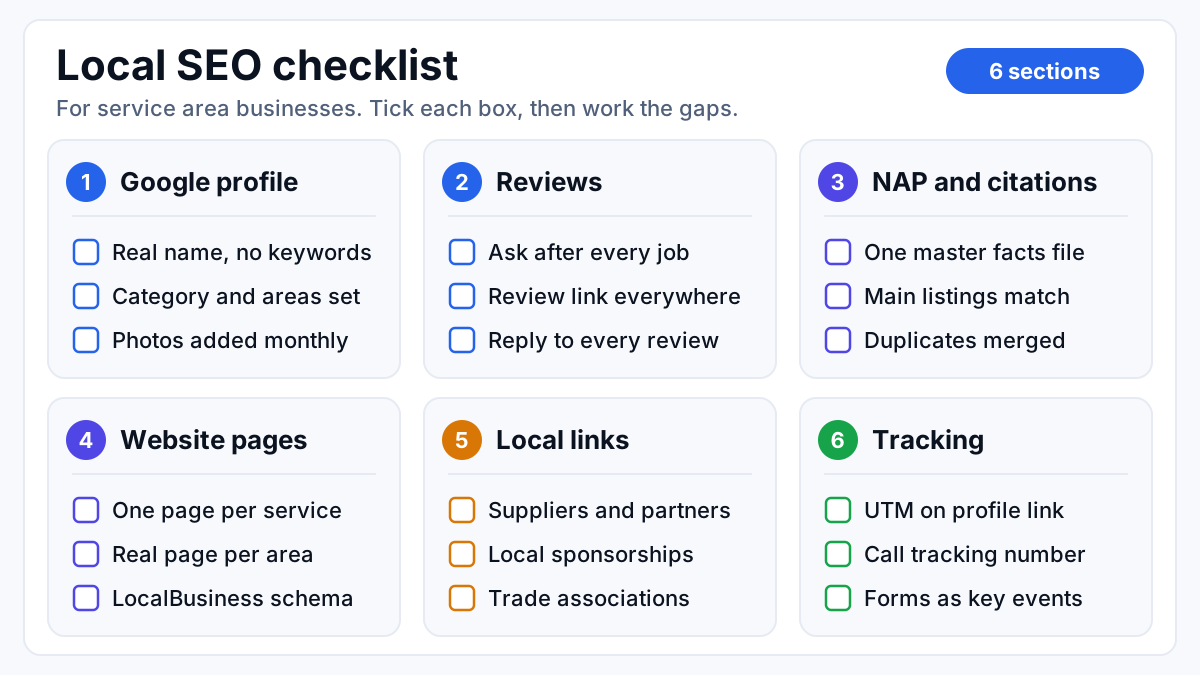
Reviews are one line on a longer local SEO checklist. If the asking is running every week and the map pack still is not moving, the gap is usually somewhere else: categories, service areas, location pages or citations. That is the work I take on as a local SEO consultant, starting with a review of your profile against the businesses ranking above you.