To rank higher on Google Maps, work on the three things Google says local results rest on: relevance (how well your Business Profile matches the search), distance (how far you are from the person searching) and prominence (how well known your business is, judged from reviews, links and mentions across the web). You can move relevance and prominence. Distance you mostly cannot, which is why one business ranks in the top three on one street and out of sight a few miles away.
Below are the moves under each factor, the difference between the map pack, the local finder and the Maps app, why your rank changes with the searcher's location, and how to check it properly with a grid check instead of a search from your own desk.
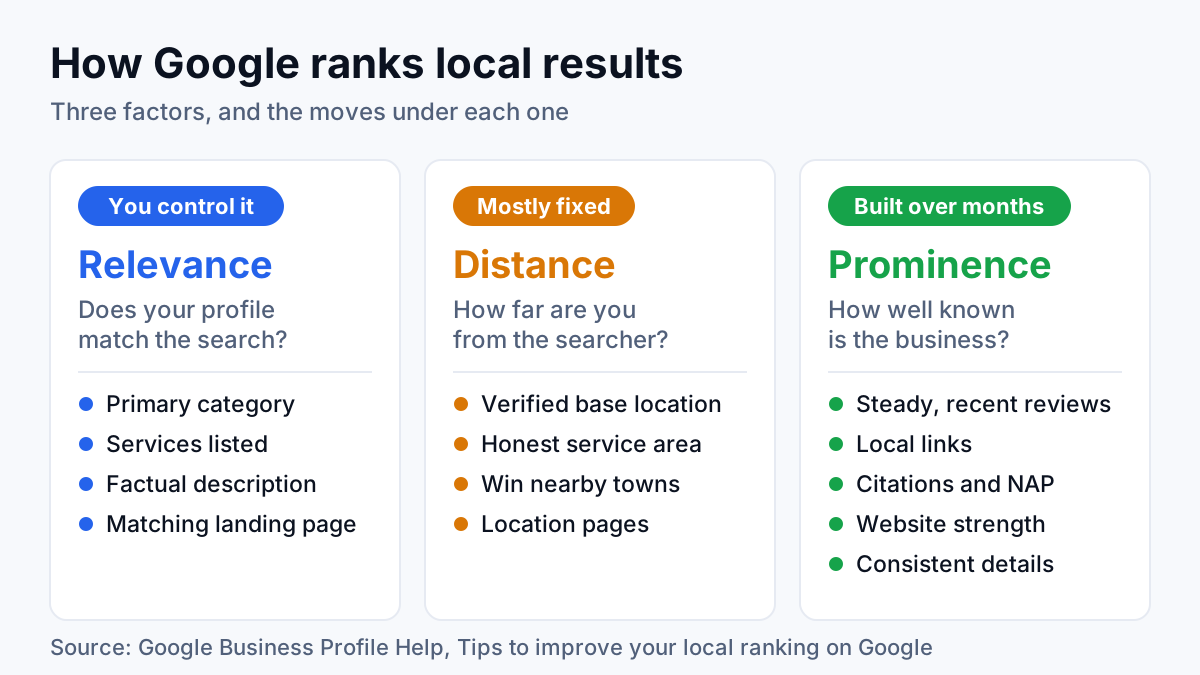
The three factors Google names for local rankings
Google spells this out on its Business Profile help page, Tips to improve your local ranking on Google. The short version is one sentence:
“Local results are mainly based on relevance, distance, and popularity.” Google Business Profile Help
The same page heads the third factor prominence, and defines all three in plain terms. Relevance is how well a Business Profile matches what someone searches for. Distance is how far each business is from the searcher, or from where Google thinks they are if they share no location. Prominence is how well known the business is, based on signals such as how many websites link to it and how many reviews it has.
Two more points from that page matter before you spend a cent. There is no way to request or pay for a better local ranking. And a Google Business Profile (GBP, the listing that puts your business on Maps and in local results) with complete, accurate details is more likely to show up at all.
| Factor | The question behind it | How much you control | Main moves |
|---|---|---|---|
| Relevance | Does this profile match what was searched? | Most of it | Primary category, services, description, a matching landing page |
| Distance | How far is the business from the searcher? | Very little | An accurate base location, a truthful service area, location pages for towns further out |
| Prominence | How well known is this business? | A lot, slowly | Reviews, local links, citations, website strength, the same details everywhere |
Map pack vs local finder vs the Maps app
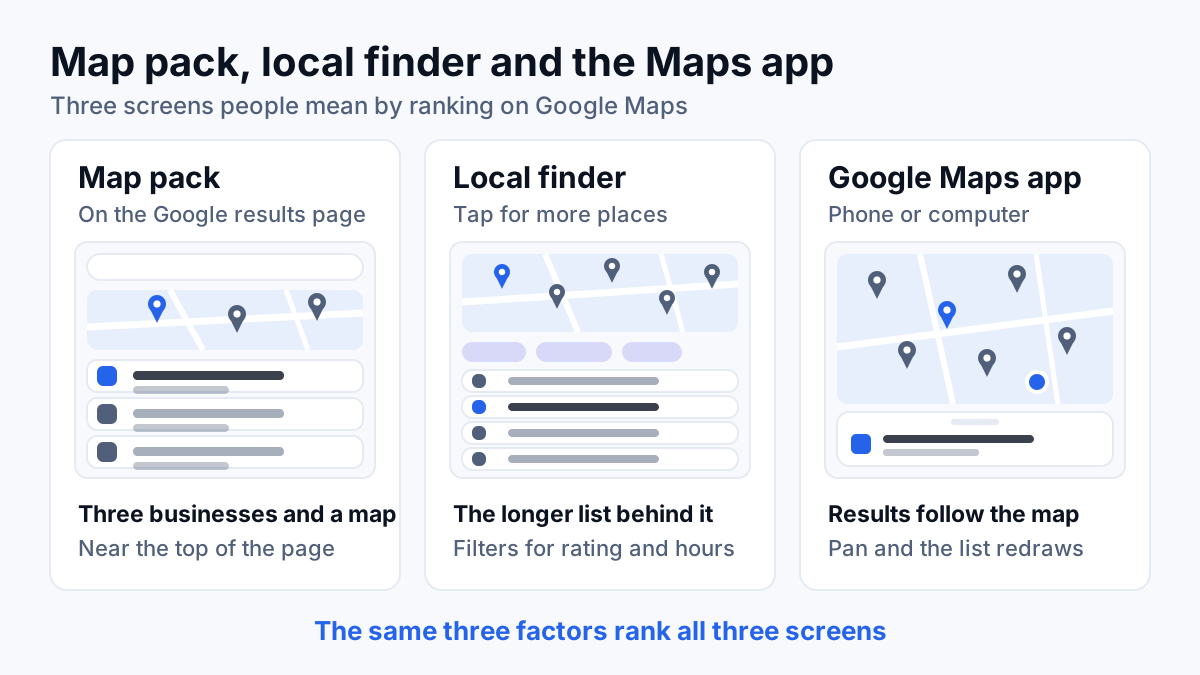
When people ask how to rank in Google Maps, they usually mean one of three screens. The same three factors rank all of them, but what the searcher sees, and how far down the list they read, changes.
| Surface | Where it shows | What the searcher sees | What shifts the order |
|---|---|---|---|
| Map pack | On the normal Google results page, for searches with local intent | A small map and three businesses, sometimes with a sponsored listing above them | The searcher's location and exact wording |
| Local finder | After tapping the link under the map pack to see more places | A longer list beside a bigger map, with filters such as rating and opening hours | The same factors, plus any filter the searcher taps |
| Google Maps app | Inside Google Maps on a phone or computer | Pins and a list tied to the part of the map on screen | Where the map is centered and zoomed, plus the user's own location |
The map pack gets the attention because it shows near the top of the main results page for searches like “plumber near me”, and only three businesses fit in it. The local finder is the expanded list behind it, where positions four and lower live. In the Maps app, results follow the map: pan to another neighborhood and the list redraws around it, so a business can look strong in the app and weak in the pack, or the reverse.
Relevance: tell Google exactly what you are
Relevance decides which searches you are eligible for at all. If Google does not connect your profile to “water heater repair”, no number of reviews puts you in that map pack. The fixes here are quick, cheap and usually where I start.
Choose the primary category carefully
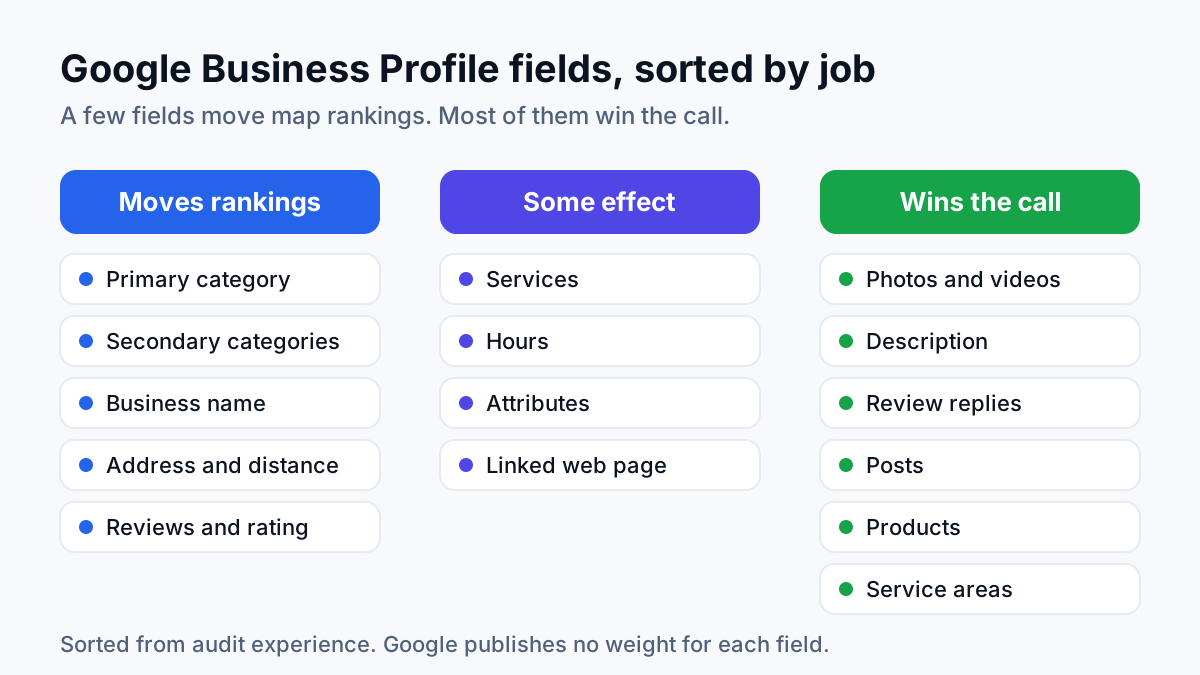
Your primary category is the one main label that says what kind of business you are, such as Plumber, Dentist or Roofing contractor. In audits I run, it is the profile field that most often explains why a competitor outranks a client on the core search. Google's guidelines for representing your business ask you to use as few categories as possible to describe your core business, and to pick ones that are specific but representative of it.
A quick test: search your main service in your town, open the three businesses in the map pack and note their primary categories. If all three say Plumber and yours says Water heater supplier, you have found the problem. Secondary categories are for real services you offer, not for keywords you wish you ranked for.
List your services and write a factual description
Add every service you actually sell in the services section, in the words customers use (“drain cleaning”, not “drainage solutions”). Write the business description from plain facts: what you do, where, for whom and since when. The profile then says the same thing your website says, which is the point. My guide to Google Business Profile optimization covers every field.
Keep keywords out of the business name
Renaming the profile “Plumber Tampa 24/7” is an old trick, and Google's guidelines rule it out: the name should match your real-world business name, with no service, product or location information stuffed in. Stuffed names do sometimes rank, until a competitor suggests an edit or the profile gets suspended, and then the problem is much bigger than a ranking.
Point the profile at a page that matches
The website link on your profile should land on a page about the service and the place, not a generic homepage that never names your town. Your service and your town have to travel together: in the profile, on the page, in the schema markup (code that labels your business details for search engines) and in the reviews.
Balance across the whole site counts too. On one plumbing site I audited, water-heater topics filled 28 of 29 blog posts, and the pages that actually produced calls (local service pages, the homepage, the brand) got under 4% of the traffic. Google read the domain as an information blog, not a plumber. The pattern, and the fix, is covered in SEO for plumbers.
Distance: the factor you mostly cannot change
You cannot move closer to every customer. Distance is measured between where your business is based and where the searcher is, and Google has closed most of the shortcuts people try.
- Your base location is the anchor. For a storefront, that is the verified address. A service-area business (one that travels to customers, like a plumber or a cleaner) should hide its address under Google's guidelines, but the profile is still tied to where the business is based.
- The service area is a label, not a radius. Google's service area help page lets you list up to 20 service areas and says the boundary should not reach beyond about 2 hours of driving from your base. In my experience, adding towns to that list tells customers where you work. It does not, on its own, pull the profile into the map pack in those towns.
- The searcher's wording moves the reference point. In rank checks I run, a search that names a town (“plumber in Brandon”) behaves differently from “plumber near me” typed from the same spot, so track both.
What you can control is where you compete. Win the map pack in the towns closest to your base before chasing towns an hour away. For towns further out, the organic results under the map pack are the realistic target, because they do not weigh your distance from the searcher the same way. A well-built location page for each area that justifies one is the tool for that job.
Prominence: how well known Google thinks you are
Of the three factors, this is the slow one, and the one competitors find hardest to copy. Google's own examples are links and reviews. In practice it is the sum of everything the web says about your business, and how well those mentions agree.
Reviews: steady, recent and specific
Google's help page states that more reviews and positive ratings can help your local ranking. What works is a system, not a burst: ask at the moment customers are happiest, name the technician who did the job, put the review link in every email signature, and reply to every review. Reviews that mention the service and the town carry a relevance signal on top of the prominence one.
Bought or fake reviews break Google's policies and put the profile at risk. The full request process is in how to get more Google reviews.
Local links
Links are the other example Google gives. For a local business the useful ones are local and relevant: suppliers and manufacturers you are certified with, trade associations, the chamber of commerce, sponsorships of local teams and events, local news coverage. In my experience, a handful of real local links does more for a map ranking than a pile of bulk directory submissions.
Citations and NAP consistency
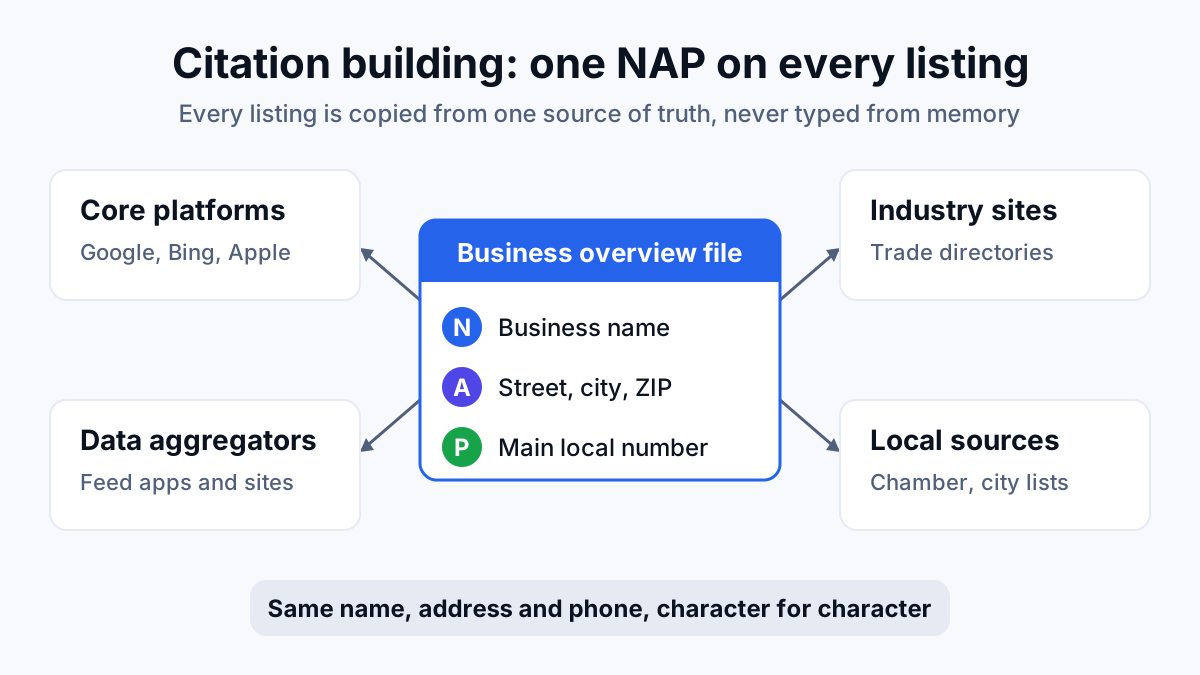
A citation is any online listing of your business details, such as a directory entry. NAP stands for name, address and phone, and those three need to match everywhere. An old address on three directories and a phone number written four ways leave Google unsure which version of you is real. Fix the mismatches, then fill the gaps: the listings your competitors have and you do not. The method is in citation building.
Website strength
The website behind the profile is part of how well known you are. A site with real service pages, location pages that say something specific, clean technical health and its own earned links gives Google more to trust. In audits I run, a profile backed by a thin one-page site rarely holds the top three for long against competitors with strong sites, whatever its review count.
Entity consistency
An entity is Google's understanding of your business as one real thing, with one name, one location and one set of services. Every surface should describe that entity the same way: the profile, the website, the schema markup, the citations and your social profiles. Google's guidelines ask you to represent the business as it is recognized in the real world, on signage and stationery. When the details agree, the signals add up to one well-known business instead of several weak ones Google cannot tie together.
Why your Maps ranking changes with the searcher's location
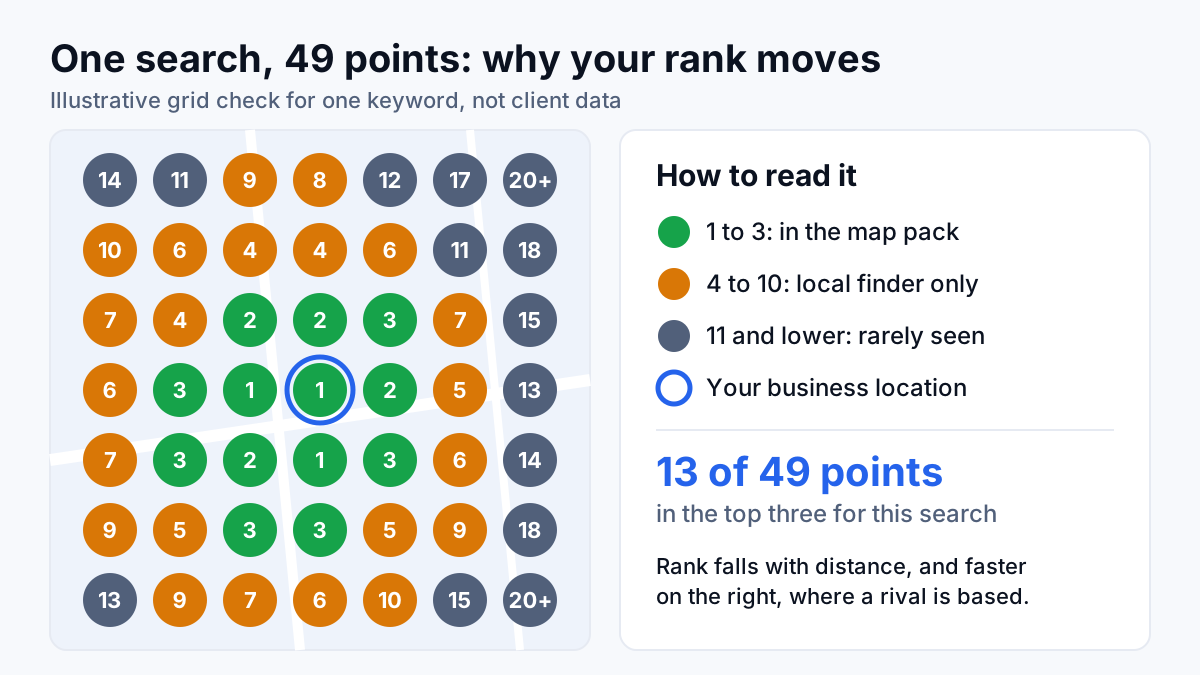
There is no single Google Maps ranking. Every searcher stands somewhere different, so the distance factor gives each of them a different list. A business can hold the top spot for someone two blocks away and not appear for someone across town, for the same search, in the same minute.
Other things shift the list too: the exact wording (“emergency plumber” and “plumber” are different searches), whether the searcher names a town, the device, and whether they filter by rating or opening hours. That is how an owner who searched and saw the business in fourth place and a report that shows it in the top three can both be telling the truth.
How to check your Google Maps rank properly
Searching your own business from your own desk mostly tells you that you exist. Google knows where you are standing and may personalize what it shows you. A grid check (sometimes called a geogrid scan) removes that bias: a rank tracker places a grid of points over your area and runs the same search from each point's coordinates, so you see your rank across the map instead of at one spot.
- Pick the searches that bring work. Your main service plus “near me”, your main service plus your town, and two or three high-value services. Five to ten keywords is plenty to start.
- Center the grid on your base and size it to your real service area. A 7 by 7 grid gives 49 points. Match the spacing to how far your customers actually are: tighter in a dense city, wider in a rural county.
- Read two numbers. Your average rank across the grid, and the share of points where you are in the top three, since only the top three appear in the map pack.
- Repeat on a fixed schedule. Same keywords, same grid, same spacing, roughly the same time of day, every month. Changing the grid between checks makes the trend meaningless.
- Compare against Business Profile performance. Calls, direction requests and website clicks in your profile's performance report show whether rank changes are turning into customers.
What a better map ranking is worth
Rank is a means. The number that matters is booked work, and it does not always move in step with rankings, or even with leads. On a local plumbing account in Florida, organic revenue grew three months in a row, from $10,378 to $14,373 to $15,497, reported in actual dollars. Lead volume was not a straight line: 43 leads in July fell to 27 in August, even as revenue and booking rate improved that month.
That is organic revenue as a whole, not Maps alone, and it is the reason I report local work in calls, booked jobs and revenue rather than in grid colors.
Where to start this week
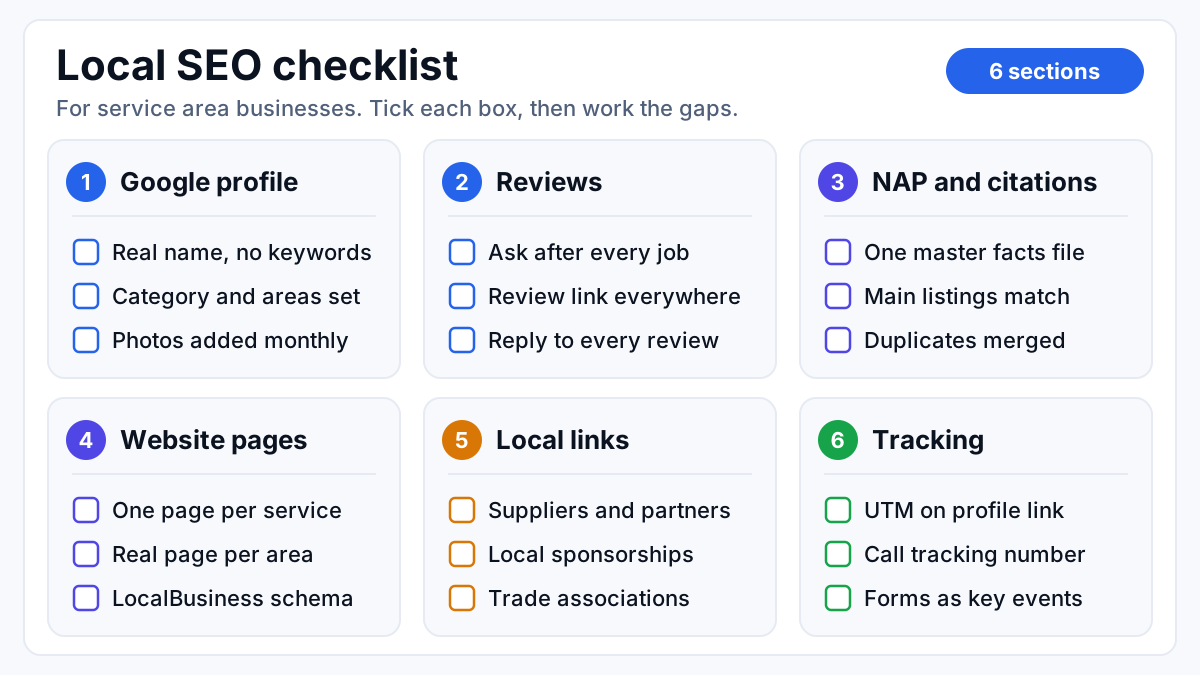
Three checks fit into an afternoon: run a grid check on your main service search, compare your primary category with the three businesses in your map pack, and fix any name, address or phone mismatches on your profile and your main directory listings. Relevance fixes tend to show sooner; prominence builds over months.
If you would rather have the audit and the fixes handled, that is the work I do as a local SEO consultant: profile, citations, reviews and location pages, measured in calls and booked jobs.