Technical SEO is the work that lets search engines crawl, render and index your site. It covers the parts underneath the content: site architecture, speed, mobile use, HTTPS, redirects and structured data. A page can answer a search perfectly and still earn nothing if Google can't reach it, can't see its text, or files the wrong version of it.
This guide explains what technical SEO covers, how it differs from on-page SEO, and then walks through the technical SEO checklist I audit from, in the order I run it, with what each check looks for and what a fixed site looks like.
What technical SEO covers
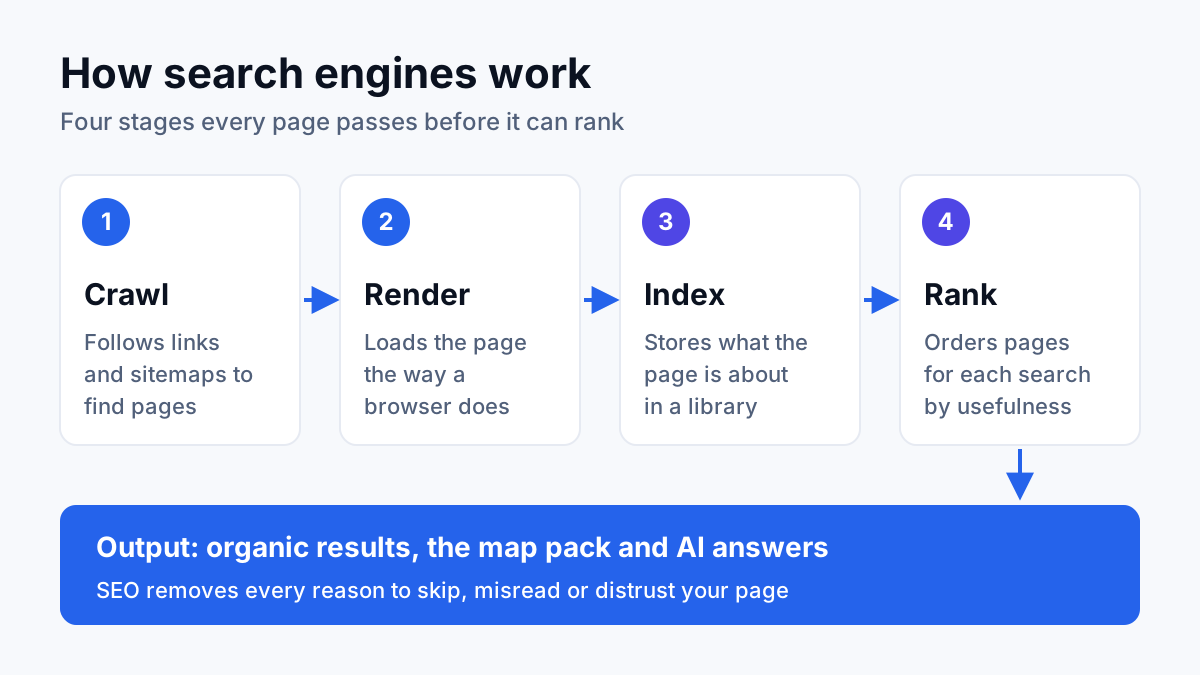
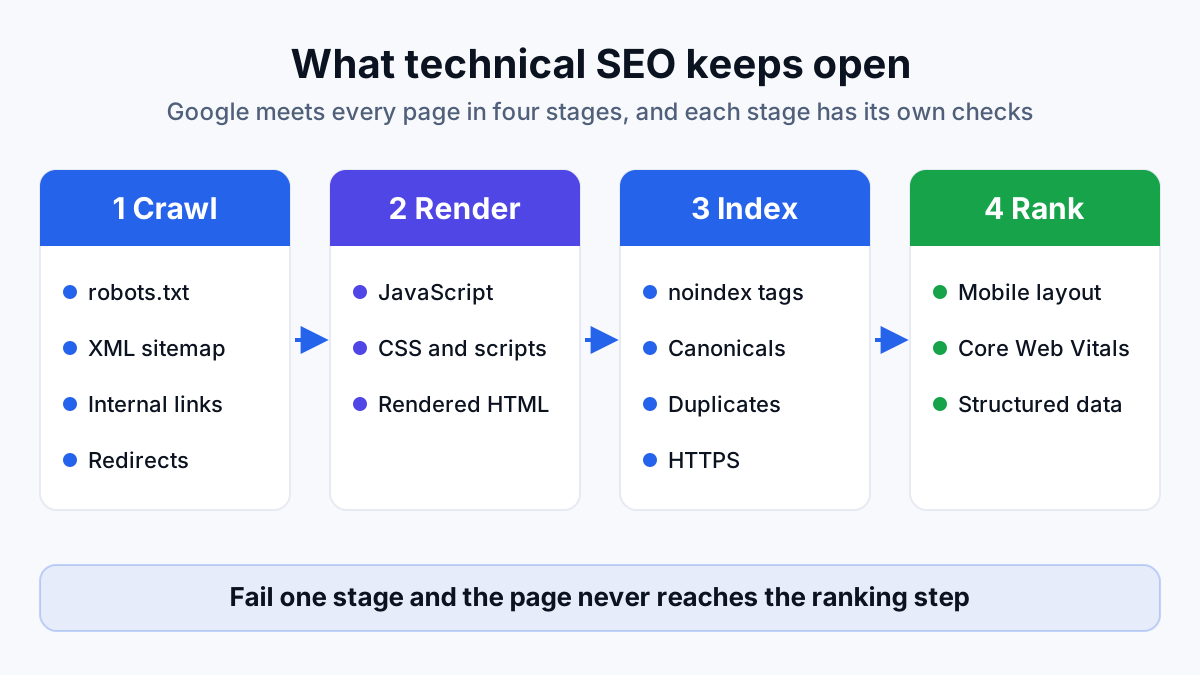
Google gets a page into its results in three steps, and technical SEO is the work that keeps each step open. If you're new to the topic, the post on how SEO works gives the wider picture; here is the short version of the three steps.
- Crawling: Googlebot, Google's crawler, requests your URLs and follows the links it finds, much like a visitor clicking from page to page.
- Rendering: Google runs the page's JavaScript and builds the page the way a browser would, so it can read text and links that scripts add.
- Indexing: Google decides whether to file the page in its index, the database search results are pulled from, and which URL to file it under.
Ranking comes after those three, and a page that fails any of them never gets there. That is the case for technical SEO in one line: it doesn't make a page more persuasive, it makes the page eligible. Google's own SEO Starter Guide frames its advice the same way, as making it easier for search engines to crawl, index and understand your content.
Your developer usually makes the fixes. The SEO's job is to find what's broken, prove it with evidence, say what it costs, and check the fix held. In audits I run, a finding without all four isn't finished.
How technical SEO differs from on-page SEO
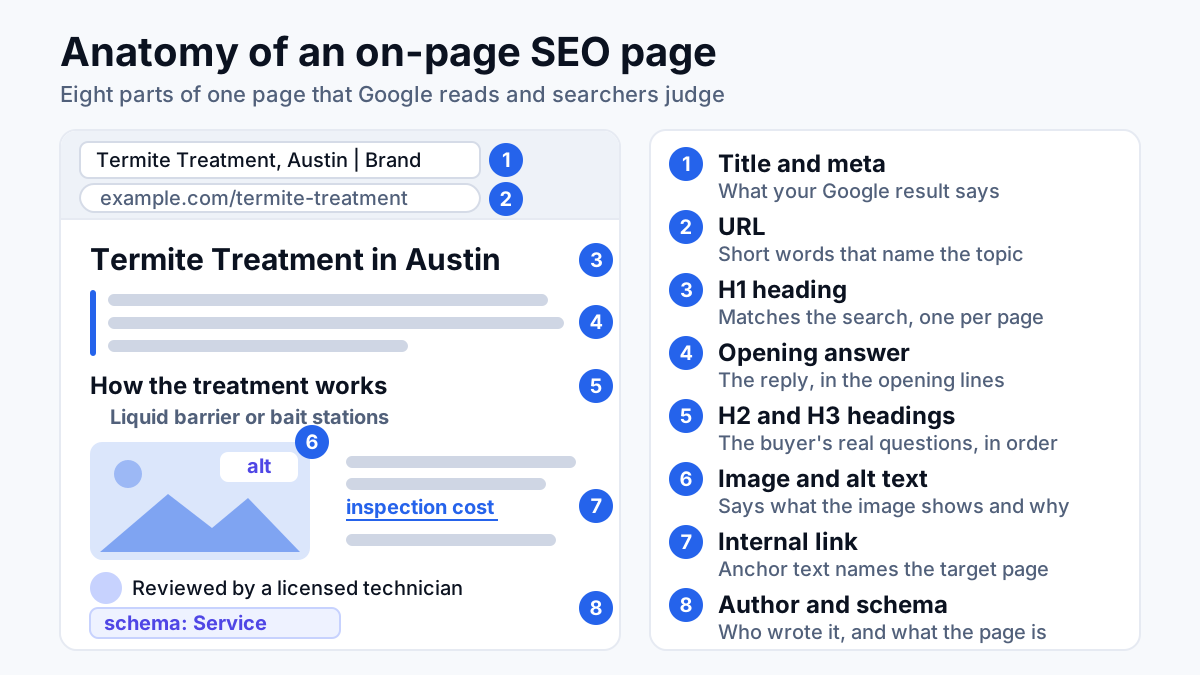
Technical SEO asks whether Google can reach, read and file a page. On-page SEO asks whether that page answers the search it targets, through its title tag, headings, copy, images and the links inside it. One works on the site as a system, the other on one page at a time.
The line blurs in a few places. Internal links serve both: on-page SEO picks the anchor text, technical SEO makes sure the links are real, crawlable links and that no important page is left without any. Title tags are on-page work, but the same title repeated across a thousand filter URLs is a technical problem wearing an on-page costume.
| Technical SEO | On-page SEO | Off-page SEO | |
|---|---|---|---|
| Question it answers | Can Google reach, read and file the page? | Does the page answer the search? | Do other sites vouch for it? |
| Works on | The whole site and its server | One page at a time | Other websites |
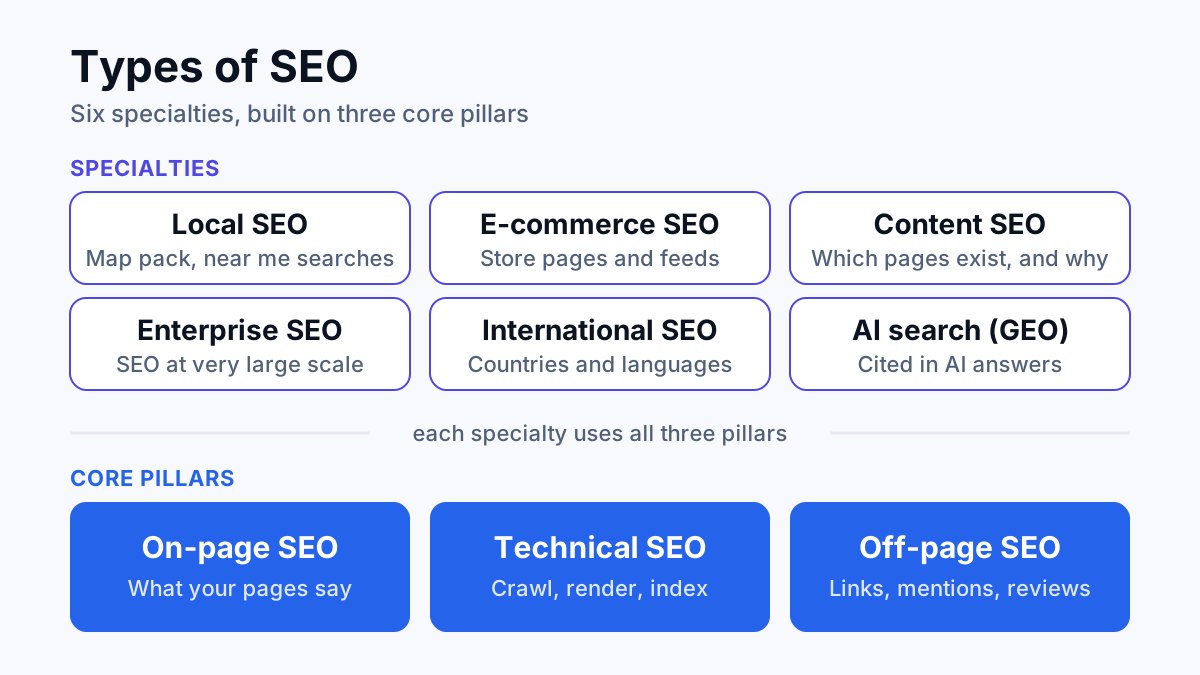
| Typical fixes | Robots rules, redirects, canonicals, speed | Titles, headings, copy, internal links | Links, mentions, reviews |
| Who usually makes the fix | A developer, from the SEO's spec | A writer or the SEO | PR, partners and the SEO |
The three depend on each other. The post on types of SEO sets them next to local and e-commerce SEO, if you want the full map.
The technical SEO checklist, in audit order
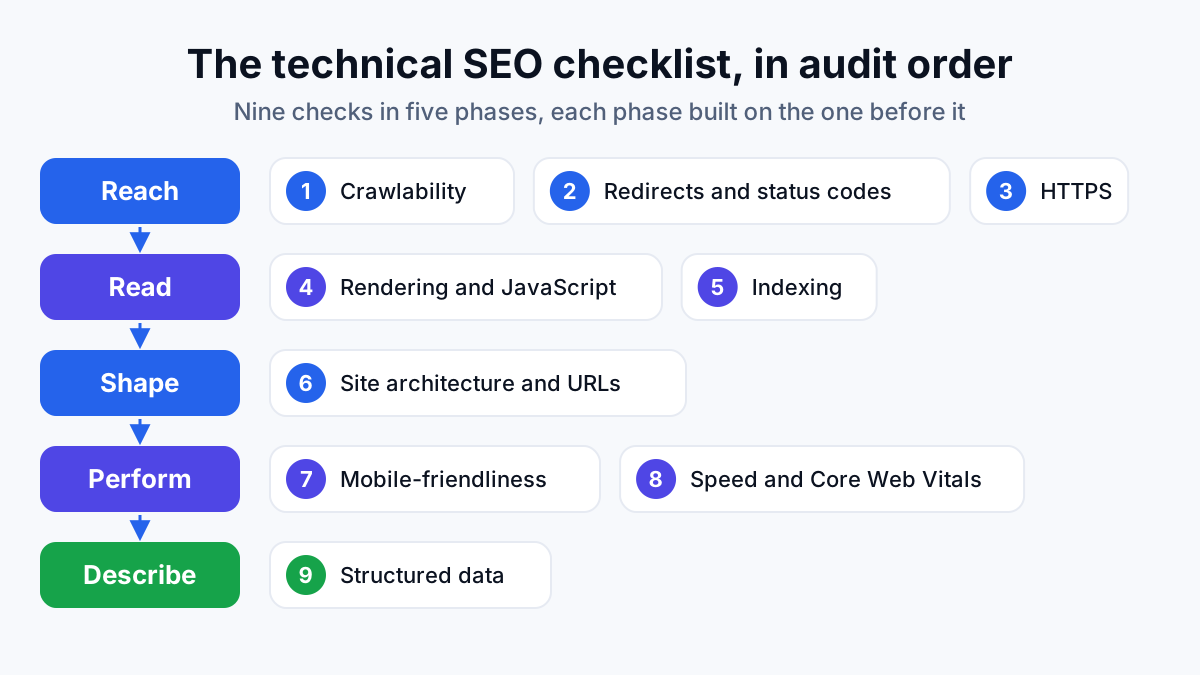
Order matters more than most checklists admit. Each check depends on the one before it: there's no point judging how a page renders if Google can't crawl it, and no point tuning the speed of a page that is set to noindex. So I run the checks the way Google meets a page: reach it, get a clean answer, read it, file it, then judge how it performs.
| Step | Check | The question | Where to look |
|---|---|---|---|
| 1 | Crawlability | Can Google reach every page that matters? | A site crawl, robots.txt, the sitemap report, server logs |
| 2 | Redirects and status codes | Does every URL give a clean answer? | A site crawl, Search Console crawl stats |
| 3 | HTTPS | Is there one secure version of the site? | A browser, a site crawl |
| 4 | Rendering and JavaScript | Does Google see what visitors see? | URL Inspection, raw versus rendered HTML |
| 5 | Indexing | Did Google file the right pages, under the right URLs? | The page indexing report, URL Inspection |
| 6 | Site architecture and URLs | Can visitors and crawlers follow the structure? | A site crawl: click depth and orphan pages |
| 7 | Mobile-friendliness | Does the phone version hold everything? | A real phone, the URL Inspection screenshot |
| 8 | Speed and Core Web Vitals | Does the page load fast and stay still? | The Core Web Vitals report, PageSpeed Insights |
| 9 | Structured data | Does the markup describe the page correctly? | The Rich Results Test, Search Console |
Crawlability: robots.txt, XML sitemap and internal links
Crawlability is whether Google's crawler can reach a page at all. Three things decide it, and they come before everything else in the audit.
The robots.txt file
robots.txt is a small text file at the root of your domain that tells crawlers which paths they may not request. One stray rule, such as a blanket Disallow copied over from a staging site, blocks the whole domain. The file controls crawling, not indexing: a blocked URL may still appear in results if other pages link to it, just without a description. I check that no money page, and none of the CSS or JavaScript files those pages need, is blocked.
The XML sitemap
An XML sitemap is a file that lists the URLs you want indexed, which Google reads as a hint about what matters. A clean one lists only live, indexable, canonical URLs that return a 200 status. The usual failure is a sitemap full of redirects, 404s and noindexed pages, which sends Google mixed signals about what you actually want filed. I compare the sitemap against the crawl and Search Console's sitemap report, and every gap in either direction becomes a finding.
Internal links
Google finds most pages by following links, so a page with no internal links pointing at it (an orphan page) may never get crawled. The links have to be plain HTML links with a real URL; a menu that only works through JavaScript click handlers gives the crawler nothing to follow.
On bigger sites I read the server logs too. They record every request Googlebot makes, which shows where Google spends its crawl budget (the number of URLs it's willing to fetch from your site in a given period) and which pages it rarely comes back to.
Redirects and status codes
Every URL answers a request with a status code, a three-digit number that tells the crawler what happened. The same crawl that tests crawlability hands you the full list, and these are the codes that matter:
- 200: the page loaded. Every URL in your sitemap should return this.
- 301: moved permanently. The right redirect for a URL with a new home, and a strong signal to Google to index the new URL instead.
- 302: moved temporarily. Fine for a short promotion, wrong for a permanent move.
- 404 and 410: not found, and gone for good. Normal for pages that no longer exist, a problem when internal links still point at them.
- 5xx: server errors. Google slows its crawling when it keeps hitting these, so repeated 5xx on key pages needs fixing fast.
Two patterns cause most redirect findings. A redirect chain is one URL redirecting to another that redirects again: each hop slows the page and spends a crawl request. A soft 404 is a page that tells the visitor “not found” but returns 200 to Google, so Google keeps it in circulation. The fix for chains is to point every redirect, and every internal link, straight at the final URL.
Redirects matter most during a redesign or a platform change, when whole sections change address at once. A website traffic drop right after a launch is often a redirect map that was never built.
HTTPS
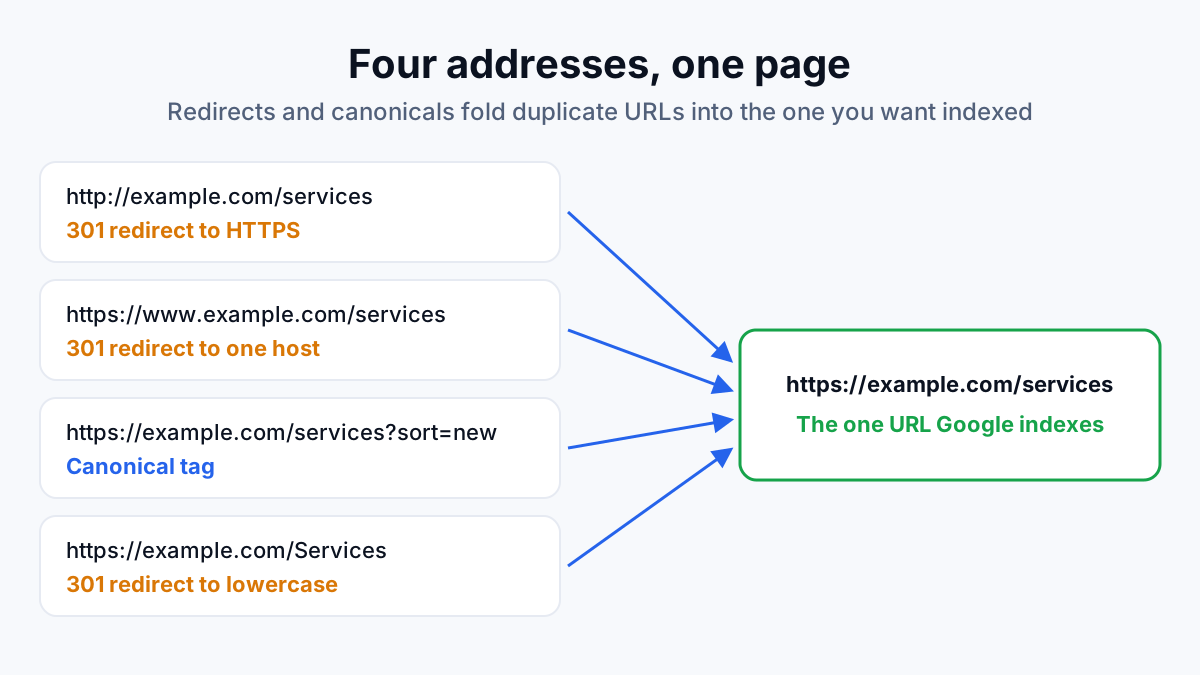
HTTPS is the encrypted version of the web protocol, the padlock in the address bar. Google announced HTTPS as a ranking signal in 2014 and called it a lightweight one, so the padlock alone won't move rankings. The mess around it will: a site that answers on http and https, with and without www, is four copies of itself competing for the same searches.
- The certificate is valid and renews automatically.
- Every http URL returns a 301 to its https version in a single hop.
- The www and non-www versions resolve to one host.
- No page loads images or scripts over plain http (mixed content, which browsers may block or flag as not secure).
- Canonicals, internal links and the sitemap all use the final https address.
Rendering and JavaScript
Many sites build part of the page with JavaScript: reviews, tabs, product grids, sometimes the entire page. Google runs JavaScript, but in a separate rendering step, and anything that fails there, a blocked script or an error, is content Google never sees. Google's Starter Guide makes the same point: Google needs access to the same CSS and JavaScript files as a visitor's browser, or it may not understand the page.
The test is a comparison. I take the raw HTML the server sends and the rendered HTML Google builds (URL Inspection in Search Console shows it), then check template by template that the main text, links, title, canonical and structured data survive. I built my own render-audit tool for this, because comparing the two by hand across every template is slow and easy to get wrong.
Common findings: text that only loads after a click or a scroll, links that aren't real links, and a canonical or noindex tag that JavaScript changes after the page loads, so the raw HTML says one thing and the rendered page says another.
Indexing: noindex, canonicals and duplicates
A crawled page isn't an indexed page. Search Console's page indexing report lists which of your URLs Google filed and gives a reason for each one it left out, so that report is where this step starts.
noindex tags
A noindex tag, placed in the page's HTML or its HTTP header, tells Google not to show the page in results. It's the right tool for thank-you pages, internal search results and thin tag pages, and the wrong one on a service page. Google has to crawl a page to see its noindex, so never block a noindexed page in robots.txt at the same time.
Canonicals
A canonical tag is a line in the page's code that tells Google which URL is the main version when several URLs show the same content. It's a hint, not an order: Google picks its own canonical if other signals, such as internal links, redirects and the sitemap, point somewhere else. So the check is agreement. The canonical, the internal links, the sitemap and the redirects should all name the same URL.
Duplicates
Duplicate content usually comes from the site's own mechanics, not from copying: tracking parameters, sort and filter options, http and https, www and non-www, trailing slashes, uppercase letters. Each variant is a separate URL to a crawler.
“Having duplicate content on your site is not a violation of our spam policies.” Google, SEO Starter Guide
So duplicates don't earn a penalty. The cost is quieter: crawlers spend requests on URLs you don't care about, and Google may pick a canonical you wouldn't have chosen. Consolidate with 301 redirects where you can and canonical tags where you can't, which is the order the same guide recommends.
Site architecture and URLs
Site architecture is how your pages link together: which pages the homepage links to, which link to which, and how many clicks it takes to reach each one (its click depth). A clear hierarchy, from home to category to page, tells Google how the pages relate and passes internal link strength toward the pages that make money.
- Money pages within a few clicks of the homepage, not buried under pagination.
- No orphan pages: every page worth indexing has at least one internal link.
- Breadcrumbs on deeper pages, so visitors and crawlers both see where they are.
- Filter and sort combinations kept out of the crawl, or out of the index, on stores and directories.
- Short, descriptive, lowercase URLs, with hyphens between words and no session IDs.
Google's Starter Guide adds a point for larger sites: keeping similar topics in the same directory, such as /services/ or /blog/, helps Google learn how often each section changes. Changing URLs on a working site is a migration, though, not a tidy-up. Every changed URL needs a 301, and I only rename URLs that are actively causing a problem.
Mobile-friendliness
Google crawls and indexes sites with its smartphone crawler, so the phone version of your page is the version Google judges. If the mobile layout hides a section, drops the reviews or trims the copy to save space, that content may as well not exist for search.
- The same main content, headings, links and structured data on mobile as on desktop.
- A responsive layout with the viewport set, so the page fits the screen with no sideways scrolling.
- Text readable without zooming, and buttons far enough apart to tap.
- No full-screen pop-up covering the content as the page opens.
- Images and video that load on mobile, not only on desktop.
Check it on a real phone and with the screenshot URL Inspection takes of the rendered page. A desktop browser shrunk to phone width doesn't behave like a phone on a mobile connection.
Speed and Core Web Vitals
Core Web Vitals are Google's three measures of how a page feels to load. Google's documentation sets the threshold for a good score on each, measured on real visitors' devices:
- Largest Contentful Paint (LCP): how long the main content takes to appear. Good is 2.5 seconds or less.
- Interaction to Next Paint (INP): how quickly the page responds to a tap or click. Good is 200 milliseconds or less.
- Cumulative Layout Shift (CLS): how much the layout jumps while it loads. Good is 0.1 or less.
Two kinds of data measure these, and they often disagree. Field data comes from real Chrome users and is what Search Console's Core Web Vitals report shows. Lab data is a single simulated load in PageSpeed Insights or Lighthouse, useful for finding causes. Judge pass or fail on field data; diagnose with lab data.
The causes repeat from site to site: oversized images, heavy themes, a stack of third-party tags, fonts and ads that load without reserved space, and a slow server. On the server side, I hold response time in Search Console's crawl stats against a 150 ms target. Speed is a page experience factor, not a trump card: a fast page with the wrong content still loses to a slower page that answers the search.
Structured data
Structured data is code, usually a block of JSON-LD in the page's HTML, that describes the page in the schema.org vocabulary Google reads: this is a local business at this address, this is a product at this price with these reviews, this is an article by this author. Visitors never see it.
Google's Starter Guide says valid structured data makes pages eligible for rich results such as review stars and carousels. Eligible is the key word: markup doesn't promise the feature, and it isn't a ranking shortcut.
- The right types for the business, such as Organization or LocalBusiness, Product, Article and BreadcrumbList.
- Every property matches what the page shows; markup for content the visitor can't see breaks Google's guidelines.
- No errors in the Rich Results Test or in Search Console's rich result reports.
- Markup present in the rendered HTML, not dropped by a plugin conflict or a JavaScript error.
It comes last in the audit for a reason. Structured data adds meaning to a page Google can already reach, read and file; on a page that fails the earlier checks, it describes something nobody will see.
How often to run a technical SEO audit
A full audit makes sense at the start of any SEO engagement, before and after a redesign or platform move, and whenever traffic falls with no obvious cause. Between audits, most technical problems show up in Search Console: a jump in pages left out of the index, new server errors in crawl stats, Core Web Vitals slipping to “needs improvement”. A monthly look at those three reports catches regressions early, because a plugin update, a new template or a quick edit to robots.txt can undo a fix without anyone noticing.
Turning the checklist into fixes
A long list of issues isn't a plan. Rank each finding by impact, effort and confidence, fix whatever blocks crawling or indexing of money pages before anything cosmetic, and look for shared causes: ten broken canonicals and forty duplicate titles may be one template bug.
On a managed IT site in Texas, the audit traced twenty separate findings back to two root causes, and the work went at those two instead of the symptoms. Over the engagement, average Google position moved from 41 to 21, and 199 of the site's 717 ranking keywords are now in Google's top three. The caveat: raw impressions fell while position improved, because Google now shows the site for fewer, better-matched searches. Figures are from Search Console and Ahrefs, September 2026.
Your next step: open Search Console, read the page indexing report and the Core Web Vitals report, and write down every reason Google gives for leaving a page out. That list tells you which part of this checklist to start with. If the reasons don't make sense, or the fixes need more developer time than you have, that is the work I do as a technical SEO consultant: audit, fix and re-check until each issue is gone from the live site.