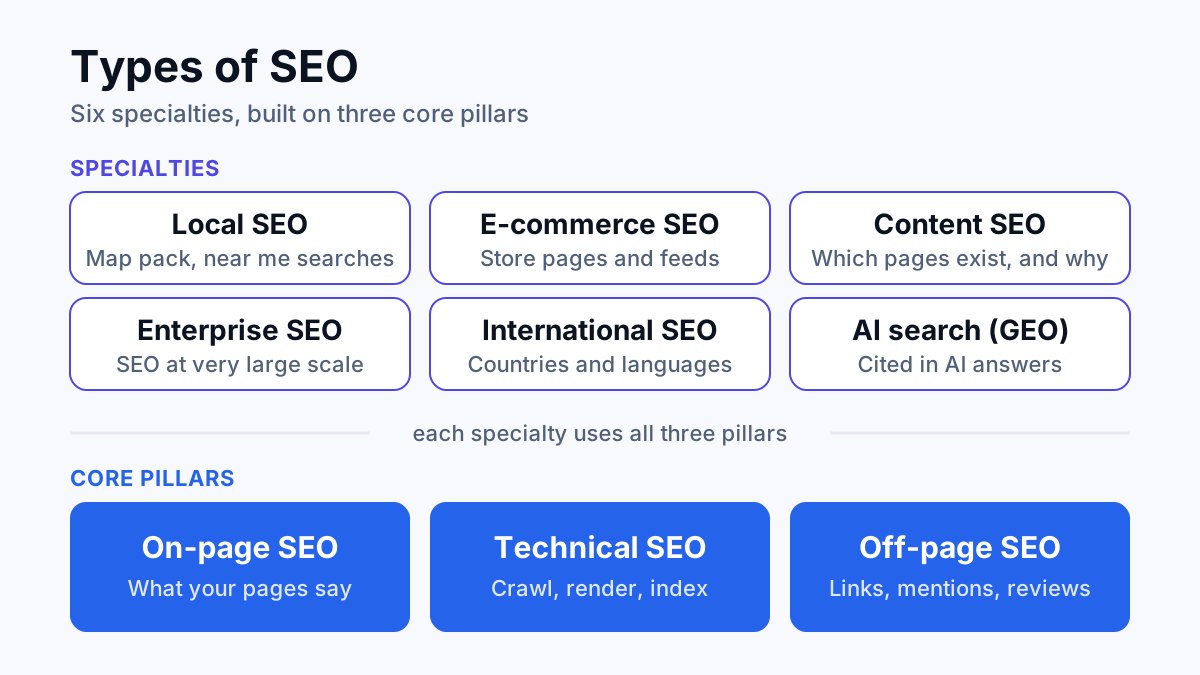
On-page SEO is the work done on a page itself (its content, title tag, headings, internal links, images and markup) so search engines understand what the page is about and searchers choose it over the other results. It covers everything you control inside one URL, as opposed to links from other websites or the settings of the server behind it.
This post gives a plain definition, shows where on-page SEO stops and technical and off-page SEO start, then walks through the on-page SEO checklist I run on client pages, one item at a time, with a before and after example.
What is on-page SEO?
On-page SEO, sometimes written without the hyphen as on page SEO, means optimizing the parts of a web page you can edit: the words, the HTML tags wrapped around them and the links going in and out of it within your own site. The job has two audiences. Google needs to read the page and work out which searches it answers. A person scanning the results needs to see your title and snippet and decide yours is the one worth clicking.
Google's SEO Starter Guide describes SEO as helping search engines understand your content and helping users decide whether to visit your site. On-page work is where both halves of that sentence happen. It is one of the three classic types of SEO, and the one most businesses can act on this week, because it needs nobody else's permission.
On-page vs technical vs off-page SEO
The three overlap, so the quickest way to tell them apart is to ask where the fix happens and who can make it.
| Type | Where the work happens | Typical fixes | Question it answers |
|---|---|---|---|
| On-page SEO | Inside one page: its copy, tags and links | Titles, headings, answers, alt text, schema, internal links | Is this page the clearest answer to the search? |
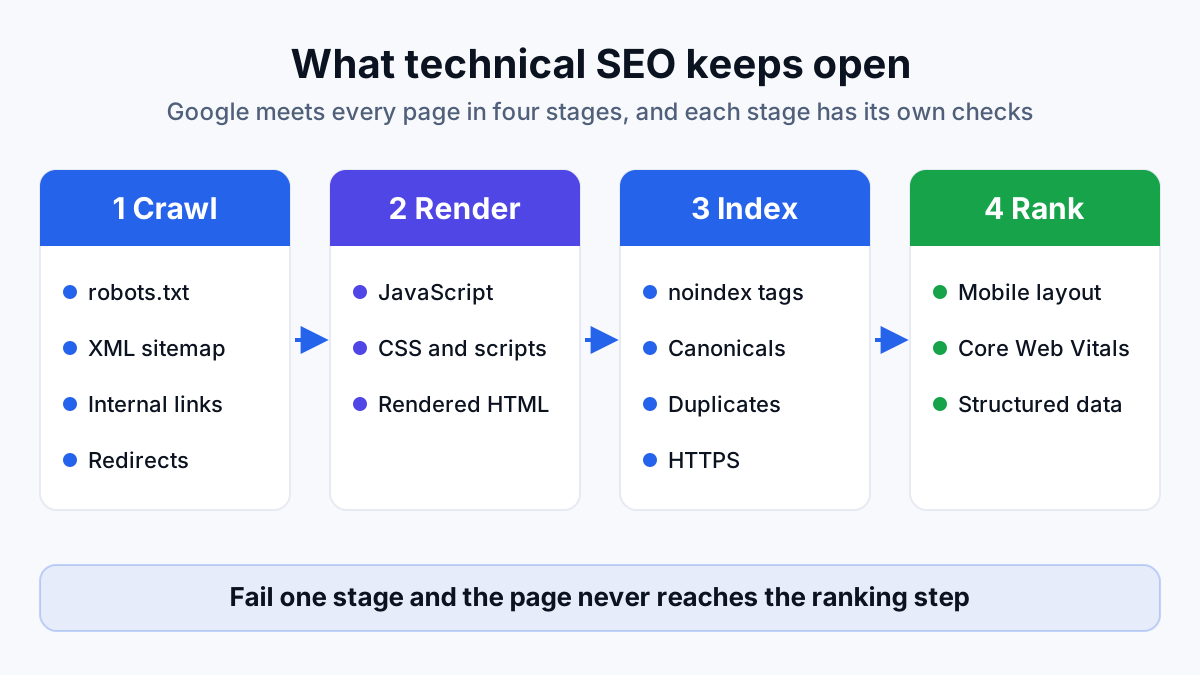
| Technical SEO | The site's code, server and structure | Crawling, indexing, speed, canonicals, redirects, sitemaps | Can Google reach, render and index the page? |
| Off-page SEO | Other websites and platforms | Backlinks, brand mentions, reviews, business listings | Do other people vouch for this site? |
The edges blur. Schema and canonical tags (the tag that tells Google which URL is the main version of a page) both live in page code, so an audit could file them under either heading. My rule: anything a writer or editor can change on one URL is on-page, and anything that needs a developer or touches the whole site is technical SEO.
Why on-page SEO matters
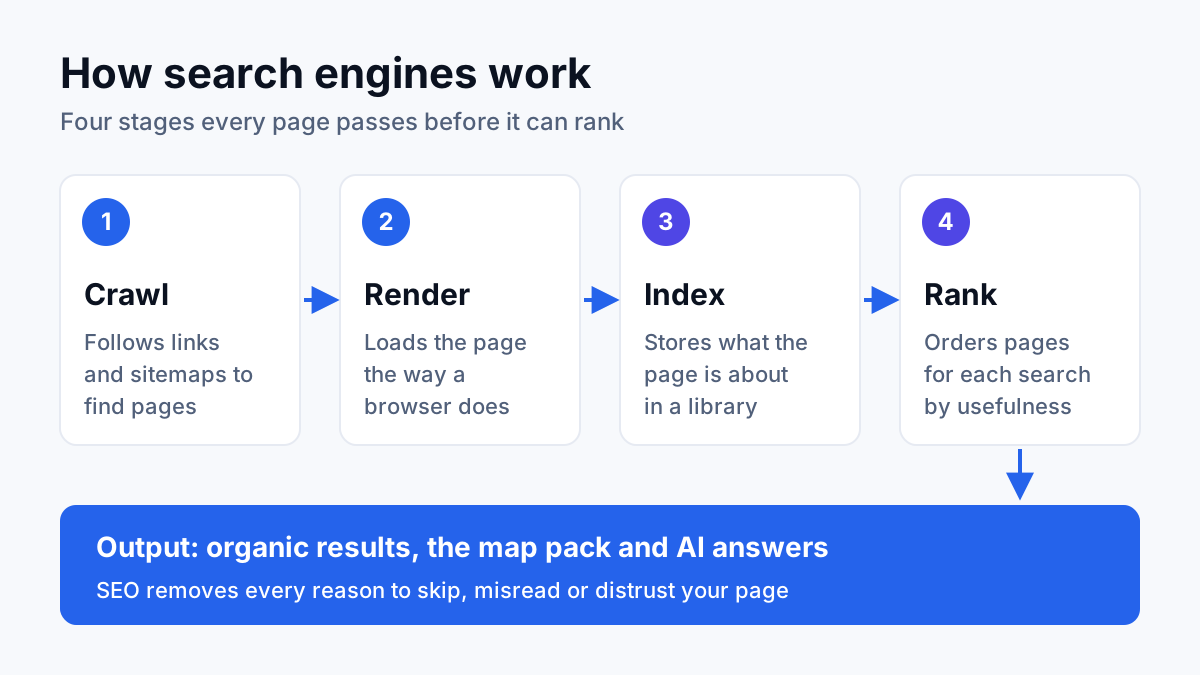
Google reads a page in layers. The title tag and headings name the topic. The body text, the named things in it and the links around it show how well the topic is covered. Structured data states what kind of thing the page describes. According to Google's Starter Guide, the headline of your search result (Google calls it the title link) is built from sources that include the title tag and the headings on the page, and the snippet under it usually comes from the page's own text.
People read the same parts in a different order: title, snippet, opening lines, then the headings on the way down. If those match what they searched for, they stay. If the page answers a different question, they go back and click a competitor. Rankings follow the pages that satisfy the search, and on-page SEO is how you make a page do that on purpose instead of by accident.
The on-page SEO checklist
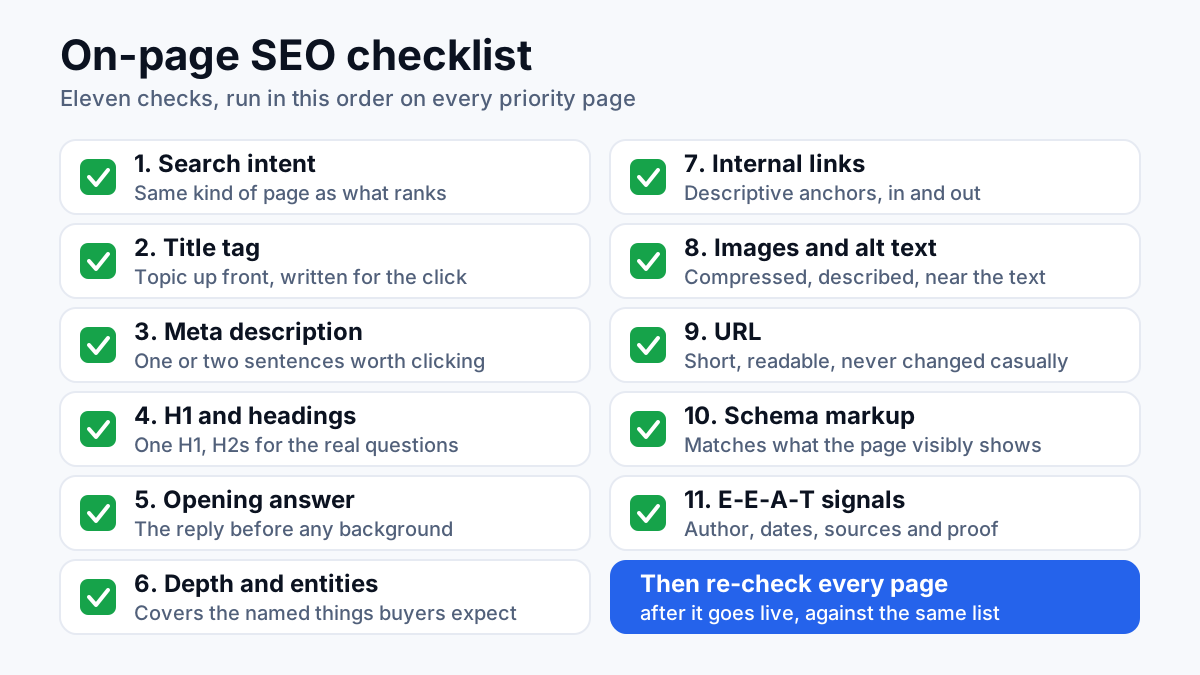
These are the eleven checks I run on every priority page, in the order I run them. The order matters: there is no point polishing the title of a page that answers the wrong question.
Match the search intent
Search intent is what the searcher wants to do: learn something (informational), compare options (commercial), buy or book (transactional) or reach a specific site (navigational). Google ranks the kind of page that satisfies that intent, so yours has to be the same kind. Search the query yourself and look at what ranks. If the results are guides and your page is a sales page, no title rewrite closes that gap; you need a different page.
Keep one page to one intent. When two of your pages chase the same query, SEOs call it keyword cannibalization, and in audits I run the usual symptom is two URLs trading places with neither holding a position. Merge them, or give each a distinct job.
Intent is where on-page work pays. For a water heater installer in California, I rebuilt the pages around how buyers actually research, including brand comparison searches, instead of only “plumber near me”. The result was +37% revenue from search, month on month. (Figures from the client's Search Console and analytics; client anonymized.)
Write the title tag
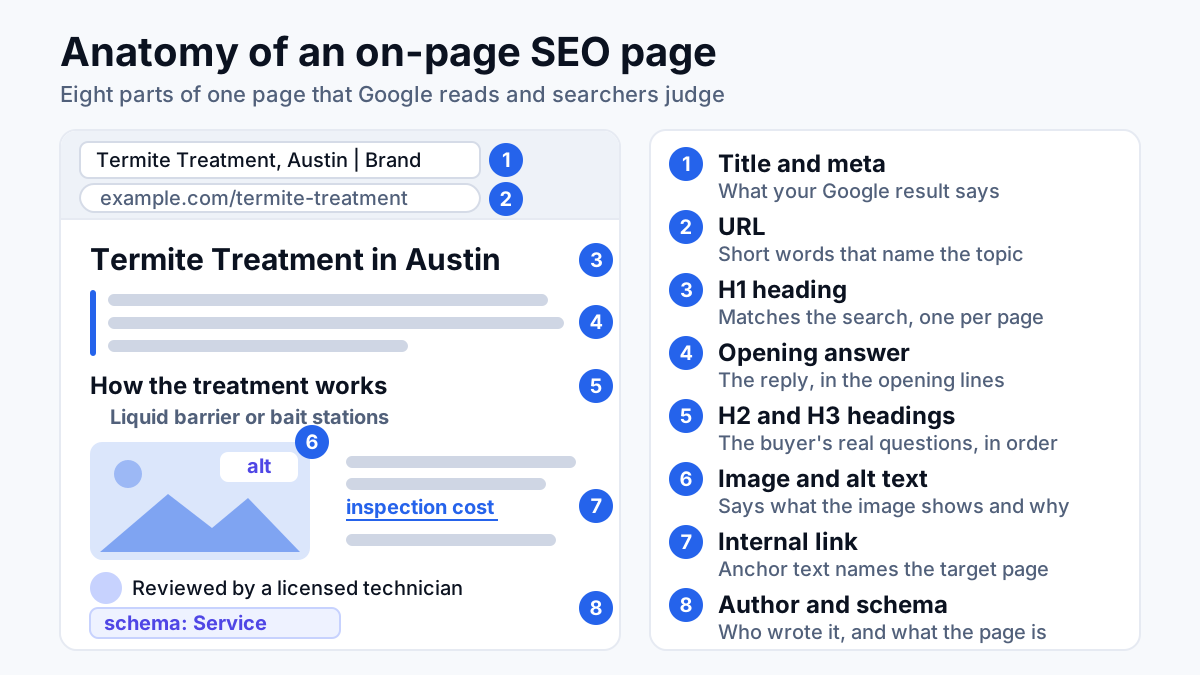
Your title tag, one line of HTML in the page head, usually becomes the clickable headline of your result. Google's Starter Guide asks for titles that are unique to the page, clear, concise and accurate about what the page contains, and suggests adding the business name and, where it matters, the location. My formula for service pages is the thing you sell, then the qualifier the buyer cares about: Termite Treatment in Austin | Company Name. Put the topic at the front, since a long title gets cut off on a phone.
Google may replace a title it finds vague, stuffed with keywords or repeated across many pages. If you search for your page and see a headline you didn't write, treat that as feedback on the title.
Write the meta description
Google's Starter Guide says the snippet under your title is mostly taken from the page content and only sometimes from the meta description, the one or two sentence summary stored in the page code. So the meta description works as a suggestion Google may or may not use. Write it for the click: short, unique to the page and carrying its most relevant points. On a service page that means the service, the area and the reason to pick you, in plain words.
Set one H1 and a clear heading structure
Use one H1, the main visible headline on the page, and make it match the search the page targets, saying what the title tag says in slightly different words. Under it, H2 headings mark the main sub-questions and H3 headings split an H2 into parts. The fastest way to write them is to list the questions a buyer asks about the topic, in the order they ask them, and turn each one into a heading.
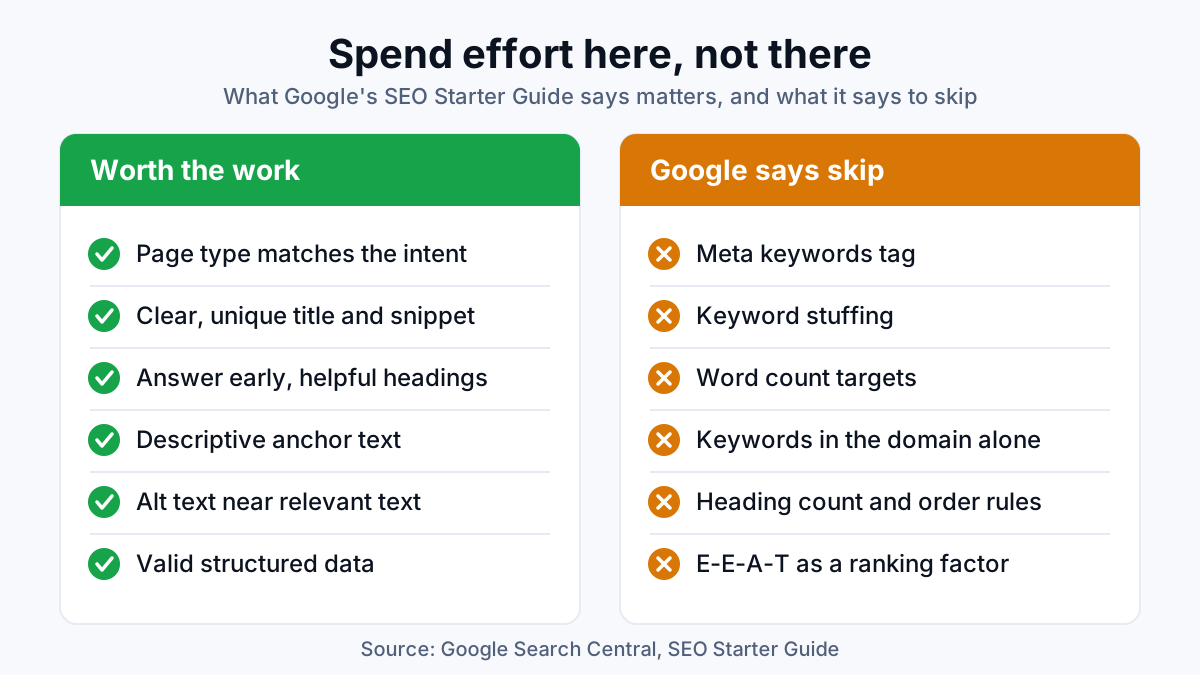
Google's Starter Guide is candid that heading order doesn't matter to Google Search and that there is no ideal number of headings. I keep a clean order anyway, because screen readers depend on it and readers skim headings before they commit to a page.
Answer the question in the opening lines
Put the answer in the opening sentence or two, then support it. That applies to the page as a whole and to each section under its heading. A reader who gets the answer up top keeps reading for the detail; one who has to scroll for it often leaves. Short, self-contained answers are the passages Google lifts into featured snippets and AI answers quote, so an answer placed early does double duty.
Cover the topic in depth, with its entities
Depth is not length. Google's Starter Guide says content length alone doesn't matter for ranking and there is no magic word count. What counts is whether the page covers what someone needs to act. Entities help you check that. An entity is a named thing Google can recognize: a product, a place, a brand, a method, a standard. A termite treatment page that never mentions subterranean termites, bait stations, liquid barriers or a warranty is thin, whatever its word count.
Use your buyers' words next to the trade terms. A homeowner searches for a water heater that keeps running out of hot water, not for its recovery rate, and the page should speak to both.
Add internal links with descriptive anchor text
Internal links are links between pages on your own site. They let Google find pages (the Starter Guide notes that most new pages Google finds are reached through links) and they carry context. The anchor text, meaning the clickable words, tells users and Google what the target page is about. Click here says nothing; termite inspection cost says exactly what is on the other side.
Link by what the reader needs next, not by page type. A service page should link to its pricing page, its location pages and the guide that answers a buyer's usual objection, and those pages should link back.
Optimize images and alt text
Every meaningful image needs alt text: the short description in its HTML that tells search engines, and people using screen readers, what the image shows and how it relates to the page. Describe what is in the picture in plain words, such as technician fitting a bait station beside a slab foundation, not a string of keywords. The Starter Guide asks for sharp images placed near the text they relate to, since that nearby text helps Google read the image in context. Compress files before upload so they don't slow the page, and give them descriptive file names.
Keep the URL short and descriptive
A URL made of real words, like /termite-treatment-austin, tells people what they will get before they click, and Google can show those words as breadcrumbs in the result. The Starter Guide is plain that keywords in the domain or URL path have hardly any ranking effect beyond that, so don't chase them. Pick a clean URL when the page is new, then leave it alone. Changing a live URL without a 301 redirect (a permanent forward from the old address) breaks every link pointing at it.
Add schema markup
Schema markup, or structured data, is a small block of code that labels what a page is: a service, a product, a local business, an article, a set of FAQs. Google says valid structured data makes pages eligible for special result features such as review stars and carousels. Eligible is the key word; nothing promises them. Match the schema to what the page visibly shows, and test it in Google's Rich Results Test before and after it goes live.
Show E-E-A-T signals on the page
E-E-A-T stands for experience, expertise, authoritativeness and trustworthiness, the qualities Google's search quality raters are asked to judge. The Starter Guide states that E-E-A-T is not a ranking factor. The signals still belong on the page, because readers use them to decide whether to trust you, and the guide notes that expert or experienced sources help people see a page's expertise. On a page, that looks like:
- A named author or reviewer, with a line on why they are qualified
- Published and updated dates that are true
- A source for every number or claim you make
- Real photos of your team, your work or your premises instead of stock images
- Business details: address, license numbers, reviews and case results where you have them
On-page SEO example: one page before and after
Here is the checklist applied to an illustrative service page for a pest control company. It is a composite, not a client, so there are no results attached, only the changes.
| Element | Before | After |
|---|---|---|
| Title tag | Services | Company Name | Termite Treatment in Austin | Company Name |
| URL | /services-page-2 | /termite-treatment-austin |
| H1 | Welcome to Our Company | Termite Treatment in Austin |
| Opening lines | Company history and a mission statement | What the treatment does, how long it takes and who it suits |
| Headings | Our Services, Why Us, Contact | How treatment works, Liquid vs bait, What it costs, Warranty |
| Internal links | “Click here” to the contact page | “termite inspection cost” to the pricing guide |
| Image alt text | IMG_2041.jpg with no alt text | Technician fitting a bait station beside a slab foundation |
| Schema | None | Service and LocalBusiness, validated |
| E-E-A-T | No author, stock photos | Reviewed by a named licensed technician, real job photos |
None of those changes is hard on its own. The work is doing them on the pages that earn money, in the right order, and checking them again after they go live.
Common on-page SEO mistakes
- Keyword stuffing. Repeating the same phrase over and over reads badly and is against Google's spam policies.
- Filling in the meta keywords tag. Google doesn't read it, so its only audience is competitors viewing your source code.
- Writing to a word count. A page padded to hit a number is longer, not better.
- Template titles. Hundreds of pages sharing one title pattern with a swapped city name look like boilerplate, and Google may rewrite them.
- Schema that says something the page doesn't. Markup has to describe visible content; marking up reviews that aren't on the page risks a manual action (a penalty applied by a Google reviewer).
- Two pages for one query. Merge them or split the intent, as covered under search intent above.
- Changing URLs without redirects. The old links break and the page starts again from nothing.
“Google Search doesn't use the keywords meta tag.” Google Search Central, SEO Starter Guide
How to run an on-page SEO audit on your own site
- Pick the pages closest to revenue. Service, product and location pages come before blog posts.
- Pull each page's queries. In Google Search Console's Performance report, filter by page and read the searches it already gets impressions for (times it appeared in results). They show what Google thinks the page is about.
- Search the main query yourself. Note what kind of pages rank and what they cover that yours doesn't.
- Run the checklist. One row per page in a spreadsheet, one column per check, and a note on each gap.
- Fix, then re-check the live page. The URL Inspection tool in Search Console shows whether Google sees the page the way a reader does.
- Wait before judging. Google's Starter Guide says some changes show in hours and others take months, and suggests waiting a few weeks before you assess them. More on how long SEO takes.
When to get help with on-page SEO
A small site with a dozen pages is a weekend with this checklist and a spreadsheet. It gets harder when there are hundreds of pages, when titles and schema come from templates, or when pages rank and nobody calls. Across 200+ projects, the pattern I meet most is a page that is well written but answers a different question than the one searched.
If you would rather hand the checklist to someone who runs it on your priority pages, rewrites what needs rewriting and re-checks every page once it is live, that is what my on-page SEO service covers. Either way, start with the page that earns you the most money and work down the list.