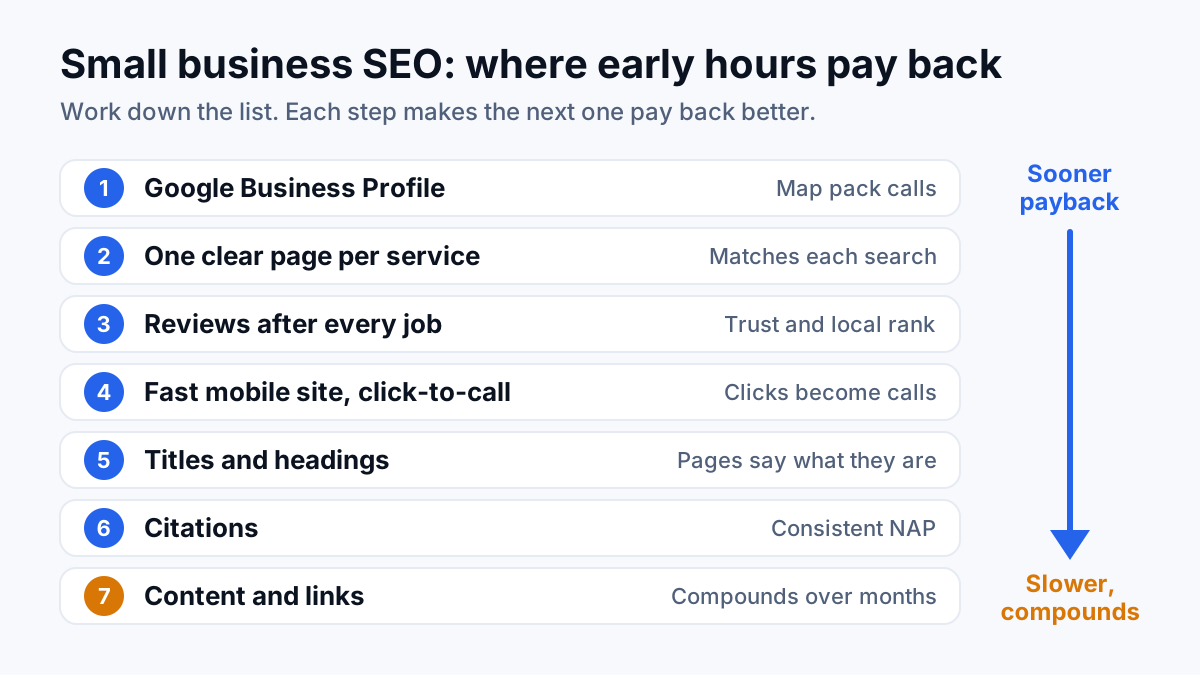
SEO for a small business starts with a complete Google Business Profile, a page for each service you sell, a steady flow of reviews and a site that loads fast on a phone, and only then blogging and link building. That order follows payback: the early items put you in front of people who want to hire someone this week, while content and links build slowly over months.
Below is where to spend limited hours, in that order, what to leave alone at the start, and a week-by-week plan for the early stretch.
What SEO means for a small business
SEO (search engine optimization) is the work of getting your business shown on Google when people search for what you sell. For most small businesses that happens in two places: the map pack, the block of three local listings with a map that appears for searches like “plumber near me”, and the regular organic results underneath it. The map pack runs mostly on your Google Business Profile. The organic results run on your website.
The hard part for an owner is rarely knowing what to do. It is choosing what to do with a few hours a week, when most guides list dozens of tasks as if they all mattered the same. Across 200+ projects, the gap I find on small business sites is seldom an advanced tactic. It is a half-filled profile, one generic Services page and a phone number you cannot tap.
If you are still deciding whether SEO is worth it for your business, settle that question before you spend the hours. This post assumes you have decided, and ranks the work by how soon it tends to pay back.
| Order | Task | Why it pays back | Effort |
|---|---|---|---|
| 1 | Google Business Profile | Decides whether you show in the map pack, where many local buyers call from | One long sitting, then minutes a week |
| 2 | One page per service | Gives Google a clear page to match each service search | A sitting per page |
| 3 | Reviews | Feed local ranking and persuade the buyer comparing you with competitors | A habit after every job |
| 4 | Fast mobile site with click-to-call | Turns a click into a call instead of a back button | A handful of fixes, mostly done once |
| 5 | Titles and headings | Tell Google and the searcher what each page is about | An afternoon on a small site |
| 6 | Citations | Confirm your name, address and phone across the web | A few sittings, then occasional checks |
| 7 | Content and links | Compound over months and widen the searches you show for | Ongoing |
Start with your Google Business Profile
The listing that appears in the map pack and on Google Maps, with your name, category, hours, phone, photos and reviews, is your Google Business Profile (GBP). Claiming it costs nothing but time, and for a local service business it is often the thing a buyer reads and calls from without opening the website at all.
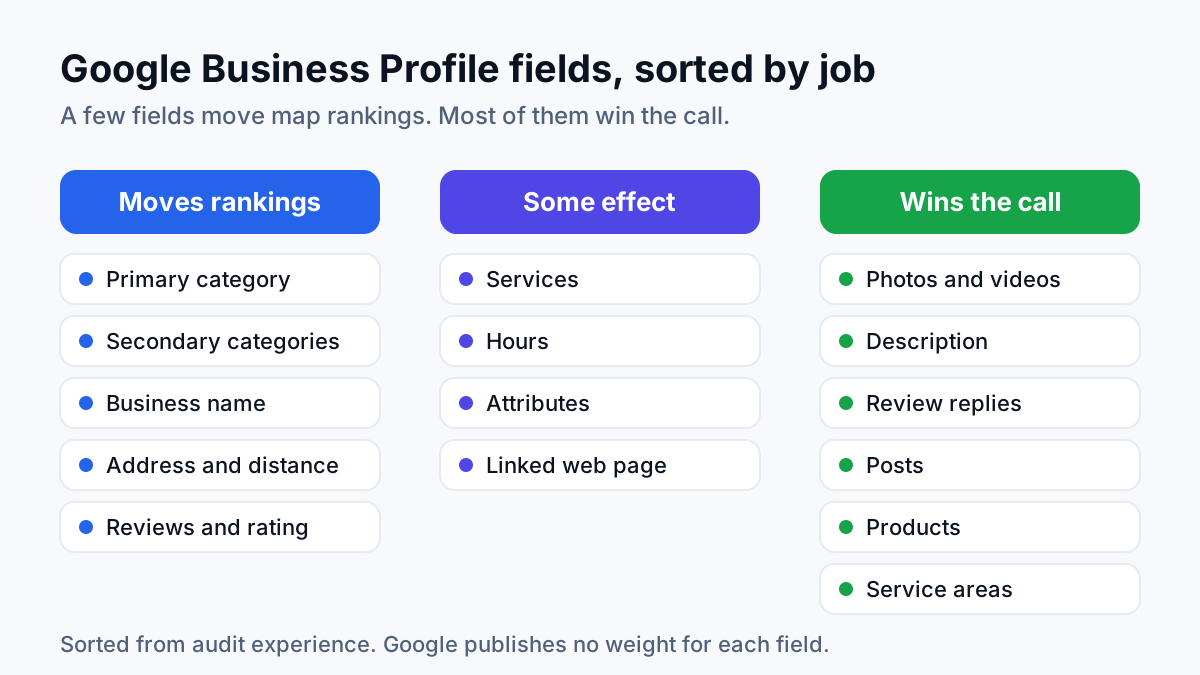
Google's help page on local ranking names three factors: relevance, distance and prominence. For relevance it asks for complete and detailed business info. For prominence it points to how many websites link to your business and how many reviews you have. You cannot move your office closer to every customer, so the work goes into the other two.
“There's no way to request or pay for a better local ranking on Google.” Google Business Profile Help, Tips to improve your local ranking on Google
Fill in the profile in this order:
- Primary category. The most specific category that matches the service you most want calls for. In audits I run, a primary category set too broadly is a common miss.
- Secondary categories. Only for services you really offer. A category for work you turn down brings calls you will not take.
- Services. Each one listed in the words customers use, not trade shorthand.
- Service area or address. Businesses that travel to customers set a service area, and Google asks them to hide the address if customers do not come to it. Storefronts show it.
- Hours and phone. Real hours, holiday hours, and a number a person answers.
- Photos. Your own jobs, vans, team and premises. Stock photos tell a buyer nothing.
- Website link. Point it at your homepage or main service page, and check that page loads fast on a phone.
Keep the business name exactly as it appears on your signs and paperwork. Google's guidelines ask for the real-world name, and a keyword stuffed into it puts the listing at risk. Look at the live listing once a month too, because Google may accept edits suggested by the public. For each field in detail, see Google Business Profile optimization.
Give each service its own page
A single Services page that lists drain cleaning, water heaters, repiping and leak detection gives Google one thin page to match against four different searches, and it usually matches none of them well. A page per service fixes that. Each page targets one job, in the words people type, with enough detail to answer what a buyer wants to know before calling.
A service page that earns calls has these parts:
- A title and main heading naming the service and the area, such as “Drain Cleaning in Plano, TX”.
- A tap-to-call button near the top of the page on a phone.
- An opening paragraph that says what you do, where, and how fast someone gets a response.
- What the job includes, what changes the price, and how long it takes.
- Photos of your own work on this service.
- Two or three reviews from customers who hired you for this service.
- Short answers to the questions customers ask on the phone.
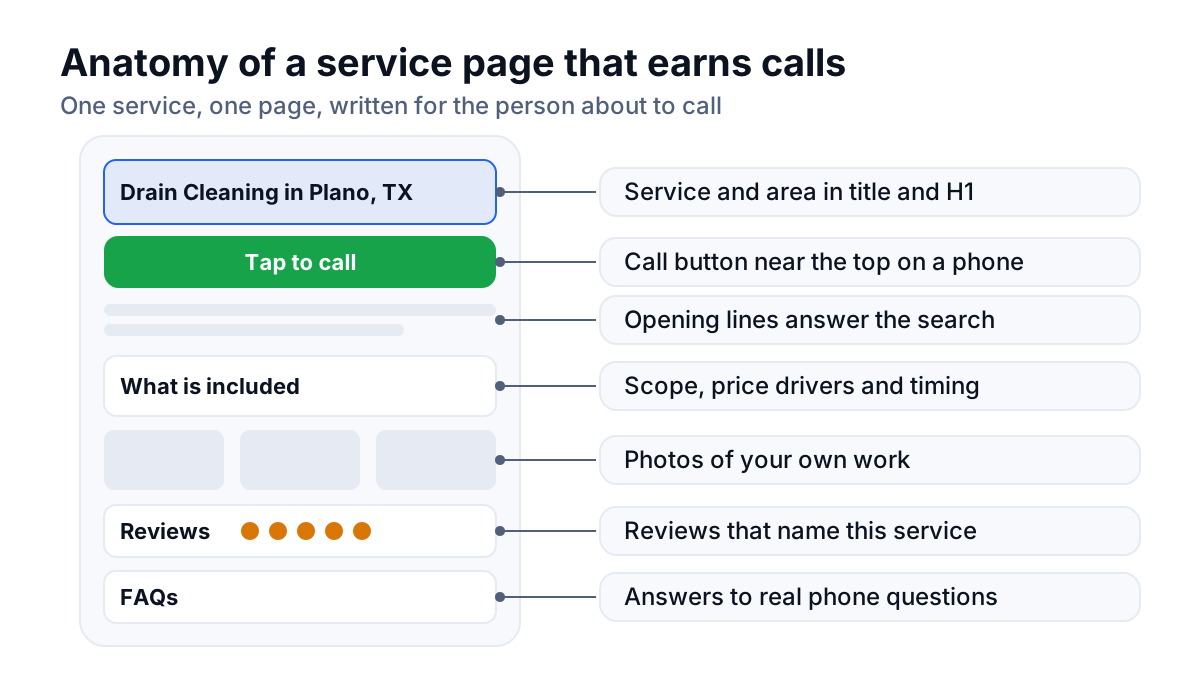
Start with the service that makes you the most money or the one you most want more of, not the one that is easiest to write. Link every service page from the main menu and the homepage, so buyers and Google reach it in one click. If you serve several towns, one strong page per service comes before a thin copy of every page for every town. Location pages are worth adding later, for towns where you really take work.
Build a steady flow of reviews
Reviews do two jobs. Google's local ranking page says more reviews and positive ratings can help your local ranking, and the person comparing you with two competitors in the map pack reads them before picking up the phone. Buyers notice dates, so a steady trickle reads better than a burst from years ago.
Make asking part of finishing every job:
- Copy the short review link from your Business Profile and save it on your phone.
- Mention it in person when the job is done, then text the link later that day so the customer writes it in their own time.
- Ask every customer, not only the ones you expect to be happy, and do not tell them what to write.
- Reply to every review, good and bad, briefly and without arguing. Future buyers read the replies too.
Google's Maps content policy does not allow paying for reviews, offering discounts or other incentives in exchange for them, or asking only the customers you expect to be pleased, and it removes reviews that break those rules. A slower, honest flow outlasts a fast, fake one.
Make the site fast on a phone, with click-to-call
Many searches for an urgent job happen on a phone, with a leaking pipe or a dead AC unit in front of the searcher. If your page loads slowly or hides the number, they go back and tap the next result. Rankings do little for a page that loses the call. A phone number shown as an image, which nobody can tap, is a small act of hostility toward the person trying to pay you.
- Put the phone number in the header of every page as a tap-to-call link.
- Keep contact forms short: name, phone, and what the job is.
- Compress large photos before uploading them. Oversized images are a frequent cause of slow small business pages.
- Remove pop-ups that cover the page on mobile.
- Check your pages in Google's PageSpeed Insights, which reports Core Web Vitals (Google's measures of loading speed, responsiveness and visual stability).
Fix titles and headings
Basic on-page SEO means making each page say plainly what it is. Two fields matter most at this stage. The title tag is the blue clickable line in Google's results, and the H1 is the main heading on the page itself. Many small business sites leave both on defaults like “Home” or “Services”, which tells Google and the searcher nothing.
| Page | Weak title | Clear title |
|---|---|---|
| Homepage | Home | Plumber in Plano, TX | [Business name] |
| Service page | Services | Drain Cleaning in Plano, TX | [Business name] |
| Service page | Water Heaters | Water Heater Repair and Replacement in Plano | [Business name] |
| Contact page | Contact Us | Contact [Business name] | Plumber Serving Plano and Frisco |
Give each page one clear main heading that matches the title in plain words. Use subheadings for the sections a buyer scans for (price, process, areas served). Write a meta description, the two-line summary under the title in results, that says what the page offers and why to call. Google does not always show the one you write, but a clear one gives it a good option.
Clean up your citations
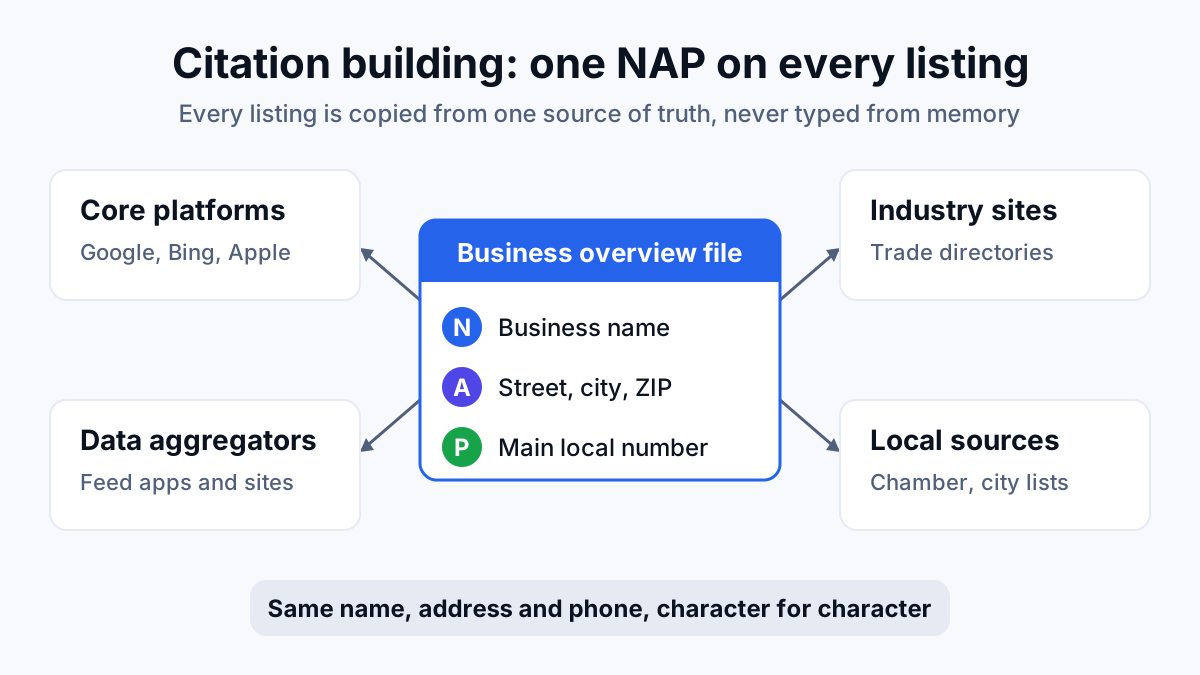
Every directory that lists your business name, address and phone number counts as a citation: Apple Maps, Bing Places, Yelp, the Better Business Bureau, your trade association, the local chamber of commerce. Those three details together are your NAP. Citations help Google confirm the business is real and where it works, and some buyers find you through them directly.
The work here is mostly consistency. If you moved premises or changed phone numbers years ago, old listings still show the old details. Search your business name and your old numbers, note every directory that comes up, and correct each one to match your Business Profile. Pick one format for the address and use it everywhere.
Skip services that promise to submit you to hundreds of directories. A modest set of relevant, accurate listings does more for a small business than a pile of junk ones you will never maintain.
Content and links come later
Content and links are where SEO compounds, and they are real work. They come late in this plan because they pay back slowly, and they pay back far better on a site that already has a complete profile, clear service pages and reviews to point to.
Useful content for a small business answers the questions buyers ask before they hire: what a job costs and why, how two options compare, whether a problem needs a professional, what happens on the day. Each piece ends by pointing to the matching service page. On a California plumbing account I worked on, organic growth came from comparison searches about water heater brands, written well and linked to the install page, not from the company's own name or “plumber near me”.
Links (other websites linking to yours) feed prominence, but for a small business the useful ones come from real relationships: manufacturers you are a dealer for, builders you work with, local sponsorships, local news, trade associations. They take a phone call or an email, not a budget line.
What to skip in the early months
Plenty of popular advice eats hours and rarely pays back this early:
- Generic blogging. Posts like “Spring cleaning tips” or “Why we love our community” rarely reach anyone who wants to hire you. Write for buyers or do not write yet.
- Buying links. Packages of links from unrelated sites are cheap for a reason. Google's spam policies name buying or selling links for ranking purposes as link spam.
- Chasing head terms. A head term is a short, broad search like “plumber” or “roofing”. Directories, national brands and ads crowd it. “Emergency plumber Plano” brings fewer searches from people much closer to hiring.
- Dozens of city pages. One page copied fifty times with the town name swapped reads badly to people and looks like a doorway page to Google.
- Tool scores. A perfect score in an audit tool is not a business goal. Fix what stops calls and leave the rest for now.
A week-by-week plan for your early hours
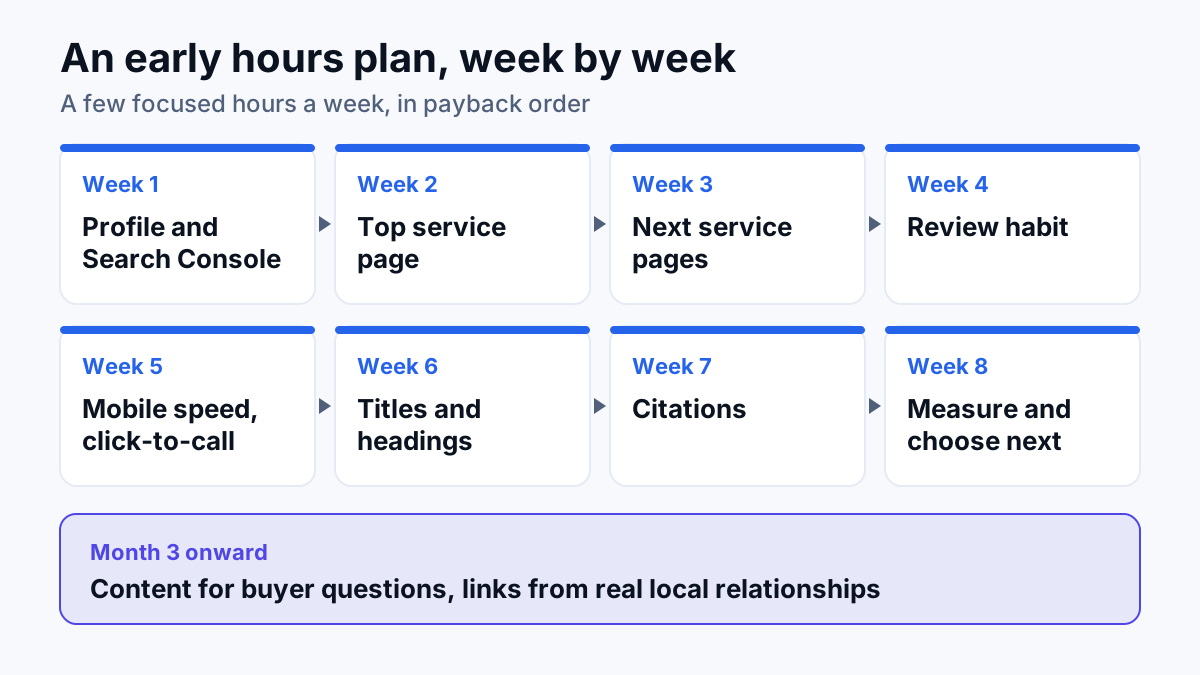
This plan assumes a few focused hours a week. With more time, compress it. With less, stretch it, but keep the order.
| Week | Focus | What to do | Done when |
|---|---|---|---|
| Week 1 | Profile and tracking | Claim or verify your Business Profile, set the primary category, fill services, hours, area and photos. Connect Google Search Console, Google's report on the searches your site appears for. | Every profile field is filled and the phone rings a person |
| Week 2 | Top service page | List the services you want more of. Write a full page for the most profitable one. | One service page is live with a call button near the top |
| Week 3 | Next service pages | Write pages for the next two or three services. Link each from the menu and the homepage. | Each main service has its own page |
| Week 4 | Review habit | Save your short review link, ask after every job, reply to every review. | Asking is part of closing each job |
| Week 5 | Mobile speed and click-to-call | Test on your phone on mobile data. Make the number tappable, shrink big images, drop pop-ups. | A buyer reaches a ringing phone in a couple of taps |
| Week 6 | Titles and headings | Rewrite the title, main heading and meta description on the homepage and each service page. | Every page says what it is and where |
| Week 7 | Citations | Search your name and old phone numbers, then correct every listing to match your profile. | Name, address and phone match everywhere you checked |
| Week 8 | Measure and choose | Check calls from the profile and the queries in Search Console. Pick the next service page or buyer question. | You know which pages and searches bring calls |
| Month 3 onward | Content and links | Answer one buyer question a month and ask real partners for links. | The site grows each month without new setup work |
For the full set of local tasks beyond these early weeks, work through the local SEO checklist.
What early progress looks like
Progress on a small account starts small, and it helps to know what honest early movement looks like. On a small flooring account I worked on, 76% of the clicks on its top queries were the company's own name: past customers and referrals found it, and new homeowners mostly did not. A later monthly report showed Search Console clicks up 201% and impressions up 261% over a comparable window, with average position (the average spot the site holds in results across its searches) moving from 31.3 to 11.8, from page 3 and beyond into page 2.
The caveats matter as much as the figures. This is a small account: the earlier snapshot showed under 2,000 clicks across the top queries, the report gives percentages rather than absolute click totals, and one month in the report window was an unfilled report template that contributes no data. Real, fast movement, from a small base. That is the usual shape of early small business SEO, and no one can honestly promise when it will show up for yours.
Doing it yourself or bringing in help
Most of the work above is within reach of an owner who can write clearly about their own trade: the profile, the review habit, service pages and titles. Outside help makes sense when your hours are the limit, when the site has technical problems you cannot see (pages Google is not indexing, a slow theme, a messy redesign), or when competitors have years of reviews and links on you.
If you are weighing that, what SEO costs sets out the pricing models and what drives them, so you can compare quotes on the same terms.
Your next step: open your Google Business Profile today and work through week 1 of the plan. If you would rather hand it over, an SEO consultant should work through the same order and be able to tell you which of these steps your business still needs.